The prompt to fill the masked part of the image.
0/5000Click to upload or drag and drop
Supported formats: JPEG, PNG, WEBP Maximum file size: 10MB; Maximum files: 5
A set of images to use as character references. Currently only 1 image is supported, rest will be ignored. (maximum total size 10MB across all character references). The images should be in JPEG, PNG or WebP format
The rendering speed to use. Default value: "BALANCED"
The style type to generate with. Cannot be used with style_codes. Default value: "AUTO"
Determine if MagicPrompt should be used in generating the request or not. Default value: true
Select description
The resolution of the generated image Default value: square_hd
Seed for the random number generator
Description of what to exclude from an image. Descriptions in the prompt take precedence to descriptions in the negative prompt. Default value: ""
0/5000A configurable parameter. Defaults to true in the Playground.
Explore different use cases and parameter configurations
The prompt to fill the masked part of the image.
0/5000Click to upload or drag and drop
Supported formats: JPEG, PNG, WEBP Maximum file size: 10MB
The image URL to generate an image from. Needs to match the dimensions of the mask.
Click to upload or drag and drop
Supported formats: JPEG, PNG, WEBP Maximum file size: 10MB
The mask URL to inpaint the image. Needs to match the dimensions of the input image.
Click to upload or drag and drop
Supported formats: JPEG, PNG, WEBP Maximum file size: 10MB; Maximum files: 5
A set of images to use as character references. Currently only 1 image is supported, rest will be ignored. (maximum total size 10MB across all character references). The images should be in JPEG, PNG or WebP format
The rendering speed to use. Default value: "BALANCED"
The style type to generate with. Cannot be used with style_codes. Default value: "AUTO"
Determine if MagicPrompt should be used in generating the request or not. Default value: true
Select description
Seed for the random number generator
A configurable parameter. Defaults to true in the Playground.

Explore different use cases and parameter configurations
The prompt to remix the image with
0/5000Click to upload or drag and drop
Supported formats: JPEG, PNG, WEBP Maximum file size: 10MB
The image URL to remix
Click to upload or drag and drop
Supported formats: JPEG, PNG, WEBP Maximum file size: 10MB; Maximum files: 5
A set of images to use as character references. Currently only 1 image is supported, rest will be ignored. (maximum total size 10MB across all character references). The images should be in JPEG, PNG or WebP format
The rendering speed to use. Default value: "BALANCED"
The style type to generate with. Cannot be used with style_codes. Default value: "AUTO"
Determine if MagicPrompt should be used in generating the request or not. Default value: true
Select description
Select description
Seed for the random number generator
Strength of the input image in the remix Default value: 0.8
Description of what to exclude from an image. Descriptions in the prompt take precedence to descriptions in the negative prompt. Default value: ""
Click to upload or drag and drop
Supported formats: JPEG, PNG, WEBP Maximum file size: 10MB; Maximum files: 5
A set of images to use as style references (maximum total size 10MB across all style references). The images should be in JPEG, PNG or WebP format
Click to upload or drag and drop
Supported formats: JPEG, PNG, WEBP Maximum file size: 10MB
A set of masks to apply to the character references. Currently only 1 mask is supported, rest will be ignored. (maximum total size 10MB across all character references). The masks should be in JPEG, PNG or WebP format
A configurable parameter. Defaults to true in the Playground.
Explore different use cases and parameter configurations
README
Complete guide to using ideogram/character
Ideogram 角色 API:确保角色在任意场景下保持完美一致
Kie.ai 的 Ideogram 角色 API 让您能够无缝生成、编辑和二创角色,并在不同的风格和设定中保持视觉形象的一致性。
什么是 Ideogram 角色 API
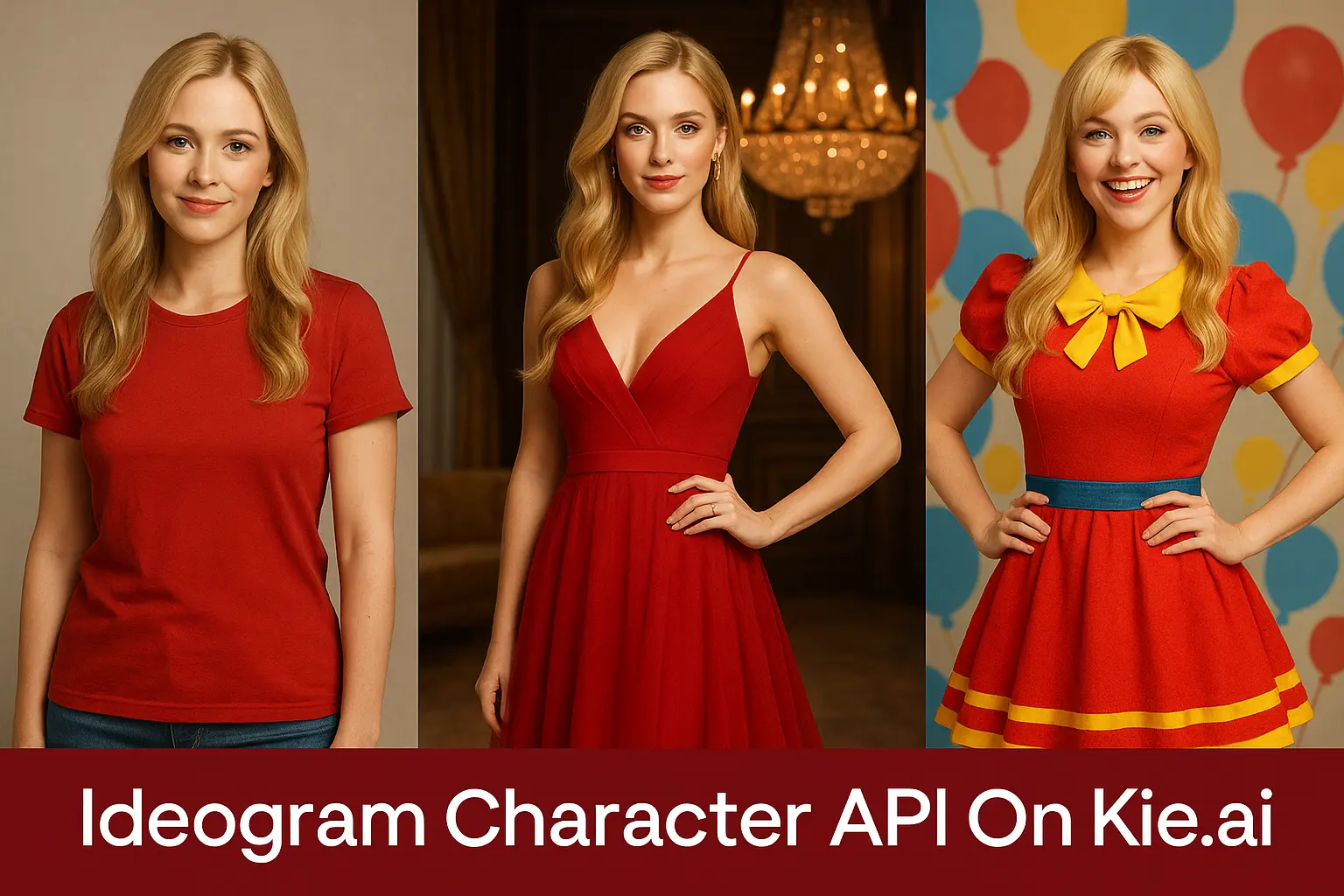
Ideogram Character 是由 Ideogram AI 开发的一款突破性的角色一致性模型。仅需一张参考图,即可为真实人物或虚拟角色生成无限变体。借助先进的面部与头发检测算法,该模型能够建立精准的身份特征映射,在各种场景、风格和上下文中完美保留五官、比例及个性化特征,即使在复杂的变换下,依然能确保惊艳且高保真的视觉输出。基于这一创新底层技术,Ideogram 角色 API 将这些能力开放给开发者与创作者,支持将其无缝集成至故事创作、品牌营销及个性化视觉生成的工作流中。Kie.ai 现已接入 Ideogram 角色 API,提供基础生成 (Base)、局部编辑 (Edit) 与变体生成 (Remix) 等灵活的端点服务。此外,我们还提供 Ideogram 角色 API 的免费试用选项,方便您快速接入并深入探索其强大的角色一致性功能。
使用 Kie.ai 的 Ideogram 角色 API 可以做什么
Ideogram 角色 API - 基础生成 (Base)
Ideogram 角色 API 的基础生成 (Base) 功能仅需单张参考图,即可创建视觉高度一致的角色图像。用户只需上传一张清晰的照片并输入描述性提示词,就能让角色自然融入全新的场景或摆出全新的姿势,同时完美保留面部轮廓和发型等核心特征。
Ideogram 角色 API Edit
借助 Ideogram 角色 API 的 Edit(编辑)功能,创作者可以微调已生成或现有的角色,且不会破坏身份的一致性。该功能支持调整姿势、表情、服装,甚至可以通过蒙版指定区域,实现对角色外观的精准控制。
Ideogram 角色 API Remix
Ideogram 角色 API 的 Remix(重绘)功能可将具有一致性的角色转换至全新的艺术风格或场景中。通过结合参考图与提示词,该功能在实现无缝风格迁移的同时,能够保留角色高辨识度的特征与身份。
Kie.ai 的 Ideogram 角色 API 教程:专业接入指南
获取您的 Ideogram 角色 API Key
配置您的 Ideogram 角色 API 请求
提交 Ideogram 角色 API 请求
监控与获取结果


为什么选择 Kie.ai 作为您的 Ideogram Character API 平台
Ideogram 角色 API:确保角色形象统一
Ideogram 角色 API 专为在多场景下保持角色特征而设计。借助先进的 Ideogram 角色一致性技术,它能精准保留五官、发型等核心视觉特征,同时让角色自然适配全新的姿态、场景与艺术风格。
操作灵活的 Ideogram 角色 API
Kie.ai 的 Ideogram 角色 API 支持 Base、Edit 和 Remix 功能,为创作者提供全方位的角色生成工具。无论是通过单张参考图生成全新图像、使用蒙版进行局部重绘,还是实现风格迁移,都能助力用户轻松实现创意叙事与品牌打造。
高性价比的 Ideogram 角色 API 按量计费方案
在 Kie.ai 平台上,Ideogram 角色 API 采用透明的按量扣费(积分制)模式。这种灵活的方案允许创作者根据项目需求动态调整用量,打破传统订阅制的限制,有效控制成本。
完善的 Ideogram 角色 API 文档与技术支持
Kie.ai 提供完善的文档、教程和快速响应的技术支持,全面指导用户接入 Ideogram 角色 API。无论您是在进行初步的项目测试,还是管理大规模的生产工作流,都能借助 Ideogram AI 生态下的详尽资源轻松应对。
Ideogram Character 与 Nano Banana、Flux Kontext 在角色一致性上的对比
Ideogram Character 在根据单张参考图生成角色变体时展现出卓越的一致性,是进行故事叙事、品牌建设和超写实内容创作的强大工具。其直观的操作(包括基础生成、编辑和重混)为创作者提供了无与伦比的灵活性。随着 AI 图像生成领域的不断演进,Nano Banana AI 与 Flux AI (Flux Kontext) 等新兴模型也凭借在角色一致性和编辑方面的创新方法备受瞩目。下表对比了 Ideogram Character 与这些模型在关键性能指标上的表现。
| 功能特性 | Ideogram Character | Nano Banana | Flux Kontext |
|---|---|---|---|
| Text and Image Upload Support | Supports single reference image uploads with detailed text prompts for scene and style customization | Supports text prompts and image uploads, with integrated editing for precise modifications | Supports both text prompts and image uploads, with advanced inpainting and depth control |
| Prompt Understanding | Excels at interpreting detailed prompts for character placement and style transfer, with automated facial/hair detection | Handles complex, multi-step instructions with high accuracy, ideal for precise text-based edits | Strong text-to-image capability with reliable fidelity, enhanced by semantic understanding |
| Style and Consistency | Superior Ideogram Character Consistency, preserving character identity across scenes and styles | Maintains character and background stability across variations, with strong scene coherence | Provides stable results with flexible outputs, but may struggle with complex scene relationships |
| Resolution and Detail | High-fidelity output with precise detail retention for photorealistic character rendering | High-resolution output with fine detail retention, especially for character restoration | Multiple model tiers (e.g., Dev, Pro, Max) balance detail and performance, up to ~4 MP outputs |
高效使用 Ideogram Character API 的实用技巧
选择高质量参考图
请选择一张面部特征清晰的正脸或四分之三侧脸参考图。光线充足且无遮挡(如阴影或模糊)的高分辨率图像,能确保 Ideogram Character API 准确捕捉面部轮廓或发型等特征,从而提升一致性。例如,清晰的肖像照生成效果远优于低画质或角度不佳的照片。
编写精准的提示词
编写详细的文本提示词,明确场景、氛围或风格,例如“自然光下充满活力的热带海滩上的角色”或“置身于极具戏剧效果的昏暗舞厅中的人物”。避免使用模糊的描述,以确保 Ideogram Character API 输出精准的结果。您还可以加入“照片级真实”或“电影级”等修饰词,以获得更符合预期的定制效果。
使用一致的参考图
在输入不同的提示词时,请始终使用同一张高质量的参考图,以确保 Ideogram Character 的一致性。这有助于在生成不同场景(如“未来城市中的角色”或“历史背景中的角色”)的图像时,完美保留角色的核心身份与特征。
确保输入符合要求
确保参考图符合 Ideogram Character 的要求(面部特征清晰可见),且文本提示词简明扼要、描述具体,以避免模型理解偏差。对于复杂场景,建议包含具体元素(如背景、光影、角色动作),从而提升图像生成的准确度。