A description of the desired elements and visual style for the generated video. Input in any language is supported. The length is limited to 5,000 non-Chinese characters or 2,500 Chinese characters. Content exceeding this limit is automatically truncated. Image referencing: In the prompt, use "[Image 1]" and "[Image 2]" to refer to the corresponding reference image in the media array. The order must be consistent with the order in the media array. When using a reference, specify the object in the image, such as "the woman in a red qipao in [Image 1]".
Click to upload or drag and drop
Supported formats: JPEG, PNG, WEBP, JPG Maximum file size: 20MB; Maximum files: 9
The URL of a reference image. Image requirements: 1. Formats: JPEG, JPG, PNG, WEBP. 2. Resolution: The shortest side must be at least 400 pixels. A clear image with a resolution of 720P or higher is recommended. Avoid using images that are too small, blurry, or overly compressed, as this can degrade the output quality. 3. Maximum file size: 20 MB.
The resolution tier of the generated video.
The aspect ratio of the generated video.
The duration of the generated video, in seconds. Value range: An integer from 3 to 15.
Text description of the video to generate. Supports any language. Maximum 5,000 non-Chinese characters or 2,500 Chinese
Output video resolution.
Output video aspect ratio.
Output video duration in seconds.
Describes the video content to generate. Supports any language. Maximum: 5,000 non-Chinese characters or 2,500 Chinese
Click to upload or drag and drop
Supported formats: JPEG, PNG, WEBP, JPG Maximum file size: 20MB; Maximum files: 1
The URL of the first frame image. Image constraints: 1. Formats: JPEG, JPG, PNG, WEBP. 2. Resolution: Width and height must both be at least 300 pixels. 3. Aspect ratio: Between 1:2.5 and 2.5:1. 4. File size: Up to 20 MB.
The resolution of the generated video.
The duration of the generated video, in seconds. The value must be an integer in the range [3, 15]. Default: 5
Happy Horse 1.1 API – Access Alibaba HappyHorse-1.1 on Kie.ai
Integrate Alibaba HappyHorse-1.1 through a unified API. Generate high-quality AI videos with T2V, I2V, and R2V workflows, test online with free credits, and launch faster on Kie.ai.
Access Alibaba HappyHorse-1.1 API on Kie.ai
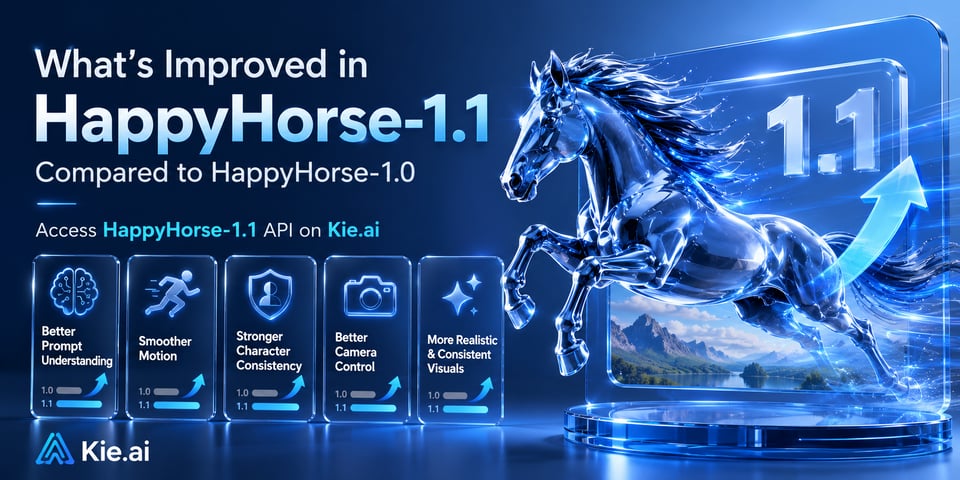
What's Improved in HappyHorse-1.1 Compared to HappyHorse-1.0
HappyHorse-1.1 improves prompt understanding, motion quality, character consistency, and visual realism across text-to-video, image-to-video, and reference-to-video generation. It delivers smoother actions, better camera control, stronger identity preservation, and more consistent outputs than HappyHorse-1.0. Developers can now access HappyHorse-1.1 directly through Kie.ai.
Core Capabilities of Happy Horse 1.1 API
Advanced Text-to-Video Generation with HappyHorse-1.1 T2V API
Convert detailed text prompts into high-quality videos with stronger semantic understanding, cinematic camera movement, realistic motion, and richer visual storytelling. HappyHorse-1.1 delivers more accurate prompt adherence and smoother scene generation for creative and commercial applications.
High-Consistency Image-to-Video Generation with HappyHorse-1.1 I2V API
Transform static images into dynamic videos while preserving character identity, visual style, and scene details. HappyHorse-1.1 I2V improves motion quality, skin texture realism, text rendering stability, and cross-shot consistency for professional video creation.
Multi-Image Reference-to-Video Generation with HappyHorse-1.1 R2V API
Generate videos from up to 9 reference images using HappyHorse-1.1 R2V. Maintain subject appearance, scene composition, artistic style, and creative intent across video sequences with greater control and consistency.
Realistic Motion Generation and Character Consistency in HappyHorse-1.1 API
Produce videos with natural physical movement, smooth character actions, improved camera transitions, and enhanced visual aesthetics. HappyHorse-1.1 creates more realistic, detailed, and consistent AI-generated videos across a wide range of use cases.
Happy Horse 1.1 API vs Seedance 2.0 API
Happy Horse 1.1 vs Seedance 2.0: Which AI Video Model Should You Choose?
Happy Horse 1.1 and Seedance 2.0 are both advanced AI video generation models, but they focus on different strengths. Happy Horse 1.1 excels in character consistency, reference-based video generation, and controllable storytelling workflows, making it well suited for branded content, virtual characters, and multi-shot projects. Seedance 2.0 is known for strong prompt following, cinematic motion, and high-quality text-to-video generation, making it a popular choice for creative video production and marketing content.
Access Happy Horse 1.1 API and Seedance 2.0 on Kie.ai
Kie.ai provides API access to both Happy Horse 1.1 and Seedance 2.0 through a unified platform. Developers can test both models online, compare generation results, and integrate the best AI video model for their specific use case without managing multiple providers.
How to Use Happy Horse 1.1 API on Kie.ai
Try Happy Horse 1.1 API Online Before Integration
Test HappyHorse-1.1 directly in the online playground using free credits. Evaluate video quality, generation speed, and outputs before writing any code.
Choose a HappyHorse-1.1 Video Generation Mode
Select HappyHorse-1.1 T2V, I2V, or R2V depending on whether you want to generate videos from text, images, or reference images.
Submit Prompts or Images to Happy Horse 1.1 API
Provide a text prompt, upload an image, or add reference images to guide the HappyHorse-1.1 video generation process.
Generate and Integrate AI Videos with Happy Horse 1.1 API
Generate videos through Happy Horse 1.1 API and retrieve results via API response, making it easy to integrate into applications, workflows, and AI video platforms.
What Can You Build with Happy Horse 1.1 API on Kie.ai
Build AI Video Generator Apps with Happy Horse 1.1 API
Create AI video generation platforms using Happy Horse 1.1 API. Support text-to-video, image-to-video, and reference-to-video workflows through a single integration.
Build Character-Consistent AI Storytelling with HappyHorse-1.1
Use HappyHorse-1.1 to generate narrative videos, animated stories, and virtual influencer content while maintaining character identity, visual style, and scene consistency across multiple shots.
Generate Product Demo Videos with HappyHorse-1.1 Image-to-Video
Convert product photos into dynamic product demonstrations for ecommerce, SaaS, and mobile apps. HappyHorse-1.1 Image-to-Video creates realistic motion and professional visuals without traditional video production.
Produce Brand Videos with Alibaba HappyHorse 1.1 Reference-to-Video
Leverage Alibaba HappyHorse 1.1 R2V to generate videos from reference images while preserving brand assets, characters, environments, and visual style for scalable content creation.
Why Choose Happy Horse 1.1 API on Kie.ai?
Access Happy Horse 1.1 API and HappyHorse-1.0 Through One Unified API
Integrate Happy Horse 1.1 API and HappyHorse-1.0 through a single API platform. Switch between models easily and build AI video applications without managing multiple providers or infrastructures.
Try Happy Horse 1.1 API Free with Online Playground and Free Credits
Test Happy Horse 1.1 AI Video Generator instantly using free credits for new users. Explore text-to-video, image-to-video, and reference-to-video workflows directly in the online playground before deployment.
Affordable HappyHorse AI API Pricing with Fast Video Generation
Get competitive HappyHorse AI API pricing without compromising generation speed or output quality. Scale AI video products efficiently while keeping infrastructure and operating costs under control.
Integrate Happy Horse 1.1 API Faster with Clear Documentation
Launch projects quickly with developer-friendly documentation, straightforward API endpoints, code samples, and integration guides designed for rapid implementation and production use.
Get Fast Access to Latest HappyHorse Model Updates
Stay ahead with early access to new HappyHorse model releases and improvements. Kie.ai continuously expands its model library, helping developers adopt the latest capabilities as soon as they are available.
Dedicated Developer Support for HappyHorse AI API Projects
Get responsive support for API integration, implementation, billing, and production deployment. Our team helps developers resolve issues faster and build with confidence at every stage.