Always Set the Aspect Ratio
aspect_ratio is required on every request, including edits with reference images. Use auto if you want the model to decide.
Nano Banana 2 Lite, aka Gemini 3.1 Flash-Lite Image, is a newly released image model from Google DeepMind built for fast 1K image generation, efficient creative iteration, prompt-based image editing, and responsive visual output in product-facing creative scenarios.
A text description of the image you want to generate
0/20000Click to upload or drag and drop
Supported formats: JPEG, PNG, WEBP Maximum file size: 30MB; Maximum files: 10
Input images to transform or use as reference (supports up to 10 images)
Aspect ratio of the generated image

Explore different use cases and parameter configurations
Complete guide to using nano-banana-2-lite
Nano Banana 2 Lite (gemini-3.1-flash-lite-image) is the model in Google's Nano Banana image family built for high-volume generation and prompt-based editing. On Kie.ai it runs as one API model, nano-banana-2-lite, for both text-to-image and editing with reference images.

One model name covers both modes: leave image_urls empty to generate from text, or pass reference images to edit or combine them.
| Parameter | Value |
|---|---|
| Model | nano-banana-2-lite (Google model ID: gemini-3.1-flash-lite-image) |
| Endpoint | POST /api/v1/jobs/createTask, then Get Task Details or a callBackUrl for the result |
| Prompt | Required; up to 20,000 characters |
| Reference images (image_urls) | Optional; up to 10 image URLs (hosted files, not raw file content); JPEG, PNG or WebP; up to 30 MB each. Omit or leave empty for text-to-image |
| Aspect ratio | Required; 1:1, 1:4, 1:8, 2:3, 3:2, 3:4, 4:1, 4:3, 4:5, 5:4, 8:1, 9:16, 16:9, 21:9, or auto to let the model decide |
| Output | One JPEG image per task; the format cannot be set |
| Output size | About 1 megapixel (1K); there is no resolution parameter. In our tests on Kie.ai: 1024×1024 at 1:1, 1200×896 at 4:3, 1376×768 at 16:9, 2064×512 at 4:1 |
| Watermark | Google applies SynthID watermarking to Nano Banana 2 Lite images |
| Pricing | Shown in the pricing card above |
Each example below was generated with nano-banana-2-lite on Kie.ai in October 2026 from the prompt described in its caption; images are shown as generated, resized for the web.
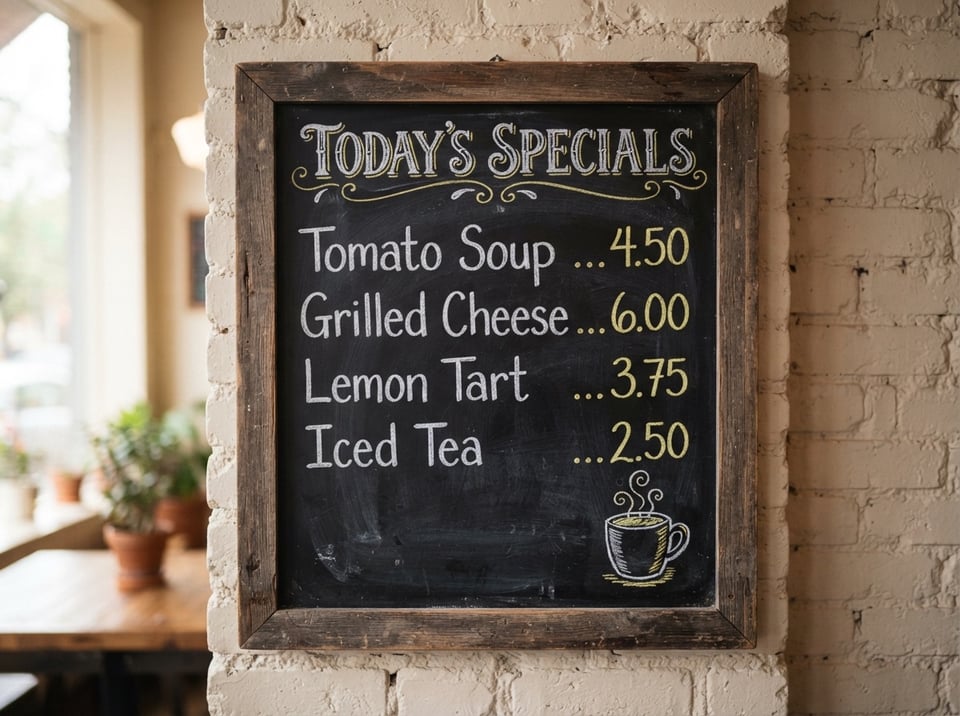
Google says Nano Banana 2 Lite keeps legible in-image text rendering. We asked for a chalkboard menu with a title and four items with prices; every word and price came out spelled as written in the prompt.
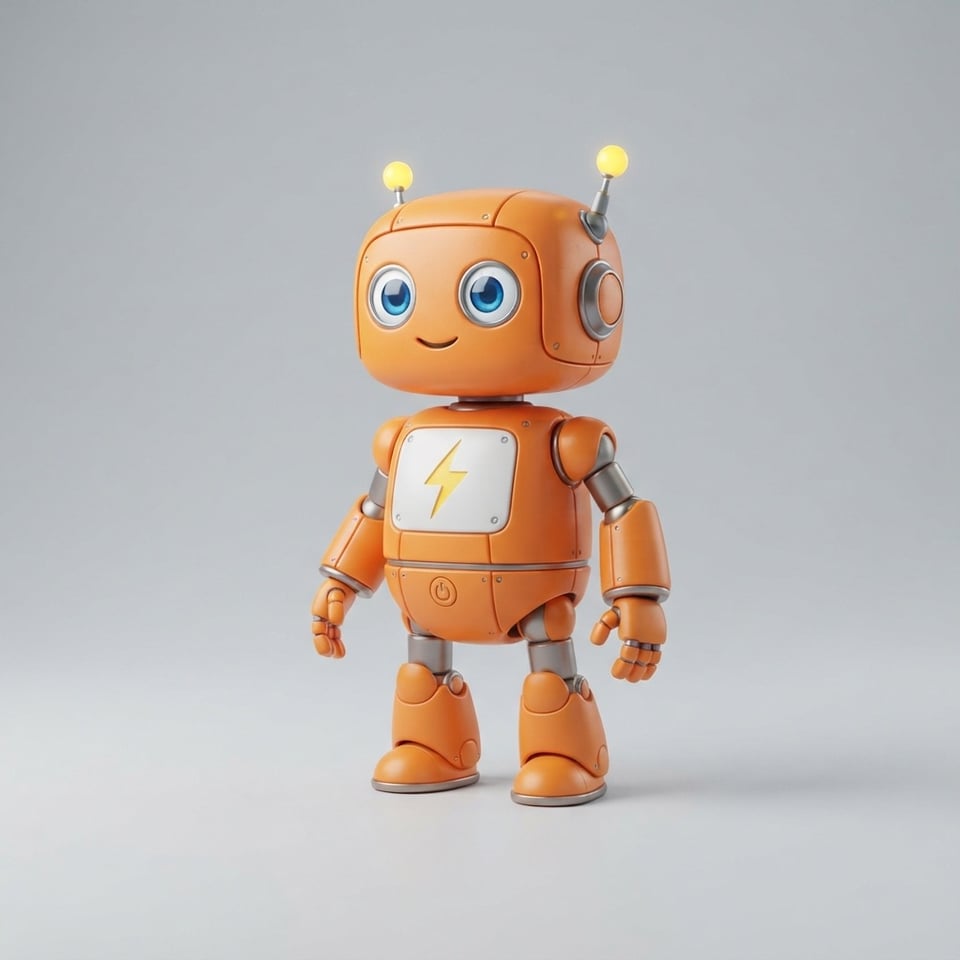
A two-sentence prompt described the robot's color, eyes, antenna and chest icon, and the result matched almost every detail. It did draw two antennas where the prompt asked for one, so check small details against your brief.
Google says the model keeps strong character consistency. With the mascot above passed as a reference image, the robot kept its colors, eyes, antennas and chest icon in a new scene. It sat in an armchair beside the books rather than on the stack of books the prompt described.

Nano Banana 2 Lite also takes very wide and very tall aspect ratios. This panoramic banner was generated at 4:1 with the headline "Explore the Valley" on the left, and the headline came out legible.

Google describes Nano Banana 2 Lite as built for high-volume workflows and Nano Banana 2 as the generalist workhorse, and recommends Nano Banana 2 Lite as the replacement for the original Nano Banana; for complex, professional work it points to Nano Banana Pro. On LMArena, Nano Banana 2 Lite scores above the original Nano Banana for both text-to-image and single-image editing; Nano Banana 2 is listed there only with web search turned on, so its scores are not compared here. Following Google's positioning, a practical default is Nano Banana 2 Lite for high-volume generation and as the upgrade from the original Nano Banana, and Nano Banana 2 as the general-purpose choice; compare both on your own prompts before switching.
| Nano Banana 2 Lite | Nano Banana 2 | Nano Banana | |
|---|---|---|---|
| Google model ID | gemini-3.1-flash-lite-image | gemini-3.1-flash-image | gemini-2.5-flash-image |
| Google's positioning | High-volume workflows | The generalist workhorse | Legacy model; Google recommends upgrading to Nano Banana 2 Lite |
| LMArena text-to-image score (Oct 7, 2026) | 1250 | Not listed without web search | 1150 |
| LMArena single-image edit score (Oct 6, 2026) | 1314 | Not listed without web search | 1293 |
Google built Nano Banana 2 Lite for high-volume work, where you generate many images and choose among them. These are the kinds of work that fit.
Mood boards, layout ideas and concept variations, where you want many options to choose from before committing to a final design.
Visuals generated on demand inside a product, such as postcards, story illustrations or game scenes created as users explore.
Illustrations for slide decks and web pages that an AI agent builds, where every page needs its own image.
Prompt-based edits to existing photos, such as changing a background, adding an object or applying a style across a batch of pictures.
Three steps from an API key to your first image.
aspect_ratio is required on every request, including edits with reference images. Use auto if you want the model to decide.
Every task returns one JPEG image, and the format cannot be changed. Do not rely on the file extension in the result URL; convert the image yourself if you need another format.
Reference images go in image_urls as hosted URLs, not raw file content. Files that are not hosted yet can be uploaded first with the Kie.ai File Upload API (Base64, file stream or remote URL).
Google notes that the model can still struggle with small faces, accurate spelling and fine details, and that masked edits, big lighting changes and multi-image blends may sometimes look unnatural. In our tests the robot mascot above came back with two antennas instead of one, so review each image before you publish.
All models in the Kie.ai market use the same authentication method: an Authorization: Bearer YOUR_API_KEY header with the key from your Kie.ai API Key Management page.
New Kie.ai users receive 80 free credits for testing. Your account has one credit balance that all generation services draw from; check it with the Get Remaining Credits API.
Kie.ai provides this model as an API with a playground; there is no app to download or install. There are no GPUs or model weights to manage.