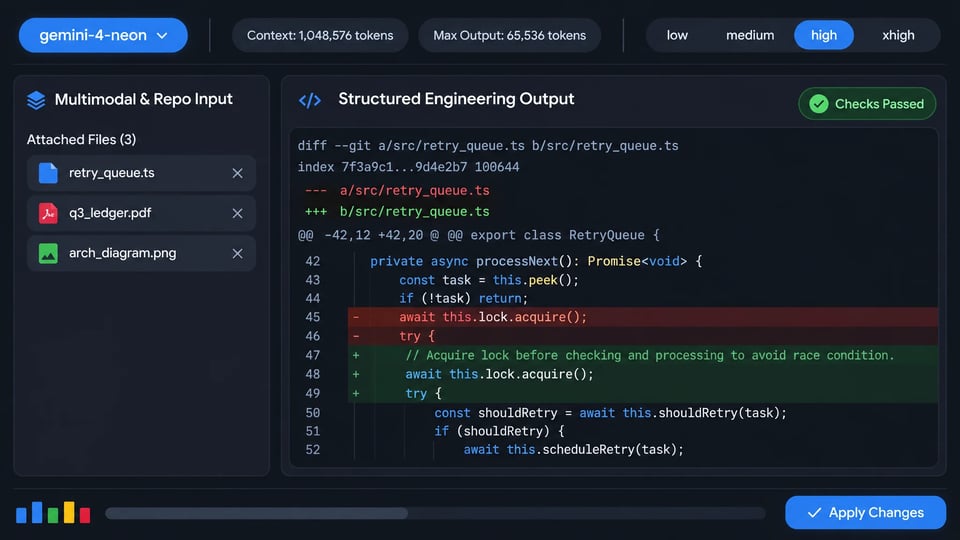
Google introduced Gemini 4 Neon (gemini-4-neon) on November 18, 2026 to balance frontier-level reasoning depth with efficient end-to-end task completion across complex software engineering, analytical reasoning, knowledge work and science workflows. Adapted from Gemini 4 Carbon, it sits between Gemini 4 Hydrogen and Gemini 4 Carbon in the Gemini 4 family and offers a unified 1,048,576-token context window with four thinking levels, from low to xhigh. On Kie.ai, it currently supports chat requests only.

Model Type:
Pricing: Input 240 credits / 1M tokens (≈ $1.20), Cached Input 12 credits / 1M tokens (≈ $0.06), Output 1200 credits / 1M tokens (≈ $6.00) — all 60% below official pricing. High-tier top-ups come with bonus credits that lower the effective price by about 10%.

Automatically append previous messages to maintain multi-turn context. May increase token usage.

Function calling
Grounding with Google Search
Source:Google Search
Thinking process
Reasoning effort
Stream Response

How can I help you today?

README

Complete guide to using Gemini 4 Neon

Gemini 4 Neon API for Complex Coding, Analysis and Science

Gemini 4 Neon accepts text, images, video, audio and PDFs and produces text responses. Input, thinking and output tokens share a unified 1,048,576-token context window, with a default maximum of 65,536 output tokens per synchronous response. Four thinking levels — low, medium, high and xhigh — let you tune reasoning depth and token use for each workload.
curl https://api.kie.ai/gemini-4-neon-openai/v1/chat/completions \
-H "Authorization: Bearer $KIE_API_KEY" \
-H "Content-Type: application/json" \
-d '{
"messages": [{ "role": "user", "content": "Analyze the latency vs consistency trade-offs of multi-region consensus." }],
"reasoning_effort": "high",
"stream": false
}'
Thinking

Key Capabilities of Gemini 4 Neon

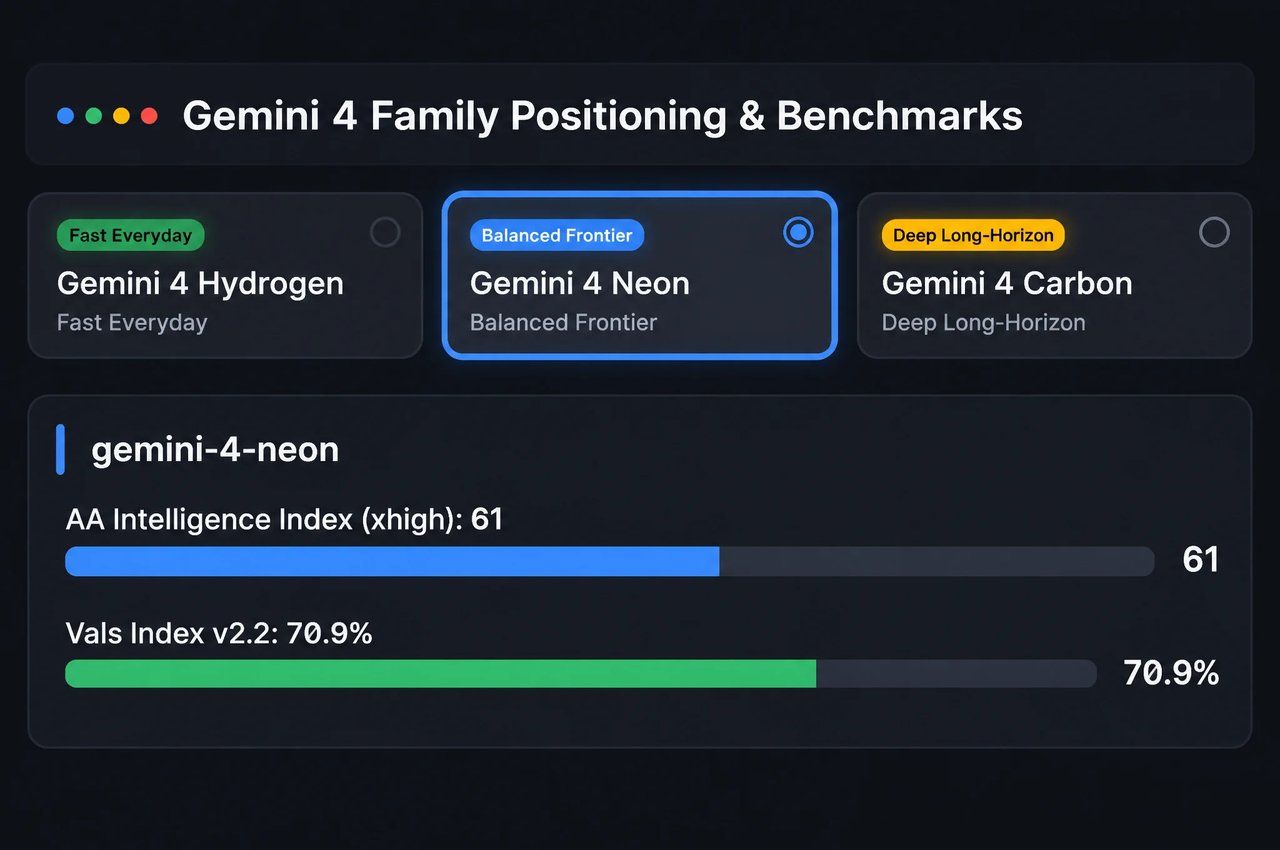
Adapted from Gemini 4 Carbon, Gemini 4 Neon sits between Hydrogen and Carbon in the Gemini 4 family, balancing frontier-level reasoning depth with efficient end-to-end task completion across complex software engineering, analytical reasoning, knowledge work and science workflows.
Balanced Frontier Reasoning in the Gemini 4 Family
01

Balanced Frontier Reasoning in the Gemini 4 Family

While Gemini 4 Carbon tackles the hardest long-horizon projects and Gemini 4 Hydrogen handles fast everyday execution, Google built Gemini 4 Neon to balance reasoning depth and efficiency. Google reports a score of 61 (#3 overall) on the Artificial Analysis Intelligence Index at xhigh and 70.9% (#2 overall) on the Vals Index v2.2.
Repository-Level Coding and Multi-File Refactoring
02

Repository-Level Coding and Multi-File Refactoring

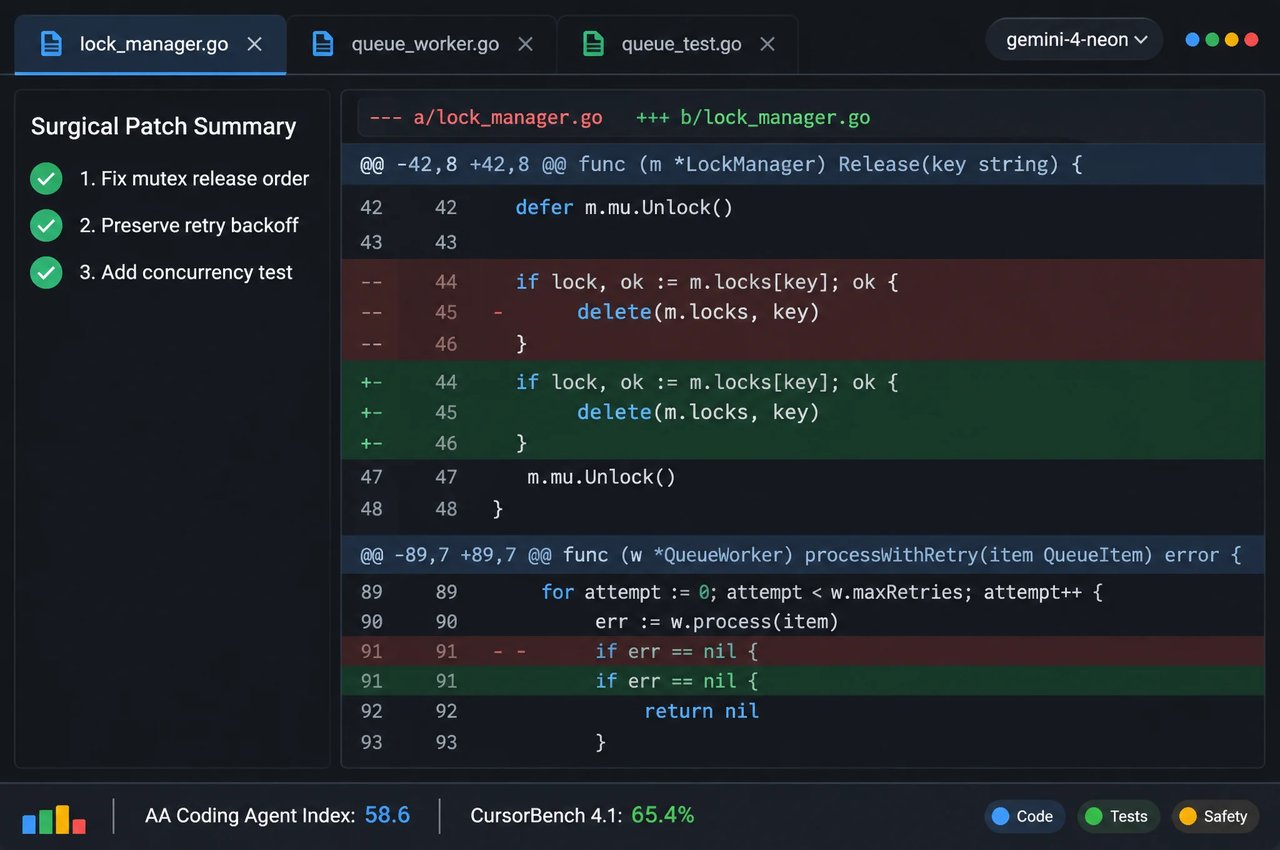
Google engineered Gemini 4 Neon for multi-file debugging and refactoring across codebases with targeted, surgical edits, fewer redundant file reads and reliable context compaction across long sessions. Google reports #1 on the Artificial Analysis Coding Agent Index (58.6), 65.4% on CursorBench 4.1, 65.2% on Terminal-Bench 4.1 and 46.2% on FrontierCode 2.0 at its default high setting.
Four Thinking Levels From Low to Xhigh
03

Four Thinking Levels From Low to Xhigh

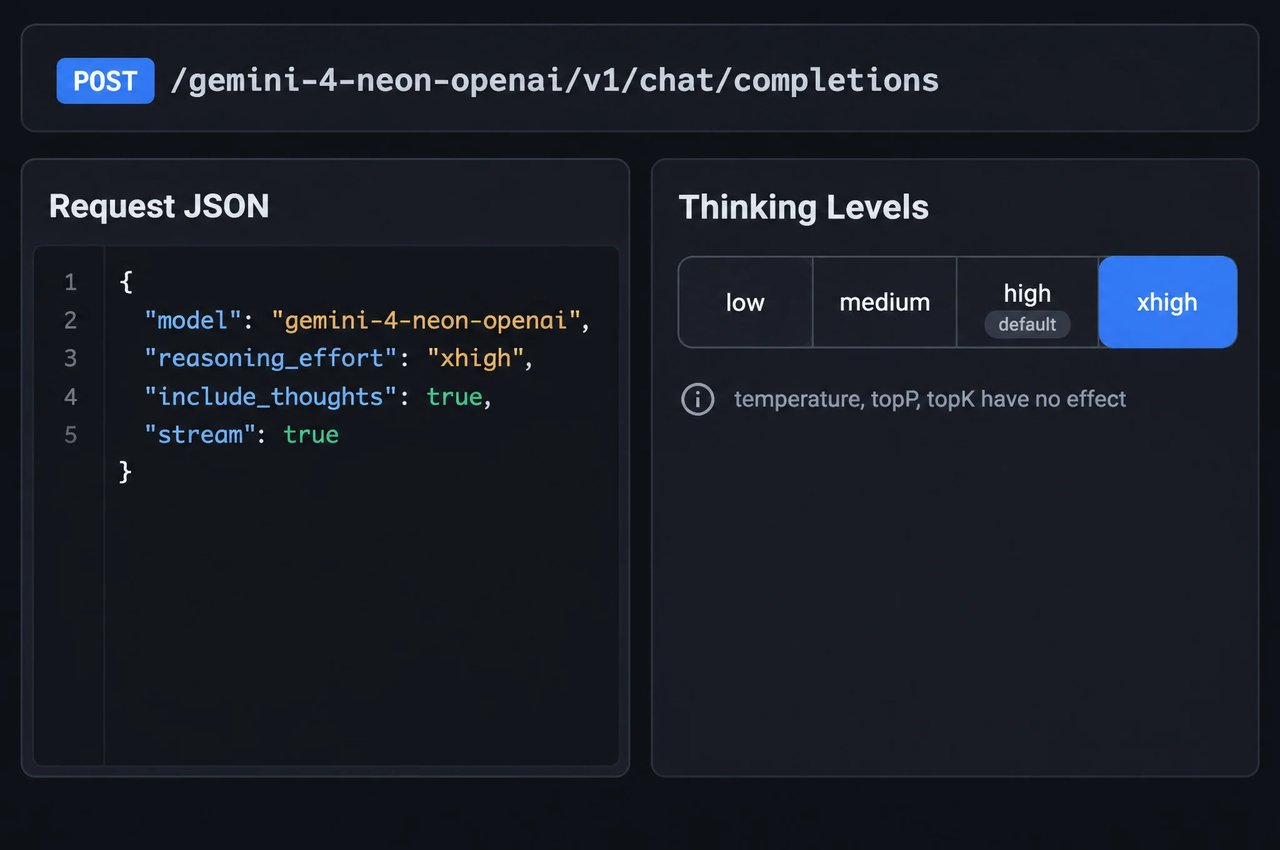
Control reasoning depth and token use across four thinking levels: low, medium, high (default) and xhigh. On Kie.ai, set reasoning_effort in the OpenAI-compatible API or generationConfig.thinkingConfig.thinkingLevel in the native Gemini API (minimal is ignored, and temperature, topP and topK have no effect). Use high for most complex coding and multimodal analysis, and reserve xhigh for hard multi-step engineering and scientific problems.
Unified 1M-Token Multimodal Context Window
04

Unified 1M-Token Multimodal Context Window

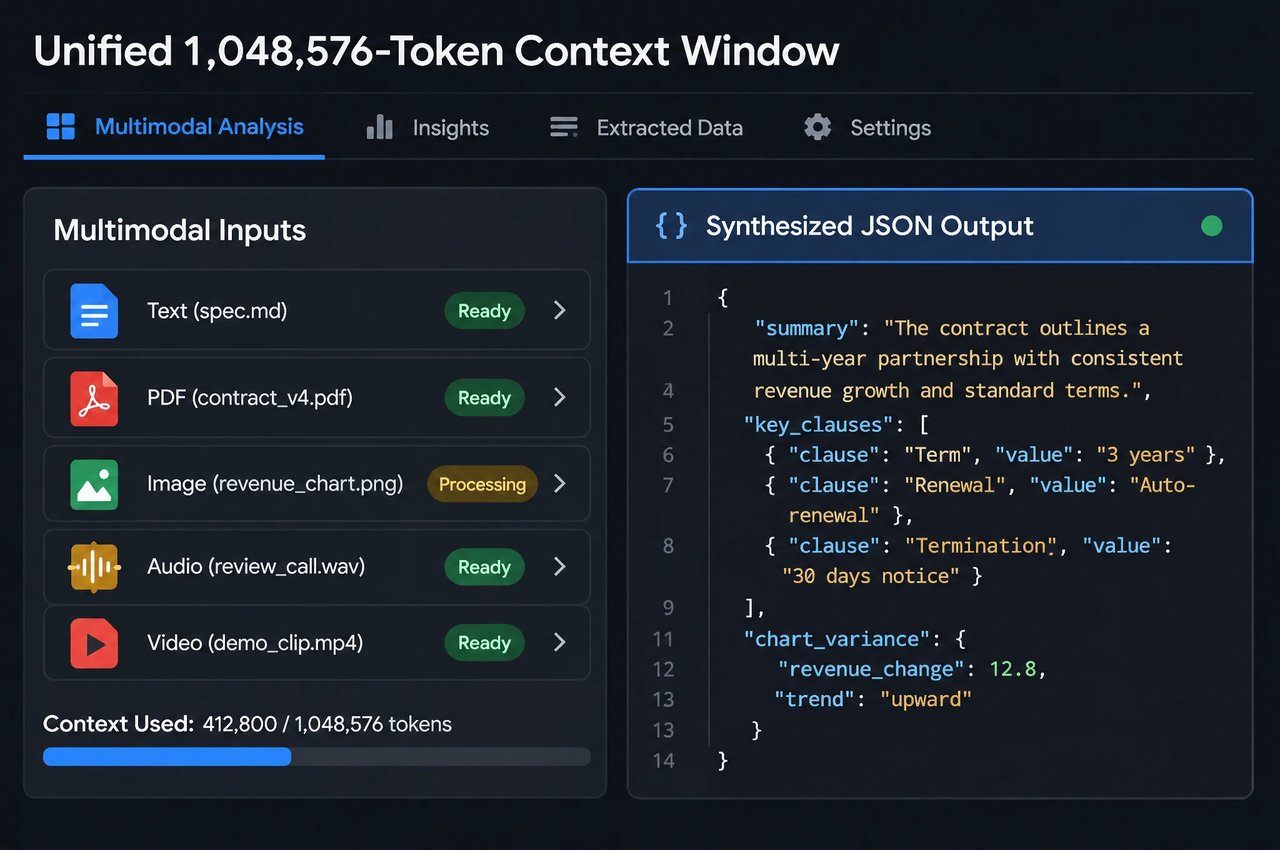
Input, thinking and output tokens share one 1,048,576-token context window, with up to 65,536 output tokens per synchronous response by default, counting thinking tokens. Pass text and up to 10 image, video, audio or PDF files in a single request to analyze contracts, dense charts and recorded meetings and produce structured text outputs, with long-context performance reflected by 95.2% on GraphWalks (256K to 1M) and 89.0% on LVBench.
Analytical, Legal and Scientific Workflows
05

Analytical, Legal and Scientific Workflows

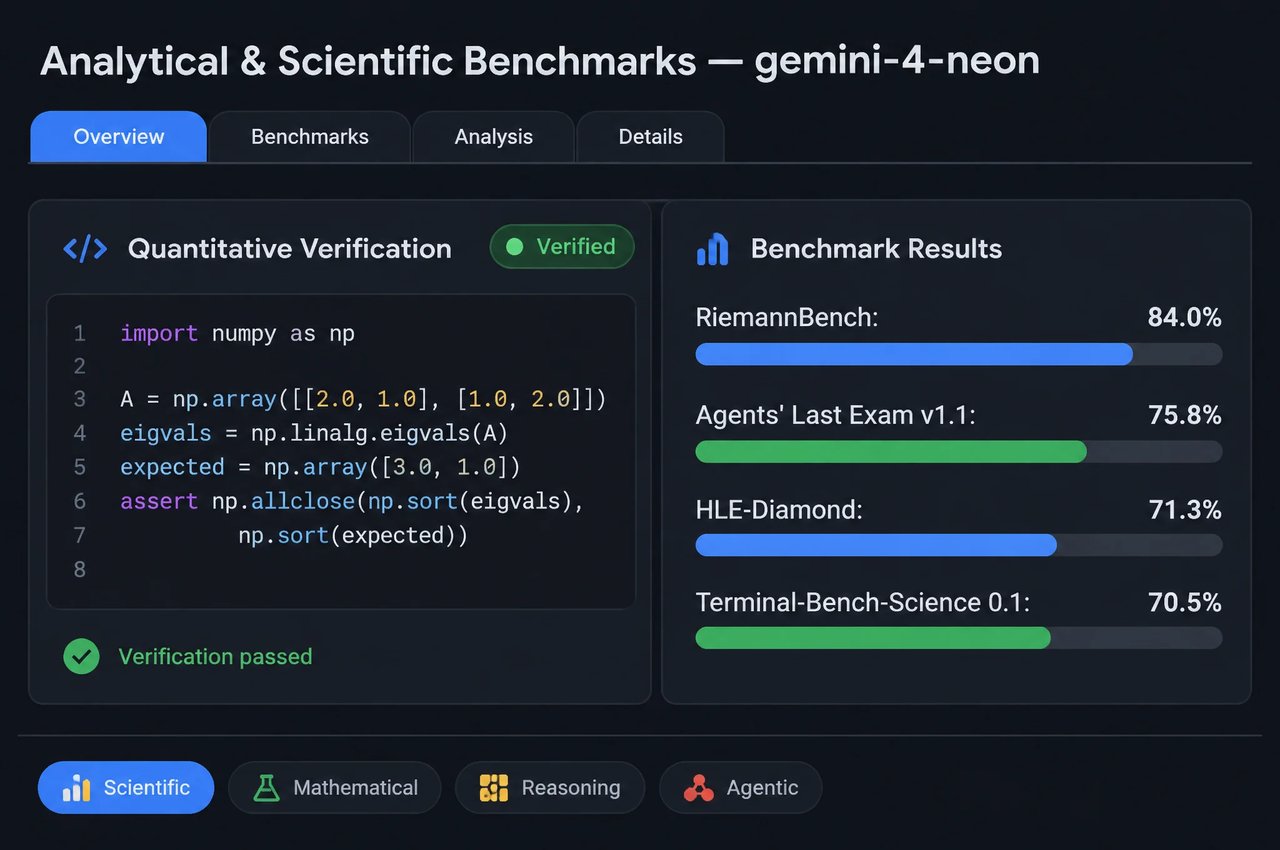
Google reports #1 placements on Legal Research Bench, Tax Agent Bench and Zapier's AutomationBench (56.3%), alongside 75.8% on Agents' Last Exam v1.1 and 73.5% on Chartography. On mathematics and scientific reasoning, Neon reaches 84.0% on RiemannBench, 71.3% on HLE-Diamond and 70.5% on Terminal-Bench-Science 0.1.
Secure Code Generation, Grounding and Tools
06

Secure Code Generation, Grounding and Tools

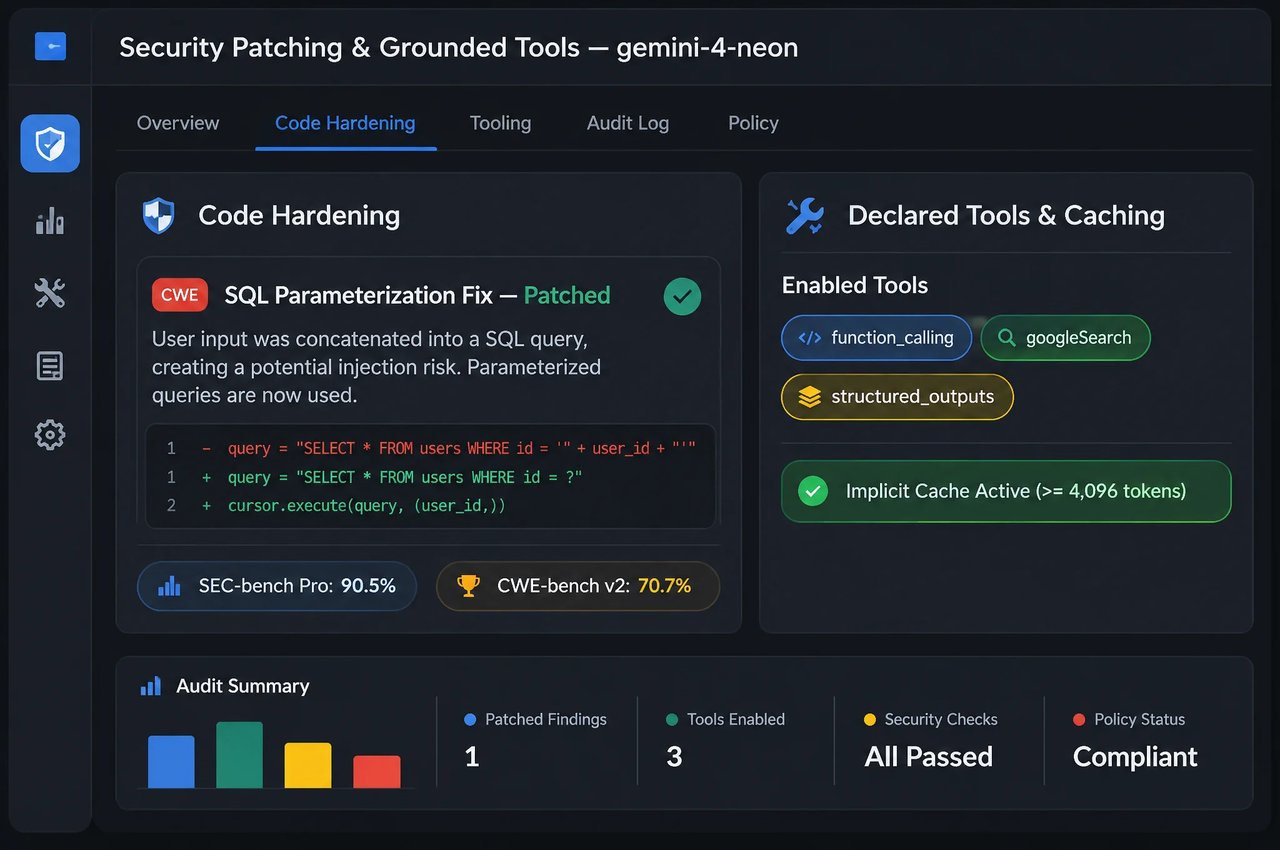
Gemini 4 Neon generates more secure code than Gemini 4 Carbon across easy, medium and hard challenges on AutoBaxBench (76% on the hard tier), scores 90.5% on SEC-bench Pro and reaches 70.7% on CWE-bench v2. Both API formats on Kie.ai support Google Search grounding (googleSearch), custom function declarations, streaming with credits_consumed in the final chunk, and implicit context caching.
SpecificationGemini 4 Neon
DeveloperGoogle (Google DeepMind)
Model IDs on Kie.aigemini-4-neon-openai (OpenAI-compatible); gemini-4-neon (native Gemini)
Release dateNovember 18, 2026
Adapted fromGemini 4 Carbon
ModalitiesText, image, video, audio and PDF input (up to 10 files per request); text output
Context window1,048,576 tokens unified across input, thinking and output
Max output tokensUp to 65,536 tokens per synchronous response by default (thinking tokens count toward output)
Thinking levelslow, medium, high (default), xhigh via reasoning_effort or thinkingLevel (minimal ignored; include_thoughts / includeThoughts optional)
API formats on Kie.aiPOST /gemini-4-neon-openai/v1/chat/completions (stream default false); POST /gemini/v1/models/gemini-4-neon:streamGenerateContent (stream default true)
Tools & parameters on Kie.aiGoogle Search grounding (googleSearch), function tools, response_format JSON schema (OpenAI-compatible), implicit caching (temperature, topP and topK have no effect; chat requests only)
Knowledge cutoffMarch 2026
BenchmarkGemini 4 NeonWhat It Measures
AA Intelligence Index v5.0.161 (#3 overall, at xhigh)General capability index
Vals Index v2.270.9% (#2 overall; #1 Legal Research & Tax Agent)Enterprise, legal and tax evaluations
AA Coding Agent Index58.6 (#1 overall)Software engineering capability evaluation
CursorBench 4.1 / Terminal-Bench 4.165.4% / 65.2% (cheating-adjusted)Repository coding and terminal execution
FrontierCode 2.0 / SWE-sweep46.2% (at high) / 39.0% (Antigravity harness), 12.8% (mini-SWE)Software engineering benchmarks
Agents' Last Exam v1.1 / AutomationBench75.8% / 56.3% (#1 overall)Multi-step knowledge work and workflow automation
RiemannBench / HLE-Diamond / Terminal-Bench-Science 0.184.0% / 71.3% / 70.5%Mathematics and scientific reasoning
GraphWalks (256K to 1M, BFS F1)95.2%Long-context retrieval and reasoning
LVBench / Chartography / MKA89.0% / 73.5% / 56.5%Long video, dense charts and multimodal reasoning
SEC-bench Pro / CWE-bench v2 / WebExploitBench v1.290.5% / 70.7% / 51.3%Vulnerability detection, patching and web security

How to Work With Gemini 4 Neon

Four practices for model selection, thinking budgets, multimodal inputs and streaming on Kie.ai.
  1. 1

    Step 1: Choose Between Hydrogen, Neon and Carbon

    Use Gemini 4 Neon for complex software engineering, analytical reasoning and science workflows where you want frontier-level reasoning depth with efficient end-to-end task completion. Keep Gemini 4 Hydrogen for fast everyday coding and execution, and reserve Gemini 4 Carbon for the hardest long-horizon projects.
  2. 2

    Step 2: Start at High and Reserve Xhigh for Hard Problems

    High is the default thinking level on Kie.ai. Set reasoning_effort (OpenAI-compatible) or generationConfig.thinkingConfig.thinkingLevel (native) to medium or low for leaner token use on simpler prompts, or xhigh for hard multi-step engineering, analytical and scientific problems. Leave temperature, topP and topK unset, as they have no effect on Gemini 4.
  3. 3

    Step 3: Leave Room for Thinking and Output Tokens

    Input, thinking and output tokens share the 1,048,576-token window, and the default 65,536-token output budget covers both thinking and visible answer text. For hard xhigh tasks, remember that deeper thinking consumes more of that shared output budget, and pass up to 10 media files per request.
  4. 4

    Step 4: Use Grounding, Function Tools and Prefix Caching

    Enable googleSearch when a question needs post-March 2026 web facts, declare custom function tools on either endpoint, or pass a response_format JSON schema in the OpenAI-compatible endpoint. Keep shared prompt prefixes unchanged across turns so repeated context can qualify for cached-input pricing.

What You Can Build With Gemini 4 Neon

Google positions Gemini 4 Neon for complex coding, analytical reasoning and science. On Kie.ai the model currently supports chat requests only, so the uses below are tasks you run through chat.

Multi-File Debugging and Codebase Refactoring

Diagnose cross-module bugs, review pull requests and generate targeted multi-file edits across large codebases while focusing changes on the relevant files.

Legal, Tax and Financial Document Synthesis

Synthesize contracts, regulatory filings, billing statements, charts and recorded meetings — provided as text, images, video, audio or PDFs — within the shared 1,048,576-token context into structured reports or JSON.

Scientific and Quantitative Analysis

Work through mathematical proofs, quantitative modeling, experiment design and technical research problems with configurable high or xhigh reasoning.

Defensive Code Review and Vulnerability Patching

Use Gemini 4 Neon to help generate more secure code, audit repositories for security flaws and draft root-cause fixes for CWE findings.

Gemini 4 Neon on Kie.ai

01

Gemini 4 Neon API Quick Start

Try Gemini 4 Neon in the playground on this page, or send a POST request to https://api.kie.ai/gemini-4-neon-openai/v1/chat/completions with messages, or to https://api.kie.ai/gemini/v1/models/gemini-4-neon:streamGenerateContent with contents, using Authorization: Bearer YOUR_API_KEY. Set reasoning_effort or thinkingLevel to low, medium, high or xhigh. On Kie.ai this model currently supports chat requests only and has not yet been adapted for agent use; connecting it to an agent may cause request errors or unexpected results.
03

One Key Across the Kie.ai Market

All models in the Kie.ai market use the same authentication method: an Authorization: Bearer YOUR_API_KEY header with the key from your Kie.ai API Key Management page.
04

Pay-As-You-Go Credits

Kie.ai is pay-as-you-go with no subscription tier: all models draw from one credit balance that never expires, failed requests are not charged, and you can check your balance with the Get Remaining Credits API.

Frequently Asked Questions

What is Gemini 4 Neon?

Gemini 4 Neon (gemini-4-neon) is Google's Gemini 4 model for complex software engineering, analytical reasoning, knowledge work and science workflows, released on November 18, 2026 and adapted from Gemini 4 Carbon. On Kie.ai it currently supports chat requests only.

How does Gemini 4 Neon compare with Gemini 4 Hydrogen and Gemini 4 Carbon?

Google positions Gemini 4 Neon between Gemini 4 Hydrogen and Gemini 4 Carbon. Hydrogen handles fast everyday coding and execution, Carbon tackles the hardest long-horizon projects, and Neon balances frontier-level reasoning depth with efficient end-to-end task completion.

What are the context window and output token limits of Gemini 4 Neon?

Gemini 4 Neon features a unified 1,048,576-token context window shared across input, thinking and output tokens. Google's model card lists up to 65,536 output tokens per synchronous response by default, and a March 2026 knowledge cutoff.

What input and output modalities does Gemini 4 Neon support?

It accepts text plus up to 10 media files per request — images, video, audio and PDFs (passed via the unified image_url structure in the OpenAI-compatible endpoint or inline_data / file_data in the native endpoint) — and outputs text. Image generation, audio generation and the Live API are not supported.

Which thinking levels does Gemini 4 Neon support?

Gemini 4 Neon supports four thinking levels: low, medium, high (default) and xhigh. Set reasoning_effort in the OpenAI-compatible API or generationConfig.thinkingConfig.thinkingLevel in the native Gemini API, and use include_thoughts or includeThoughts when you want thought output returned. On Kie.ai, minimal is ignored and temperature, topP and topK have no effect.

How does context caching work in Gemini 4 Neon?

Implicit context caching runs automatically when repeated requests share an unchanged prompt prefix (Google documents a 4,096-token minimum), and cached input tokens are billed at Kie.ai's cached-input rate.

Can Gemini 4 Neon use tools and Google Search grounding?

Yes. Both endpoints on Kie.ai support Google Search grounding (googleSearch) so responses can cite live web sources, alongside custom function declarations (and response_format JSON schemas in the OpenAI-compatible endpoint).

How do I call the Gemini 4 Neon API on Kie.ai?

Create an API key on the Kie.ai API Key Management page and pass it in an Authorization: Bearer YOUR_API_KEY header. Send a POST request to /gemini-4-neon-openai/v1/chat/completions for the OpenAI-compatible format or /gemini/v1/models/gemini-4-neon:streamGenerateContent for the native Gemini format; when streaming, the final SSE chunk includes usage metadata and credits_consumed before data: [DONE]. This model currently supports chat requests only and has not yet been adapted for agent use. See the OpenAI-compatible and native Gemini API documentation.

How is Gemini 4 Neon billed on Kie.ai?

Gemini 4 Neon is billed per million tokens across input, cached input and output tokens, with thinking tokens included in output token usage and identical rates across both endpoints. Failed requests are not charged, and credits never expire. Current per-million-token rates are shown on the pricing card on this page.