Send Duration as a String
duration is required on every model and takes the string "5" or "10", not a number.
The Kling 2.1 model powers cutting-edge video generation with hyper-realistic motion, advanced physics, and high-resolution outputs up to 1080p. Its enhanced semantic understanding and fast rendering make it ideal for dynamic, professional-grade video creation.
The text prompt describing the video you want to generate
0/5000The duration of the generated video in seconds
The aspect ratio of the generated video frame
Elements to avoid in the generated video
The CFG (Classifier Free Guidance) scale is a measure of how close you want the model to stick to your prompt
A configurable parameter. Defaults to true in the Playground.
Explore different use cases and parameter configurations
The text prompt describing the video to generate
0/5000Click to upload or drag and drop
Supported formats: JPEG, PNG Maximum file size: 10MB
URL of the image to be used for the video
The duration of the generated video in seconds
Negative prompt to exclude certain elements from the video
The CFG (Classifier Free Guidance) scale is a measure of how close you want the model to stick to your prompt
A configurable parameter. Defaults to true in the Playground.
Explore different use cases and parameter configurations
Text prompt describing the desired video content
0/5000Click to upload or drag and drop
Supported formats: JPEG, PNG Maximum file size: 10MB
URL of the image to be used for the video
The duration of the generated video in seconds
Description of elements to avoid in the generated video
The CFG (Classifier Free Guidance) scale is a measure of how close you want the model to stick to your prompt
A configurable parameter. Defaults to true in the Playground.
Explore different use cases and parameter configurations
Text prompt describing the video to generate
0/5000Click to upload or drag and drop
Supported formats: JPEG, PNG Maximum file size: 10MB
URL of the image to be used for the video
The duration of the generated video in seconds
Terms to avoid in the generated video
The CFG (Classifier Free Guidance) scale is a measure of how close you want the model to stick to your prompt
Click to upload or drag and drop
Supported formats: JPEG, PNG Maximum file size: 10MB
URL of the image to be used for the end of the video
A configurable parameter. Defaults to true in the Playground.
Explore different use cases and parameter configurations
Complete guide to using Kling V2.1
Kling 2.1 is Kuaishou's video model series, released at the end of May 2025 with a Standard mode, a High Quality mode and a Master Edition. On Kie.ai it runs as four API models: Standard, Pro and Master image-to-video, and Master text-to-video.
All four models use POST /api/v1/jobs/createTask, and results come back by callBackUrl or Get Task Details. There is no resolution parameter: the output size depends on the model.
| Parameter | Standard | Pro | Master |
|---|---|---|---|
| Model on Kie.ai | kling/v2-1-standard | kling/v2-1-pro | kling/v2-1-master-image-to-video, kling/v2-1-master-text-to-video |
| Text-to-video | No | No | Yes (kling/v2-1-master-text-to-video) |
| Start image (image_url) | Required | Required | Required for image-to-video |
| End image (tail_image_url) | No | Optional | No |
| Duration | "5" or "10" seconds | "5" or "10" seconds | "5" or "10" seconds |
| Aspect ratio | Follows the start image | Follows the start image | Image-to-video: follows the start image. Text-to-video: 16:9, 9:16 or 1:1 |
| Output size in our tests on Kie.ai | 960×960 from a square image | 1440×1440 from a square image | 1440×1440 from a square image; 1920×1080 at 16:9 and 1080×1920 at 9:16 (text-to-video) |
| Audio track in our tests on Kie.ai | None | None | None |
| Prompt / negative prompt | Up to 5,000 / 500 characters | Up to 5,000 / 500 characters | Up to 5,000 / 500 characters |
| cfg_scale | 0 to 1, step 0.1, default 0.5 | 0 to 1, step 0.1, default 0.5 | 0 to 1, step 0.1, default 0.5 |
| Input images | Hosted JPEG or PNG URL, up to 10 MB | Hosted JPEG or PNG URLs, up to 10 MB each | Hosted JPEG or PNG URL, up to 10 MB |
| Pricing | Shown in the pricing card above | Shown in the pricing card above | Shown in the pricing card above |
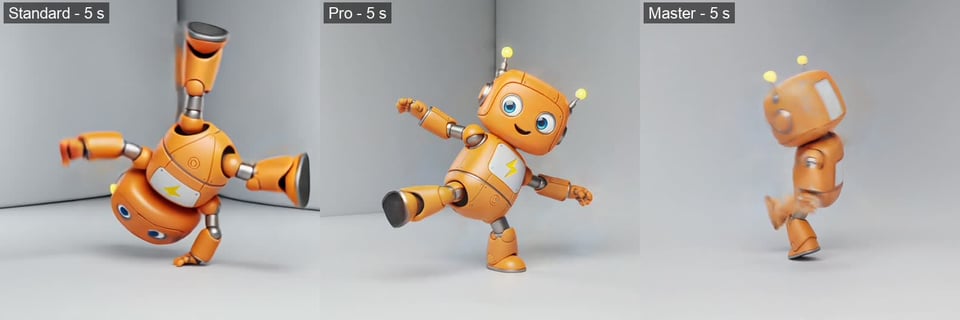
Kuaishou describes the Kling 2.1 series as having a Standard (720p) mode and a High Quality (1080p) mode, plus a premium Master Edition that it says delivers superior motion performance and enhanced semantic responsiveness. To compare the three on Kie.ai, we ran Standard, Pro and Master image-to-video twice in October 2026 with the same square image and a 10-second duration. With a simple prompt (the robot waves while the camera orbits), all three looked alike. With a hard one (the robot breakdances while the camera circles quickly), each did something different at the 5-second mark shown in the image: Standard held a handstand, Pro was mid-kick and Master was mid-spin with visible motion blur, which it also showed in its other high-motion frames. From still frames we could not tell whether one model handles fast motion better, and this is one run per model, so test your own prompts before you decide. On LMArena's image-to-video leaderboard (September 2026), Master and Standard are within each other's range. A practical default follows the model list: Standard or Pro for image-to-video, Pro when you need an end frame, and Master when you need text-to-video. Pricing for each model is shown in the pricing card above.
| Standard | Pro | Master | |
|---|---|---|---|
| Text-to-video | No | No | Yes |
| End frame | No | Yes | No |
| Output size from the same square image (our test) | Smaller (see the parameter table) | Larger | Larger |
| Simple motion: waving, slow orbit (our test) | Followed the prompt | Followed the prompt | Followed the prompt |
| Breakdance prompt, frame at 5 s (our test) | Handstand | Mid-kick | Mid-spin, with motion blur |
| LMArena image-to-video score (Sep 21, 2026) | 1229±8 | Not listed | 1235±8 |
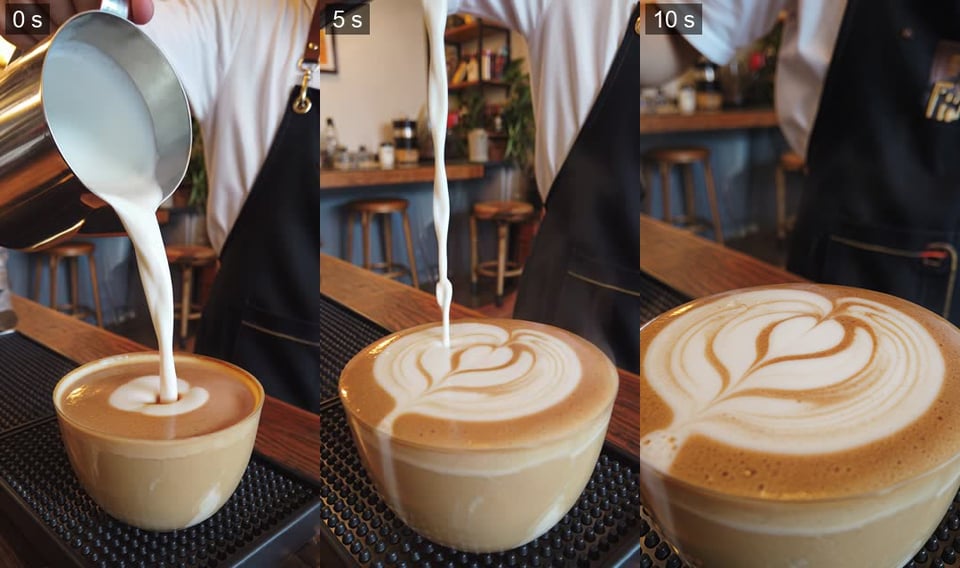
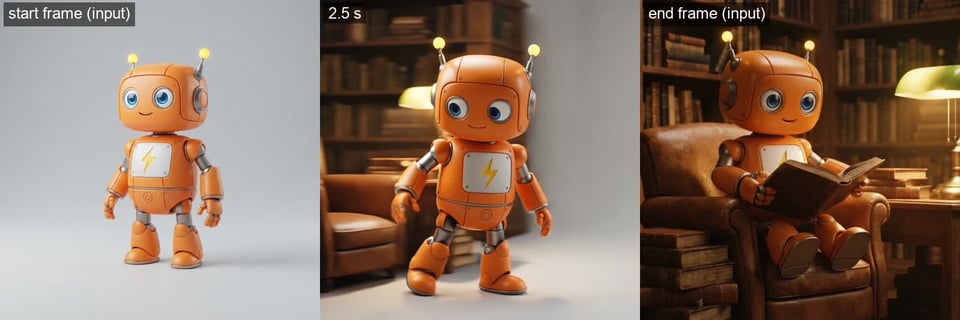
Each image below shows three frames (start, middle and end) from one video we generated with Kling 2.1 on Kie.ai in October 2026 from the prompt described in its caption; frames are shown as generated, resized for the web.
Kling 2.1 Master turned a one-sentence prompt into a 5-second landscape video: waves crash against black volcanic rocks, the spray catches the low sun, and the camera moves forward over the rocks as the prompt asked.

A 10-second vertical video from Kling 2.1 Master: milk is poured into a cup and a layered pattern forms on the surface while the camera pushes in. The prompt asked for a leaf pattern and the result is closer to a tulip, so check details like this against your brief.
Kling 2.1 Pro takes an optional end image. Given the robot on a plain background as the start frame and the same robot reading in a library armchair as the end frame, it generated a 5-second walk from one scene into the other, and the last frame matches the end image.
duration is required on every model and takes the string "5" or "10", not a number.
Standard, Pro and Master image-to-video all need image_url, and their videos follow the shape of that image. Only kling/v2-1-master-text-to-video works from text alone, and it is the only model that takes aspect_ratio.
None of our test videos on Kie.ai came with sound, so add music or sound effects in a separate step.
image_url and tail_image_url take hosted image URLs, not file content. Files that are not hosted yet can be uploaded first with the Kie.ai File Upload API (Base64, file stream or remote URL).
All models in the Kie.ai market use the same authentication method: an Authorization: Bearer YOUR_API_KEY header with the key from your Kie.ai API Key Management page.
New Kie.ai users receive 80 free credits for testing. Your account has one credit balance that all generation services draw from; check it with the Get Remaining Credits API.
Kie.ai provides this model as an API with a playground; there is no app to download or install. There are no GPUs or model weights to manage.