durationは文字列で送信する
durationはすべてのモデルで必須で、数値ではなく文字列の"5"または"10"を指定します。
Kling 2.1モデルは、超リアルな動き、高度な物理表現、最大1080pの高解像度出力によって最先端の動画生成を実現します。強化されたセマンティック理解と高速レンダリングにより、ダイナミックでプロ品質の動画制作に最適です。
The text prompt describing the video you want to generate
0/5000The duration of the generated video in seconds
The aspect ratio of the generated video frame
Elements to avoid in the generated video
The CFG (Classifier Free Guidance) scale is a measure of how close you want the model to stick to your prompt
A configurable parameter. Defaults to true in the Playground.
Explore different use cases and parameter configurations
The text prompt describing the video to generate
0/5000Click to upload or drag and drop
Supported formats: JPEG, PNG Maximum file size: 10MB
URL of the image to be used for the video
The duration of the generated video in seconds
Negative prompt to exclude certain elements from the video
The CFG (Classifier Free Guidance) scale is a measure of how close you want the model to stick to your prompt
A configurable parameter. Defaults to true in the Playground.
Explore different use cases and parameter configurations
Text prompt describing the desired video content
0/5000Click to upload or drag and drop
Supported formats: JPEG, PNG Maximum file size: 10MB
URL of the image to be used for the video
The duration of the generated video in seconds
Description of elements to avoid in the generated video
The CFG (Classifier Free Guidance) scale is a measure of how close you want the model to stick to your prompt
A configurable parameter. Defaults to true in the Playground.
Explore different use cases and parameter configurations
Text prompt describing the video to generate
0/5000Click to upload or drag and drop
Supported formats: JPEG, PNG Maximum file size: 10MB
URL of the image to be used for the video
The duration of the generated video in seconds
Terms to avoid in the generated video
The CFG (Classifier Free Guidance) scale is a measure of how close you want the model to stick to your prompt
Click to upload or drag and drop
Supported formats: JPEG, PNG Maximum file size: 10MB
URL of the image to be used for the end of the video
A configurable parameter. Defaults to true in the Playground.
Explore different use cases and parameter configurations
Complete guide to using Kling V2.1
Kling 2.1はKuaishouの動画モデルシリーズで、2025年5月末にStandardモード、高品質モード、Master Editionを備えてリリースされました。Kie.aiでは、Standard、Pro、Masterの画像から動画と、Masterのテキストから動画の4つのAPIモデルとして提供されています。
4つのモデルはすべてPOST /api/v1/jobs/createTaskを使用し、結果はcallBackUrlまたはGet Task Detailsで返されます。解像度パラメータはなく、出力サイズはモデルによって決まります。
| Parameter | Standard | Pro | Master |
|---|---|---|---|
| Kie.aiのモデル | kling/v2-1-standard | kling/v2-1-pro | kling/v2-1-master-image-to-video, kling/v2-1-master-text-to-video |
| Text-to-video | No | No | 対応(kling/v2-1-master-text-to-video) |
| 開始画像(image_url) | Required | Required | 画像から動画では必須 |
| 終了画像(tail_image_url) | No | Optional | No |
| Duration | "5"または"10"秒 | "5"または"10"秒 | "5"または"10"秒 |
| アスペクト比 | 開始画像に準拠 | 開始画像に準拠 | 画像から動画:開始画像に準拠。テキストから動画:16:9、9:16、1:1 |
| Kie.aiでのテストにおける出力サイズ | 正方形の画像から960×960 | 正方形の画像から1440×1440 | 正方形の画像から1440×1440、16:9で1920×1080、9:16で1080×1920(テキストから動画) |
| Kie.aiでのテストにおける音声トラック | None | None | None |
| プロンプト / ネガティブプロンプト | 最大5,000 / 500文字 | 最大5,000 / 500文字 | 最大5,000 / 500文字 |
| cfg_scale | 0〜1、0.1刻み、デフォルト0.5 | 0〜1、0.1刻み、デフォルト0.5 | 0〜1、0.1刻み、デフォルト0.5 |
| 入力画像 | ホストされたJPEGまたはPNGのURL、最大10 MB | ホストされたJPEGまたはPNGのURL、各最大10 MB | ホストされたJPEGまたはPNGのURL、最大10 MB |
| Pricing | 上の料金カードに表示 | 上の料金カードに表示 | 上の料金カードに表示 |
KuaishouはKling 2.1シリーズについて、Standard(720p)モードと高品質(1080p)モードに加え、優れたモーション性能と向上した意味理解の応答性を実現するとするプレミアムなMaster Editionを備えていると説明しています。Kie.aiで3つを比較するため、2026年10月に同じ正方形の画像と10秒の長さで、Standard、Pro、Masterの画像から動画生成をそれぞれ2回実行しました。シンプルなプロンプト(カメラが周回する中でロボットが手を振る)では、3つとも似た結果でした。難しいプロンプト(カメラが素早く旋回する中でロボットがブレイクダンスする)では、画像に示した5秒時点でそれぞれ異なる動きを見せました。Standardは逆立ちを保ち、Proはキックの途中、Masterは目に見えるモーションブラーを伴うスピンの途中で、このブラーは動きの激しい他のフレームでも見られました。静止フレームからは、どのモデルが高速な動きをより上手く処理するかは判断できず、各モデル1回ずつの実行結果のため、決める前にご自身のプロンプトでテストしてください。LMArenaの画像から動画生成リーダーボード(2026年9月)では、MasterとStandardは互いの誤差範囲内にあります。実用的なデフォルトはモデル一覧に沿ったもので、画像から動画生成にはStandardまたはPro、終了フレームが必要な場合はPro、テキストから動画生成が必要な場合はMasterです。各モデルの料金は上の料金カードに表示されています。
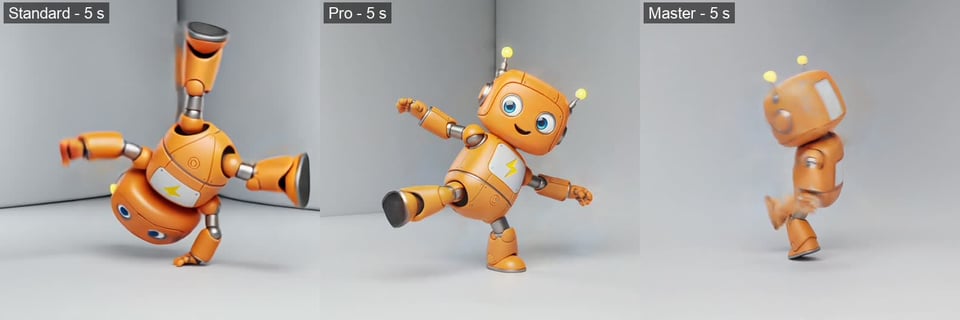
| Standard | Pro | Master | |
|---|---|---|---|
| Text-to-video | No | No | Yes |
| 終了フレーム | No | Yes | No |
| 同じ正方形画像からの出力サイズ(当社テスト) | より小さい(パラメータ表を参照) | Larger | Larger |
| シンプルな動き:手を振る、ゆっくり周回する(当社テスト) | プロンプトどおり | プロンプトどおり | プロンプトどおり |
| ブレイクダンスのプロンプト、5秒時点のフレーム(当社テスト) | Handstand | Mid-kick | 回転の途中、モーションブラーあり |
| LMArenaの画像から動画スコア(2026年9月21日) | 1229±8 | 掲載なし | 1235±8 |
以下の各画像は、2026年10月にKie.aiでKling 2.1を使い、キャプションに記載したプロンプトから生成した1本の動画の3フレーム(開始・中間・終了)を示しています。フレームは生成されたままで、Web用にリサイズのみ行っています。
Kling 2.1 Masterは1文のプロンプトから5秒の横長動画を生成しました。波が黒い火山岩に打ち寄せ、しぶきが低い太陽の光を受け、プロンプトの指示どおりカメラが岩の上を前進します。

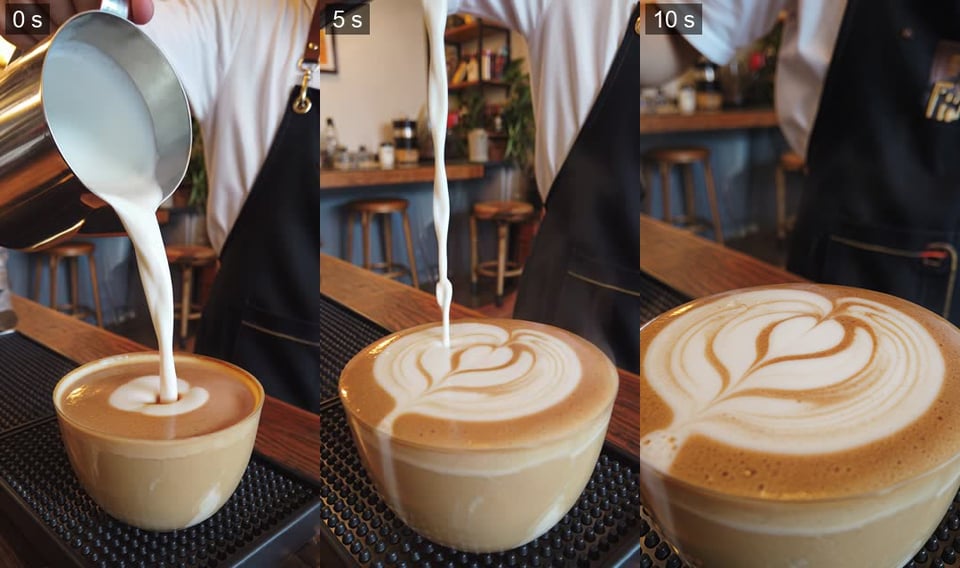
Kling 2.1 Masterによる10秒の縦長動画です。カップにミルクが注がれ、カメラが寄っていく間に表面に層状の模様が現れます。プロンプトではリーフ模様を指定しましたが、結果はチューリップに近いため、こうした細部は要件と照らし合わせて確認してください。
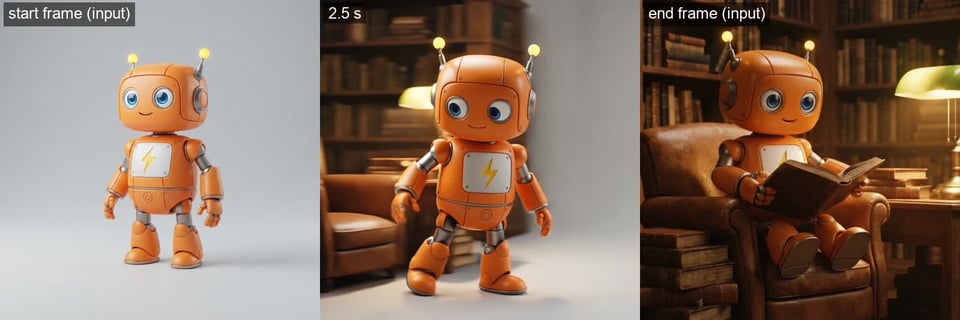
Kling 2.1 Proでは終了画像をオプションで指定できます。無地の背景に立つロボットを開始フレーム、図書館のアームチェアで読書する同じロボットを終了フレームとして渡すと、一方のシーンからもう一方へ歩いて移る5秒の動画を生成し、最後のフレームは終了画像と一致しました。
durationはすべてのモデルで必須で、数値ではなく文字列の"5"または"10"を指定します。
Standard、Pro、Masterの画像から動画モデルはいずれもimage_urlが必要で、生成される動画はその画像の形状に従います。テキストのみで動作するのはkling/v2-1-master-text-to-videoだけで、aspect_ratioを受け付けるのもこのモデルのみです。
Kie.aiでのテスト動画はいずれも音声なしだったため、音楽や効果音は別の工程で追加してください。
image_urlとtail_image_urlには、ファイルの内容ではなくホストされた画像URLを指定します。まだホストされていないファイルは、先にKie.aiのFile Upload API(Base64、ファイルストリーム、リモートURL)でアップロードできます。
Kie.aiマーケットのすべてのモデルは同じ認証方式を使用します。Kie.aiのAPIキー管理ページで取得したキーを、Authorization: Bearer YOUR_API_KEYヘッダーに指定してください。
Kie.aiの新規ユーザーには、テスト用に80の無料クレジットが付与されます。アカウントのクレジット残高は1つで、すべての生成サービスがそこから消費します。残高はGet Remaining Credits APIで確認できます。
Kie.aiはこのモデルをPlayground付きのAPIとして提供しています。ダウンロードやインストールが必要なアプリはありません。管理すべきGPUやモデルの重みもありません。