Automatically append previous messages to maintain multi-turn context. May increase token usage.
How can I help you today?
Affordable Claude Sonnet 4.6 API
Access the Claude Sonnet 4.6 API through Kie.ai at a lower cost. Build coding assistants, autonomous agents, and long-document analysis tools with 1M context window and reliable reasoning.
Core Capabilities of the Claude Sonnet 4.6 API
Advanced Coding and Software Development
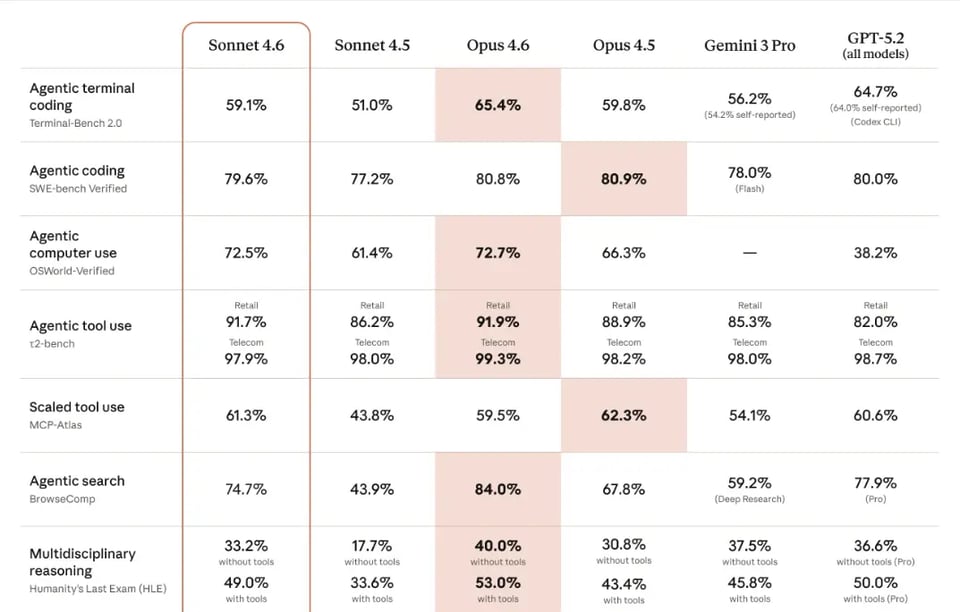
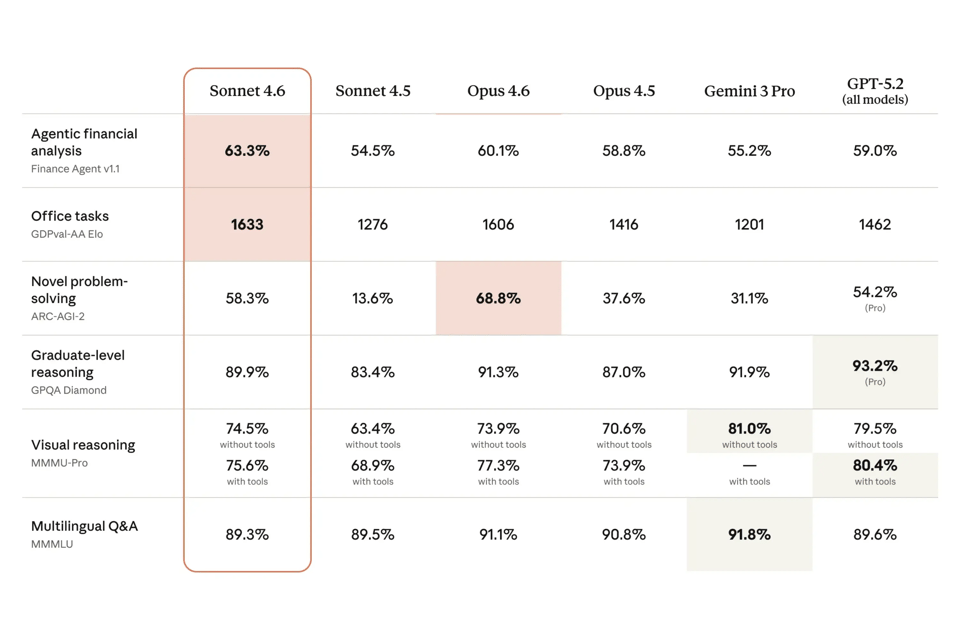
The Claude Sonnet 4.6 API performs strongly in real-world software engineering tasks. It can generate production-ready code, debug complex logic, and refactor large projects with high consistency. The model handles multi-file repositories well and helps reduce overengineering by consolidating shared logic and improving overall code quality.
Agentic Planning for Autonomous Workflows
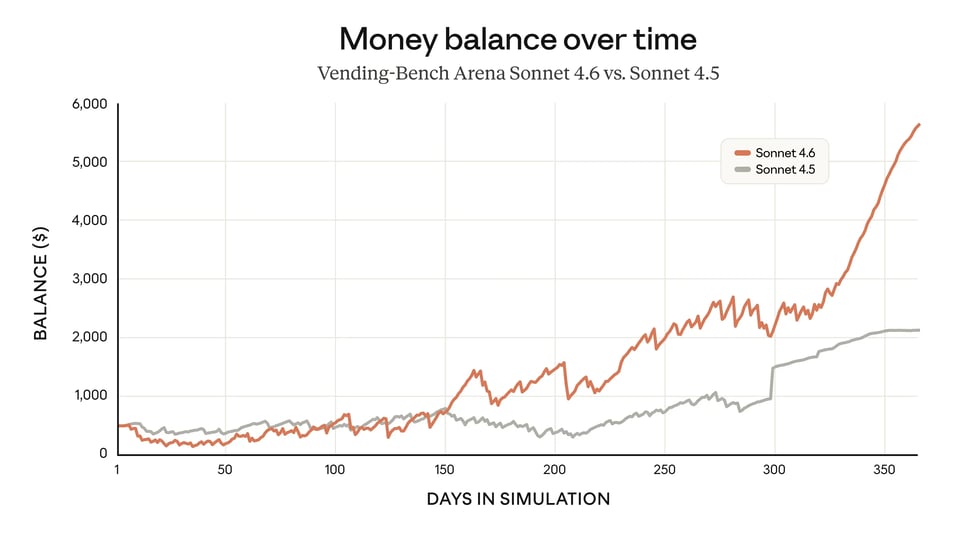
The Claude 4.6 Sonnet API is effective in workflows that require multi-step planning and task coordination. It can manage branched operations such as contract routing, template selection, and CRM updates while adjusting strategies when conditions change. This makes the Claude API suitable for building autonomous agents that handle complex processes with minimal oversight.
Computer Use and Interface-Level Automation
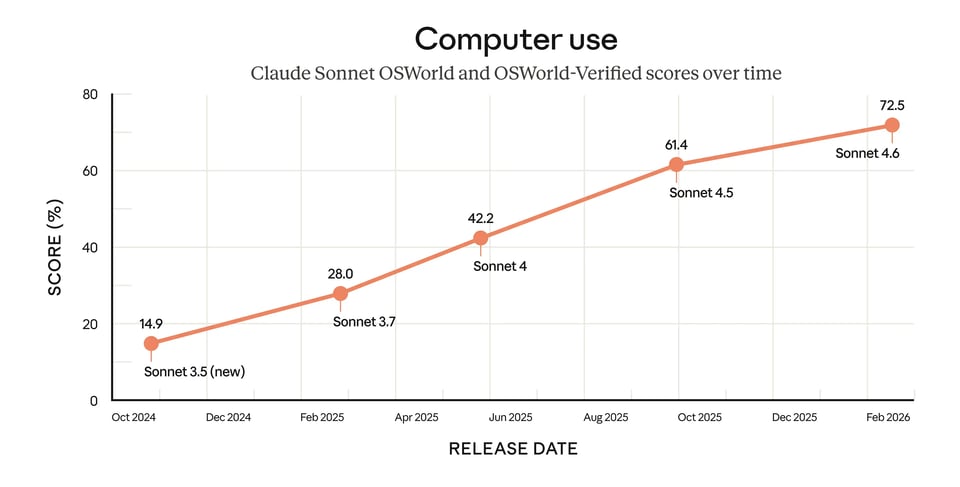
The Claude 4.6 Sonnet API can interact directly with software interfaces by simulating keyboard and mouse actions. It can navigate web pages, complete forms, and operate tools such as spreadsheets. This enables automation of systems that lack traditional endpoints, allowing developers to build workflows that interact with applications the same way users do.
Extended Context Processing for Large Inputs
Managing massive datasets is seamless thanks to the expansive Claude Sonnet 4.6 context window, which supports up to 1 million tokens in beta. Combined with context compaction feature, the Claude 4.6 Sonnet API maintains high recall accuracy while preserving token efficiency during lengthy, data-heavy sessions.
Why Choose Kie.ai for Claude API Access
Lower Cost Access to the Claude Sonnet 4.6 API
Kie.ai provides a cost-efficient way to use the Claude Sonnet 4.6 API through a flexible credit system. Developers can purchase usage credits in advance and manage spending more predictably. Higher-tier top-ups include bonus credits, making it easier for teams to scale applications built on the Claude API while keeping costs under control.
Stable Infrastructure for High-Concurrency Applications
Applications using the Claude 4.6 Sonnet API often need to handle large numbers of requests. Kie.ai is designed to support stable performance under high concurrency, helping maintain consistent response times. This makes it suitable for production environments such as AI agents, SaaS platforms, and developer tools built on the Claude Sonnet 4.6 API.
Clear API Documentation and Developer Support
Kie.ai provides detailed documentation to simplify integration with the Claude Sonnet 4.6 API. Developers can quickly learn how to obtain and configure a Claude Sonnet 4.6 API key, send requests, and integrate the API into their applications. Clear guides and examples help reduce setup time and improve development efficiency.
Practical API Management and Monitoring Tools
Kie.ai includes tools that help teams manage their Claude API usage more effectively. Developers can configure API key controls such as IP whitelists and usage limits, while built-in usage tracking and request logs provide visibility into system activity. API update records also make it easier to monitor changes related to the Claude Sonnet 4.6 API.
How to Integrate Claude 4.6 Sonnet API on Kie.ai
Step 1: Get Your Claude Sonnet 4.6 API Key
Step 2: Send Requests to the Claude API Endpoint
Step 3: Configure Parameters and Process Responses