Click to upload or drag and drop
Supported formats: JPEG, PNG, WEBP Maximum file size: 10MB; Maximum files: 7
Provide one external image URL as a reference for video generation (only one image is supported). This is one of two image input options — you can either upload an external image or specify a task_id + index from a Grok-generated image below. Do not provide both image_urls and task_id at the same time.In your prompt, reference an uploaded image by typing @image(n) followed by a space (for example: @image1 a sunset over the ocean).
Enter the task_id of an image previously generated with the Grok model on Kie. Use it together with the index below to select a specific image from that generation. When using this method, do not provide image_urls. Unlike external images, this method supports Spicy mode.
When using a task_id, specify which image to use (Grok generates 6 images per task). This parameter only works with task_id and is ignored if image_urls is used(0-based).
The text prompt describing the desired video motion
0/5000Note: When generating videos using external image inputs, Spicy mode is not supported and will automatically switch to Normal.
The aspect ratio of the video. This parameter is invalid if it is a single image.
The duration of the generated video in seconds
Resolution of the generated video
A configurable parameter. Defaults to true in the Playground.
Explore different use cases and parameter configurations
The text prompt describing the desired video motion
0/5000Specifies the width-to-height ratio of the generated content. Controls the aspect ratio of the output video.
The duration of the generated video in seconds
Resolution of the generated video
A configurable parameter. Defaults to true in the Playground.
Explore different use cases and parameter configurations
Specifies the width-to-height ratio of the generated content. Controls the aspect ratio of the output image
Toggle for request processing mode. false enables speed mode (prioritizes low latency); true enables quality mode (prioritizes output quality).
A configurable parameter. Defaults to true in the Playground.
A text description specifying the desired content or style of the generated image.
0/390000Click to upload or drag and drop
Supported formats: JPEG, PNG, WEBP Maximum file size: 10MB; Maximum files: 5
An array containing up to 1 URL string pointing to reference images. In your prompt, reference the uploaded image by typing @image(n) followed by a space (for example: @image1 a sunset over the ocean).
A configurable parameter. Defaults to true in the Playground.
Explore different use cases and parameter configurations
supports only Kie AI–generated taskid
The text prompt describing the desired video motion
0/5000Extension start time must be at least 2 seconds.
Extended duration
no output
supports only Kie AI–generated taskid
Resolution for video generation.
no output
README
Complete guide to using grok-imagine/image-to-video
Run Grok Imagine 1.5 API Online for Free on Kie.ai
Access xAI’s Grok Imagine API through Kie.ai with free credits, including latest Grok Imagine 1.5 models featuring faster video generation, improved motion physics, native audio creation, and better speech synchronization.
Grok Imagine 1.5 API Now Available on Kie.ai
Grok Imagine 1.5 API vs Previous Grok Imagine Models
Grok Imagine 1.5 API improves on previous Grok Imagine models with faster generation speeds, more realistic motion, better audio synchronization, and stronger visual consistency. Developers can now access Grok Imagine 1.5 API directly on Kie.ai alongside other leading AI video models. If you're preparing stills before animating them into video here, refine your text-to-image frames with sharper reference-based editing using the Grok Imagine Image 2.0 API first.
What's New and Improved in Grok Imagine 1.5 API
Faster AI Video Generation with Grok Imagine 1.5 API
Grok Imagine 1.5 API delivers significantly faster AI video generation, helping developers create high-quality videos in less time and scale AI video applications more efficiently.
More Realistic Motion Physics in Grok Imagine Video 1.5 API
Grok Imagine Video 1.5 API improves motion consistency, object behavior, and scene dynamics, producing AI videos with more natural movement and fewer visual artifacts.
Native Audio and Speech Generation with Grok Imagine 1.5 AI API
Grok Imagine 1.5 AI API generates video, dialogue, sound effects, and ambient audio in a single workflow, simplifying AI video production and reducing post-processing work. As a practical aside, if you want to sketch out prompts and scene descriptions with advanced reasoning before you generate any visuals, run them through the Grok 4.6 API on Kie.ai first.
Better Lip Sync and Speech Quality for AI Video Generation
XAI Grok Imagine 1.5 enhances speech clarity and synchronization, creating AI videos with more accurate lip movements and natural voice-to-action alignment.
Stronger Character and Visual Consistency in Grok Imagine Video
Grok Imagine Video 1.5 API maintains character appearance, image details, and visual style across scenes, making it ideal for storytelling and branded content.
Higher Productivity for AI Video Development Workflows
Grok Imagine 1.5 API combines faster generation speeds, improved video quality, and integrated audio creation to support more efficient AI video development at scale.
Key Features of Grok Imagine API on Kie.ai
Text-to-Image & Text-to-Video with Grok Video Generator
Use Grok Imagine API to turn text prompts into images or short videos. Enter a description, and Grok Video Generator creates visual content that matches it closely. You can generate realistic motion or stylized visuals for storytelling, research, or design work.
Grok I2V — High-Quality Image-to-Video Animation API
With Grok Imagine API, you can upload an image and transform it into a smooth, animated video. The I2V feature maintains the original look of your image while adding motion and depth. It’s useful for creating short visual sequences or enhancing static designs.
Synchronized Audio + Motion with Grok Video API
Grok Imagine AI API combines visuals with synchronized sound. Every generated video includes background audio that matches the tone and rhythm of the motion. You don’t need separate editing steps, which makes the workflow simple and consistent.
Explore Multiple Modes Including Grok Imagine Spicy Mode
Grok Imagine API includes different generation modes for varied results. You can pick standard modes for everyday visuals or try Grok Imagine Spicy Mode for more expressive or artistic outcomes. Each mode changes how the model interprets prompts, giving you creative control.
Fast & Efficient Generation Powered by Grok Imagine AI API
Grok Imagine API is built for quick response and reliable performance. It generates images and videos in seconds, supporting both text-to-video and image-to-video creation. You can use it directly on Kie.ai to test ideas, create samples, or build real-time applications.
How to Use Grok Imagine API Free on Kie.ai
Step 1: Access Grok Imagine API and Get Free Credits
Step 2: Choose a Mode and Enter Your Prompt
Step 3: Generate and Download Your Results
Grok Imagine 1.5 API vs Veo 3.1 vs Kling 3.0 vs Seedance 2.0
Grok Imagine 1.5 API vs Veo 3.1 API
Veo 3.1 API is widely recognized for premium video quality, cinematic realism, and advanced scene understanding. It is well suited for filmmakers, creative studios, and teams that prioritize visual fidelity over generation speed.
Grok Imagine 1.5 API vs Kling 3.0 API
Kling 3.0 API excels in motion control, camera movement precision, and character consistency across complex scenes. It is a strong choice for AI storytelling, animation, and projects that require detailed control over subject movement.
Grok Imagine 1.5 API vs Seedance 2.0 API
Seedance 2.0 API stands out with multi-shot storytelling, multimodal inputs, native audio generation, and strong character consistency. It supports text, image, video, and audio references, making it suitable for cinematic content and structured video workflows.
Access Grok Imagine 1.5, Veo 3.1, Kling 3.0, and Seedance 2.0 on Kie.ai
Kie.ai provides unified API access to Grok Imagine 1.5 API, Veo 3.1 API, Kling 3.0 API, and Seedance 2.0 API. Developers can compare models, switch providers, and integrate multiple AI video generation APIs through a single platform, reducing development complexity and accelerating deployment.
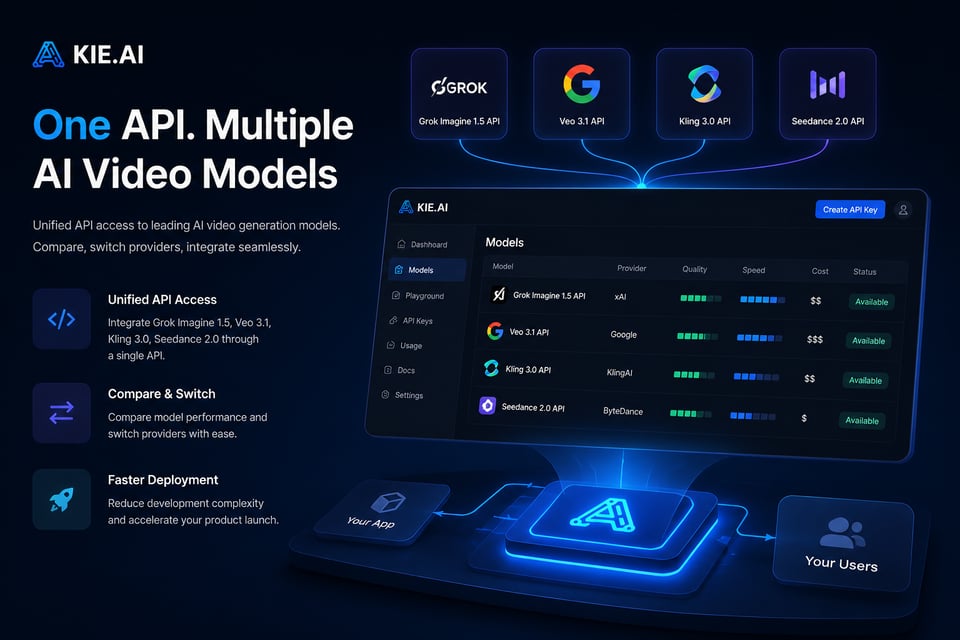
Grok Imagine vs Veo 3.1 vs Sora 2 Comparison
xAI’s Grok Imagine
Grok Imagine is a multimodal video model that generates images and short videos from text or images, with fast output, synchronized audio, and optional Spicy Mode for more expressive visual styles.
Google DeepMind’s Veo 3.1
Veo 3.1 API focuses on high-fidelity video generation with cinematic motion, strong prompt adherence, and precise lip-sync. It supports image-to-video workflows and produces coherent clips suited for creative production.
OpenAI’s Sora 2
Sora 2 API emphasizes realistic motion, complex scene understanding, and controllable long-duration sequences. It supports storyboard workflows, multi-scene continuity, and cameo integration, making it suitable for narrative video generation and detailed creative projects.
Why Choose Kie.ai for Grok Video API Integration?
Free Grok Imagine API Credits for Developers
You can start using Grok Imagine API on Kie.ai with free credits. These credits let you test text-to-image and text-to-video generation without setting up billing. It’s a simple way to check output quality, speed, and compatibility before adding the API to your workflow.
Real-Time Support for Grok Imagine v0.9 and Future Updates
Kie.ai supports Grok Imagine v0.9 and updates automatically when new versions are released. You always have access to the latest model improvements, including faster response times, higher visual quality, and better video generation stability.
All APIs in One Place with Grok Video API Integration
Kie.ai brings Grok Video API together with other AI models in one dashboard. You can manage text-to-video, image-to-video, and audio-generation endpoints from the same place, making it easier to combine multiple tools and build complete creative workflows.
Practical Use Cases of Grok Imagine API
Social Media Video Generation with Grok Video API
Create short, shareable videos for platforms like Instagram, TikTok, and X using Grok Imagine API. The system turns simple text or image prompts into motion clips with synchronized audio, making it easy to produce engaging visual content quickly.
App and Website Integration with Grok Imagine AI API
Embed Grok Imagine AI API into apps or websites to generate real-time visuals. Developers use it for dynamic banners, preview animations, and background videos that adapt to user input, improving both creativity and interaction inside digital products.
Image-to-Video Animation with Grok I2V API
Use Grok Imagine I2V (Image-to-Video) API to animate still images smoothly. It adds realistic motion, perspective, and lighting transitions while keeping the original composition intact. This feature works well for turning concept art, product photos, or character designs into short animated clips.
Creative Exploration with Grok Imagine Spicy Mode
Explore different visual styles and tones with Grok Imagine AI API, which includes creative options like Spicy Mode. Artists and designers use it to experiment with storytelling, color palettes, and motion, producing expressive or abstract results for digital art, character studies, and visual design research.