
OpenAI API: GPT Chat, GPT Image and Codex Models with One API Key
Use GPT chat models for reasoning, coding and agents, GPT Image for image generation and editing, and Codex for code tasks — all through one Kie AI API key with pay-as-you-go billing.
Reasoning, coding and agent workflows with adjustable reasoning effort.
Image generation and editing with GPT Image.
All OpenAI API models on Kie AI
This table updates automatically as new OpenAI models launch and are priced on Kie AI.
Explore all AI models on Kie AI →
| Model | Type | Launched | Price | Official price | Status |
|---|---|---|---|---|---|
| GPT 6.1 Sol | Chat | Sep 2026 | $0.6 / $3 per 1M tokens | $2 / $10 | Latest |
| GPT-6 Sol and Luna | Chat | Sep 2026 | $0.03 / $0.15 per 1M tokens | $0.10 / $0.50 | Available |
| GPT-6 Astra | Chat | Sep 2026 | $2.80 / $14.00 per 1M tokens | $10.00 / $50.00 | Available |
| GPT-5.6 | Chat | Jul 2026 | $0.56 / $3.36 per 1M tokens | $2 / $12 | Available |
| GPT-5.5 | Chat | Apr 2026 | $1.4 / $8.4 per 1M tokens | $5 / $30 | Available |
| OpenAI Codex | Chat | Mar 2026 | See pricing | Available | |
| GPT-5.2 | Chat | Feb 2026 | $0.44 / $3.5 per 1M tokens | $1.75 / $14 | Available |
| GPT Image 2.5 | Text to Image · Image to Image · Image Editing | Sep 2026 | from $0.03 per image | Latest | |
| GPT Image 2 | Text to Image · Image to Image | Apr 2026 | from $0.03 per image | $0.219 | Available |
| gpt-image-1.5 | Text to Image · Image to Image | Dec 2025 | from $0.02 per image | $0.034 | Available |
| 4o Image | Text to Image · Image to Image | Oct 2025 | See pricing | Available |
GPT Chat API on Kie AI
Kie AI serves GPT chat models and Codex through one API key. Here is what the GPT chat API supports today, based on the Kie AI API documentation.
OpenAI Responses–Compatible Endpoint
Send requests to POST https://api.kie.ai/codex/v1/responses with the model ID from the table above, such as gpt-6-1-sol. The endpoint follows the OpenAI Responses format, including response.* streaming events, and Codex uses the same endpoint; check the Kie AI API docs for the supported request fields.
Adjustable Reasoning Effort
Choose low, medium, high, xhigh or max reasoning effort to balance speed, depth and cost for each request.
Web Search or Function Calling, Plus Structured Output
Give the model built-in web search for up-to-date information, or your own function tools for agent workflows (one or the other per request), and request JSON-schema output in strict mode when your app needs parseable responses.
Text, Image and File Inputs
Combine text, images and files in a single message. GPT 6.1 Sol has a 1,050,000-token context window.
OpenAI API Models Available on Kie.ai
OpenAI Text Reasoning & GPT APIs
OpenAI Text Reasoning APIs support core text and conversational processing workflows such as multi-step algorithmic reasoning, deep document analysis, structural data extraction, and low-latency message routing. On Kie.ai, models such as GPT-5.5 API, GPT-5.4 API and GPT-5.2 API can be positioned for real-time conversational SaaS products, autonomous agent backends, enterprise data evaluation systems, and automated customer communication pipelines.
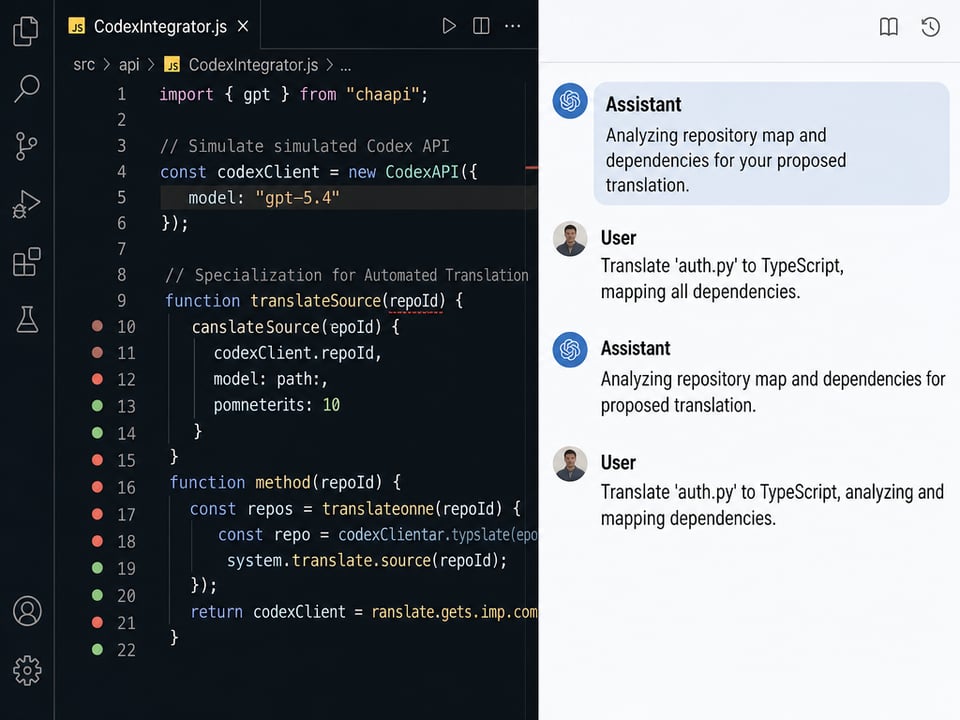
OpenAI Codex APIs for Code Automation
OpenAI Codex APIs focus on programmatic automation workflows, using advanced context understanding to guide source language translation, repository architecture mapping, inline syntax validation, and real-time error diagnostics. On Kie.ai, models such as GPT-5.4 Codex API、GPT-5.3 Codex API and GPT-5 Codex API can support automated enterprise codebase refactoring, IDE plugin features, continuous integration debugging tools, and engineering productivity dashboards.
ChatGPT Image Generation APIs
ChatGPT Image Generation APIs are built for visual asset creation and graphic modification from text or reference inputs, supporting high-resolution image synthesis, multi-object rendering, mask-based localized inpainting, and precise text design integration. On Kie.ai, models such as GPT-Image 2 API, OpenAI GPT Image 1.5 API, and ChatGPT 4o Image Generation API can be positioned for commercial graphic tools, automated e-commerce product listings, social marketing variations, and programmatic design platforms.
Advanced ChatGPT API Functional Features on Kie.ai
Unified OpenAI API Access for Text, Code, and Image Models
Access multiple OpenAI API models through one centralized platform. Use ChatGPT image generation APIs, OpenAI text reasoning interfaces, and specialized Codex automation tools together without managing separate provider accounts or fragmented development workflows.

Flexible OpenAI API Selection for Different Product Workloads
Choose the exact OpenAI API channel required for each specific runtime task. Deploy lightweight, cost-optimized models like GPT-5.2 for maximum system speed, shift to advanced reasoning options like GPT-5.5 for deep processing.

Multimodal Input and Output Support with the GPT API
Process text instructions, uploaded images, and structural reference data through a unified GPT API workflow. Build software applications that can simultaneously interpret visual content, process logical reasoning paths, and generate targeted media outputs within a single AI system.
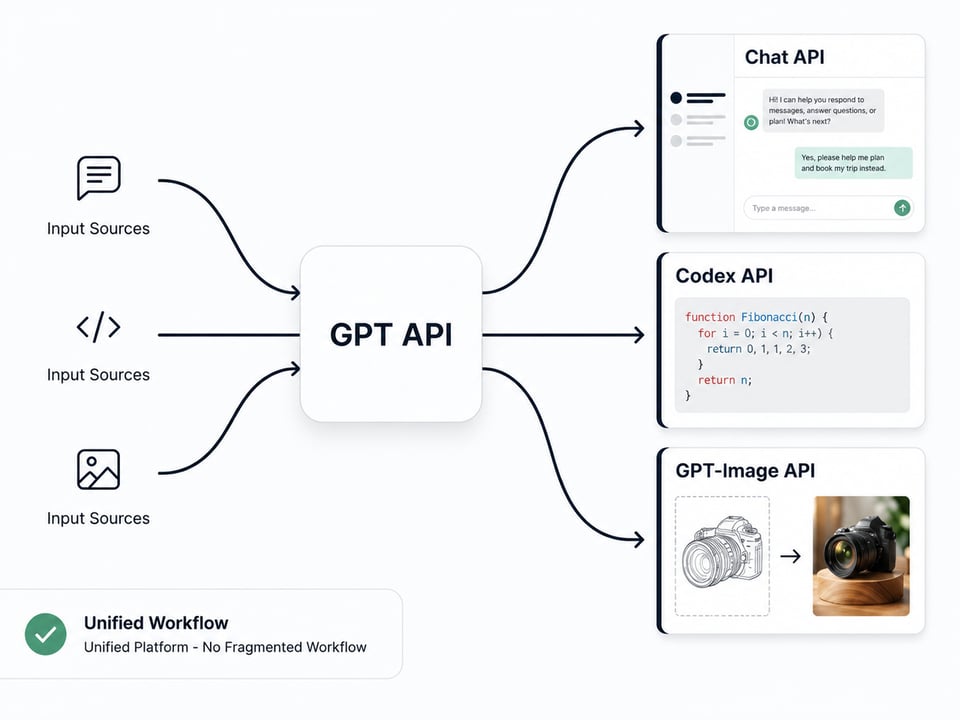
Stable Throughput and Performance for Scalable ChatGPT API Applications
Build customer-facing products and automated pipelines that demand highly responsive performance and reliable scaling. The platform's optimization framework supports fast data interactions and stable workflows across parallel chat, code execution, and bulk image generation requests.
Why Developers Choose Kie.ai for OpenAI API Access
Free Trial Credits for Early Workflow Evaluation
Eliminate initial cost barriers during software prototyping and early system architecture testing. New developer logs receive complimentary, risk-free trial credits to validate request parameters and evaluate endpoint latency boundaries.
Affordable OpenAI API Pricing for Scalable SaaS Products
Maintain healthy software operational margins through a highly competitive, credit-based billing metrics structure. The system ensures predictable development forecasting and cost-efficient scaling across high-frequency processing pipelines.
Continuously Updated OpenAI Model Library for New AI Capabilities
Access an evolving OpenAI API ecosystem through regularly updated models on the platform marketplace. New ChatGPT API versions, specialized Codex automation channels, and advanced visual asset generation upgrades are added continuously to help development teams stay current.
Continuous 24/7 Technical Support for Production Workflows
Secure constant system reliability and high availability for customer-facing commercial applications across global time zones. Technical engineering teams monitor infrastructure health 24/7 and provide responsive integration assistance for active deployment challenges.
Enterprise Workflows Powered by ChatGPT API Integration
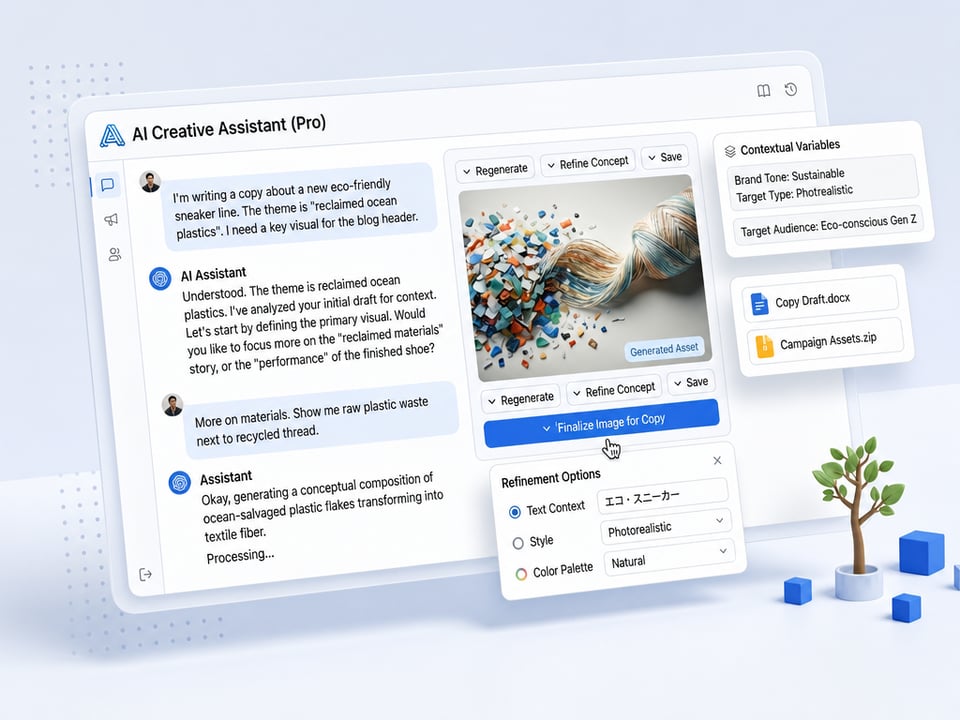
Build Conversational Platforms and Intelligent AI Agents
Deploy advanced conversational models like GPT-5.5 and GPT-5.4 to power customer-facing virtual assistants, interactive tutoring software, and domain-specific advisory systems. The interface handles multi-turn dialogue trees and complex contextual variables, allowing platforms to deliver precise, automated user communications at enterprise scale.
Develop Software Engineering and Automated Coding Tools
Integrate specialized programming interfaces like the GPT-5.4 Codex API into development pipelines, IDE extensions, and continuous deployment environments. The backend infrastructure supports programmatic source language translation, syntax validation routines, repository mapping, and automated error diagnostics to optimize internal engineering productivity.
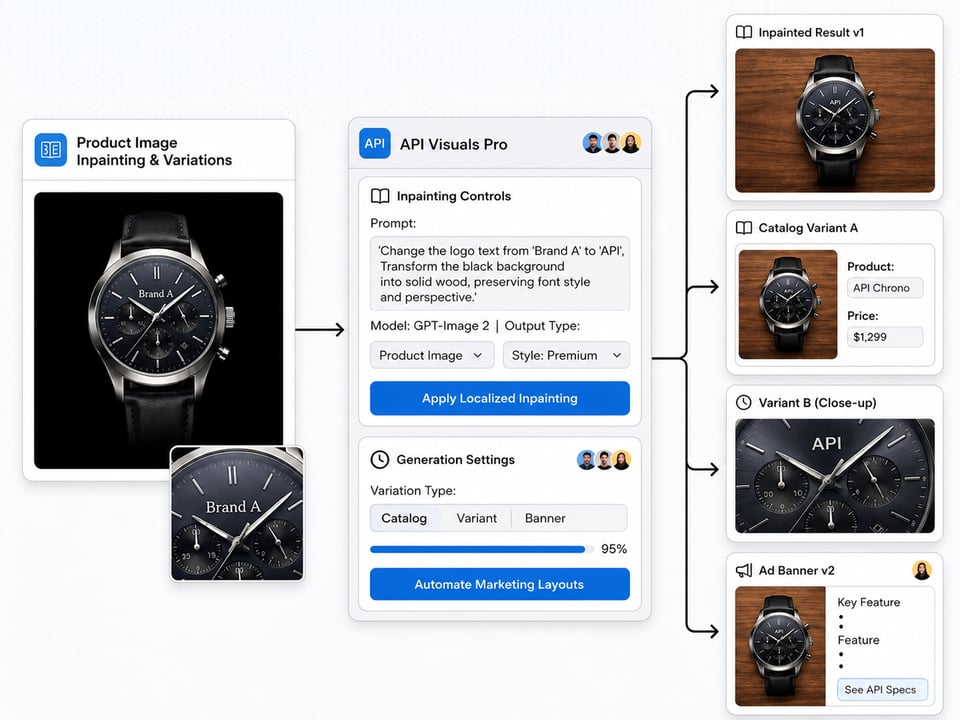
Scale Commercial Graphic Design and Marketing SaaS Products
Embed high-fidelity visual generation models like GPT-Image 2 into e-commerce management tools, ad asset generators, and creative design platforms. Software tools can leverage text-to-image conversion and precision mask-based localized inpainting to produce brand-aligned product catalogs, marketing layout variations, and digital artwork variations automatically.
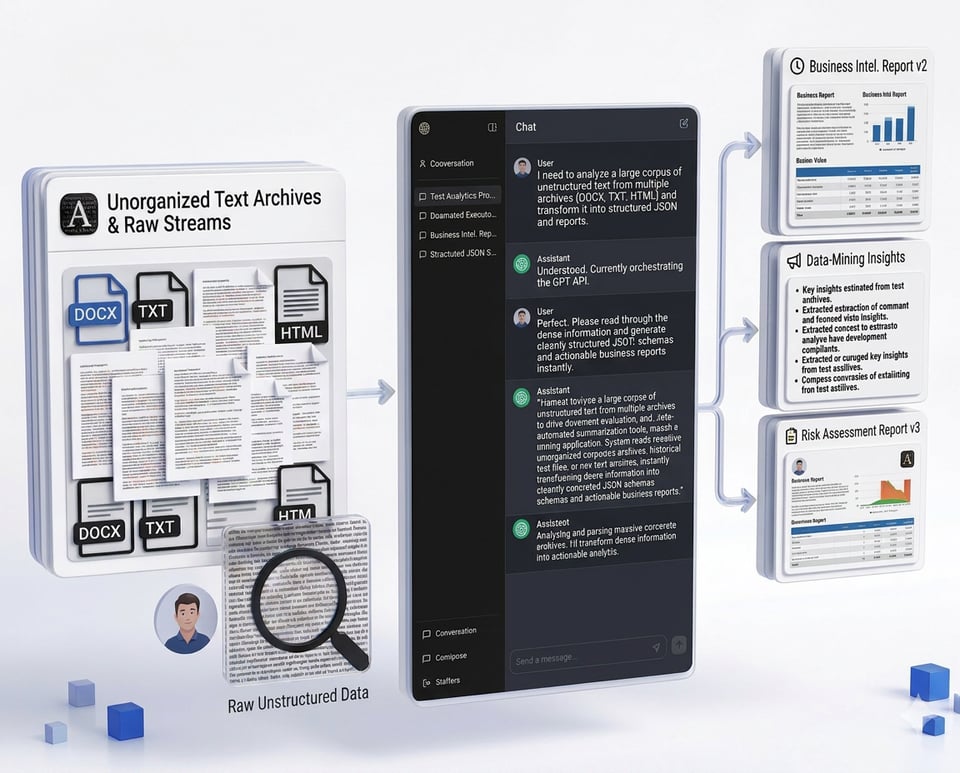
Automate Structural Text Analytics and Long-Document Parsing
Harness large-context processing channels to drive document evaluation pipelines, automated summarization tools, and data-mining applications. The system reads through massive unorganized corporate archives, historical text files, or raw text streams, instantly transforming dense information into cleanly structured JSON schemas and actionable business reports.
Frequently Asked Questions About Kie.ai OpenAI API
Which OpenAI model should I use on Kie AI?
For chat, reasoning, coding and agents, use the GPT chat model marked "Latest" in the table above; older GPT versions remain available for existing integrations. For image generation and editing, use GPT Image, and for code tasks, Codex. The table updates automatically when new models launch.
How much does the OpenAI API cost on Kie AI?
GPT chat models are billed per million input and output tokens, and GPT Image per image. Current prices are listed in the table above. You pay as you go with credits, with no subscription.
Do I need an OpenAI account to use these models?
No. Create a Kie AI account and generate a key on the API Keys page; one Kie AI key works for every OpenAI model on Kie AI.
Which models are best for reasoning versus cost-optimized text tasks?
Deploy the flagship GPT-5.5 API for complex multi-step logic. For high-volume chat and bulk data sorting, use the GPT-5.4 API or GPT-5.2 to minimize platform expenses.
Is free trial credit available for developer testing before deployment?
Yes. New developer accounts receive complimentary credits automatically to test endpoint latency, verify payload JSON formatting, and evaluate model configurations within the online Playground before launching production pipelines.
Where is live pricing and technical parameter data updated?
All live technical documentation, parameter variables, supported file types, and credit pricing structures are published directly inside the Model Market on Kie.ai, updating continuously alongside new model rollouts.
How do the GPT-5.5 API process autonomous workflows?
The GPT-5.5 tier operates as an autonomous reasoning engine across 1-million-token contexts. The model independently maps tool execution chains, validates intermediate logic, and self-corrects runtime errors based on broad target objectives.
How do Codex APIs handle repository-scale code automation?
Unlike standard tools restricted to code snippets, the GPT-5.4 Codex API ingests entire software repositories simultaneously to map complex architectures, execute programming language translations, and run automated codebase refactoring loops.
What are the main graphic design advantages of GPT-Image 2?
The GPT-Image 2 API delivers precise multi-subject composition and embeds sharp, legible text directly into generated images. This eliminates the blurred lettering common in older frameworks, securing production-ready e-commerce graphics.