
Die MiniMax Hailuo API unterstützt sowohl die Text-zu-Video- als auch die Bild-zu-Video-Generierung, wodurch Nutzer flexibel mit verschiedenen kreativen Aufgaben starten können. Ein Prompt kann bereits am Anfang die Szenenlogik, das Verhalten der Figuren, die Kamerarsprache, die Beleuchtung, die Stimmung und den visuellen Stil festlegen. Eine Bild-Eingabe hingegen bewahrt den ursprünglichen Gegenstand, die Komposition oder die künstlerische Richtung und erweitert diese in Bewegung. Damit eignet sich die Hailuo API besonders zur Erstellung origineller Szenen sowie zur Animation bestehender Inhalte wie Produktbilder, Charakterporträts, Konzeptkunst oder Kampagnenvisuals.
Image to VideoText to VideoVideo to Video
Seedance2.5
Seedance 2.5 on KIE is ByteDance’s upgraded AI video model, built for longer, more controllable video generation. It supports up to 30-second videos, multimodal references, precise editing, and improved consistency for more cinematic and production-ready creative workflows.
Text to Video
Wan 3.0
Wan3.0 is Alibaba’s next-generation all-in-one video generation model built for multimodal creation. It supports text, image, video, audio, and structured references to produce more consistent, realistic, and controllable video content with enhanced storytelling and editing capabilities.
Image to VideoText to VideoVideo to Video
Seedance 2
Seedance 2.0 on KIE is a multimodal Al video model by ByteDance, optimized for fast and realistic video generation. It supports high-quality virtual human video creation with strong multi-shot consistency, enabling more lifelike and cinematic outputs across scenes.
Text to ImageImage to Image
GPT Image 2
GPT Image 2 is OpenAI’s next-gen image model built for stronger photorealism, cleaner image editing, sharper text rendering, and more polished product photography. Designed for more advanced visual workflows, it pushes image generation beyond basic text-to-image output and into higher-quality creative, commercial, and design-ready use cases.
Text to ImageImage to Image
Nano Banana 2
Meet Nano Banana 2, Google’s Gemini 3.1 Flash Image model, now available via Kie AI API. Built for developers, it combines lightning-fast speed with Pro-level quality, accurate text rendering, strong character consistency, and scalable image generation and editing workflows.
Chat
Grok 4.6
Grok 4.6 is xAI’s latest frontier AI model, designed to enhance long-running agents, advanced reasoning, coding intelligence, and interactive AI experiences. Building on Grok 4.5, it delivers improved performance for complex multi-step tasks, knowledge work, software engineering, and creative applications.
Alle Modelle
3 Modelle gefunden3 MODELS
Anbieter(1/27)
Aufgaben(15)
Hailuo
Hailuo
MiniMax H3 (Hailuo-03)
Text to VideoImage to Video
Hailuo
Hailuo
Hailuo 2.3
starting from
$0.15-20%
30 Credits/6s
Text to VideoImage to Video
Hailuo
Hailuo 2.3
Hailuo 2.3 is MiniMax’s high-fidelity AI video generation model designed to create realistic motion, expressive characters, and cinematic visuals. It supports both text-to-video and image-to-video, handling complex movements, lighting changes, and detailed facial expressions with stability and consistency.
KI-Videoerstellung mit dynamischen Effekten durch mehrere MiniMax Hailuo API-Modelle
Nutzen Sie die MiniMax Hailuo 02 und Hailuo 2.3 auf Kie.ai, um Textanfragen und Bilder in dynamische Kurzvideos mit natürlicher Bewegung, kinospezifischem Stil und flexibler kreativer Steuerung umzuwandeln.
Hauptfunktionen des Hailuo AI API für die KI-Videoerstellung
Bewegungskohärenz durch die Hailuo 02 API
Die Hailuo 02 API ist besonders geeignet für Videos, bei denen die Bewegung einen starken visuellen Eindruck machen soll. Sie kann sichtbare Bewegungen von Figuren, Objektaktionen, kamerabetriebene Übergänge sowie Kurzform-Szenen mit klarer Richtung und Rhythmus verarbeiten. Im Gegensatz zu einer Animation, die nur eine minimale Bewegung zu einem stillen Bild hinzufügt, sorgt die Hailuo 02 dafür, dass die Bewegung natürlicher mit dem Subjekt, der Umgebung und dem gewünschten Szenenfluss verbunden wirkt.
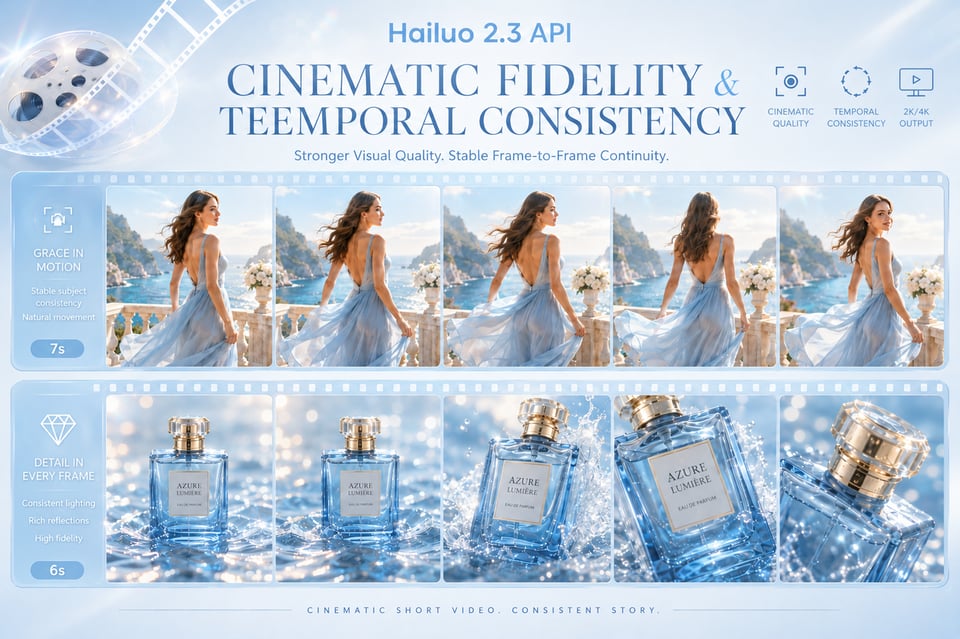
Kinoqualität und zeitliche Konsistenz in der Hailuo 2.3-API
Hailuo 2.3 API ist für Videos konzipiert, die eine höhere Bildqualität und stabilere Bildwechsel benötigen. Es liefert detailliertere Beleuchtung, flüssigere Szenenbewegung, feinere Charakterdarstellung sowie bessere zeitliche Konsistenz über den gesamten Clip hinweg. Dadurch eignet es sich besonders für kinoähnliche Erzählung, Produktfilme, Modevisuals, Branding-Videos und andere Kurzvideos, bei denen Atmosphäre, Realismus und Kontinuität genauso wichtig sind wie Bewegung.
So nutzen Sie die Hailuo API für die Video-Generierung auf Kie.ai
Schritt 1: Holen Sie sich Ihren Hailuo API-Schlüssel auf Kie.ai
Erstellen Sie ein Konto auf Kie.ai und generieren Sie Ihren API-Schlüssel über das Dashboard. Dieser Schlüssel dient zur Authentifizierung Ihrer Hailuo API-Anfragen und verbindet Ihre Anwendung mit den verfügbaren MiniMax Hailuo API-Modellen. Bevor Sie eine Produktionsumgebung aufbauen, konsultieren Sie die aktuelle Kie.ai API-Dokumentation für aktuelle Modellnamen, Anfrageparameter, unterstützte Eingaben, Auflösungsoptionen, Dauerlimits, Preisgestaltung und Callback-Einstellungen.
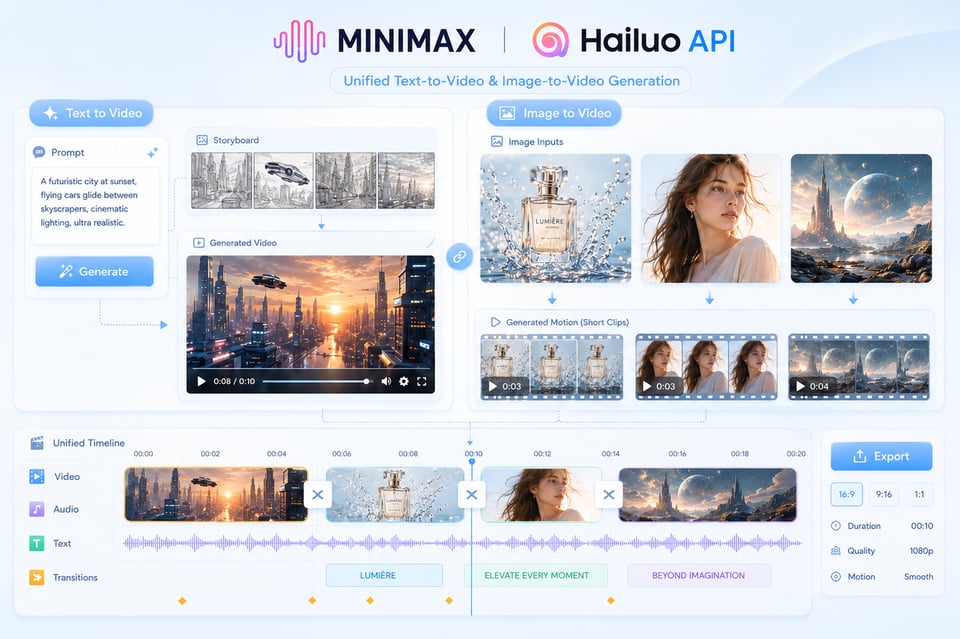
Schritt 2: Testen Sie das Hailuo AI API mit Text- oder Bild-Eingaben
Testen Sie die Hailuo 02 und Hailuo 2.3 in der Kie.ai Playground oder der API-Testumgebung, um zu sehen, wie sie auf verschiedene Video-Aufgaben reagieren. Sie können mit einem Text-Prompt für die Text-zu-Video-Generierung beginnen oder ein Bild zur Bild-zu-Video-Animation bereitstellen. In diesem Schritt können Sie die Szenenbeschreibung, die Handlung des Subjekts, die Kamerarsprache, den visuellen Stil, das Seitenverhältnis, die Dauer und die Auflösung fein abstimmen, damit die Ausrichtung des Ergebnisses klar ist, bevor Sie es integrieren.
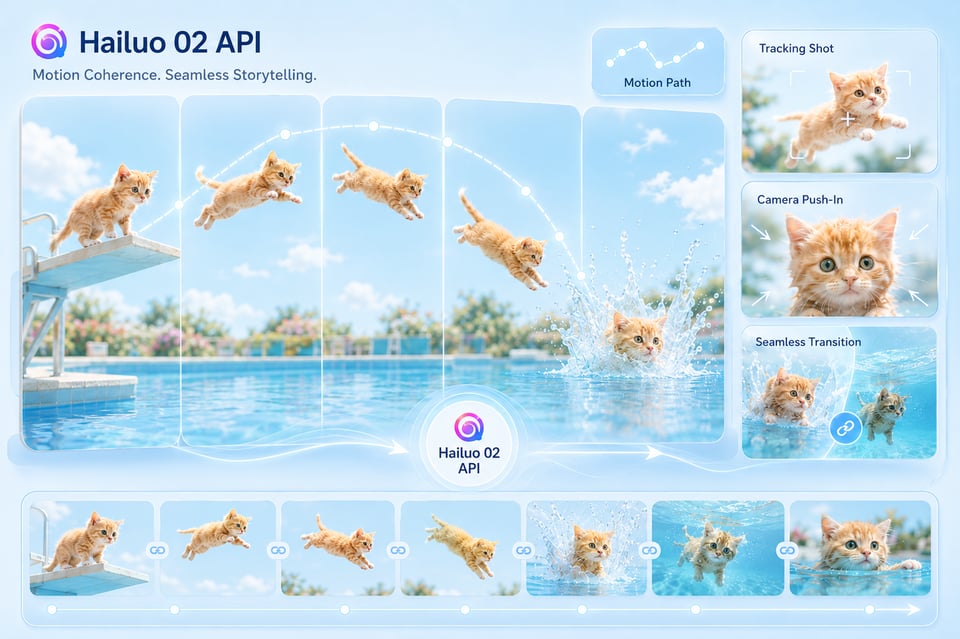
Schritt 3: Erstellen Sie eine Video-Aufgabe und holen Sie sich das Ergebnis ab
Senden Sie eine Video-Generierungsanfrage über die Hailuo API, inklusive des ausgewählten Modells, des Prompts, der Bild-URL (falls erforderlich) und anderer Parameter. Nach Erstellung der Aufgabe können Sie die zurückgegebene Task-ID verwenden, um den Generierungsstatus abzufragen. Alternativ können Sie eine Callback-URL konfigurieren, um das Ergebnis automatisch zu erhalten, sobald das Video fertiggestellt ist. Sobald der Prozess abgeschlossen ist, liefert die API die URL des generierten Videos zur Vorschau, zum Download, Speicherung oder Integration in Ihren Produktworkflow.
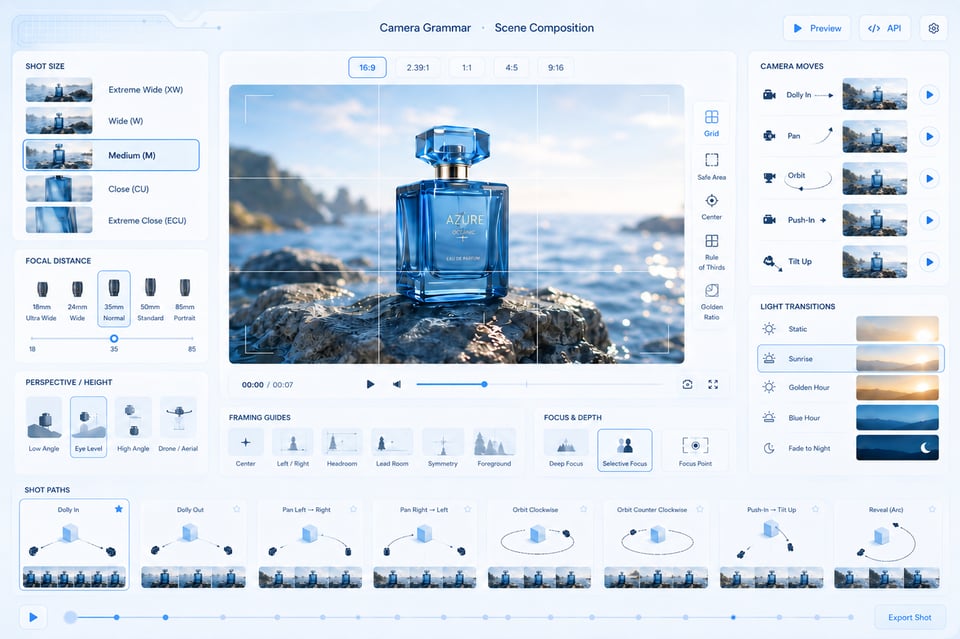
Camera Grammar and Scene Composition with Hailuo AI Video API
Hailuo AI Video API can interpret camera and scene instructions in a more structured way, helping users guide not only what appears in the frame, but how the shot unfolds. Prompts can describe camera movement, focal distance, subject framing, perspective shifts, lighting transitions, and pacing, so the final clip feels closer to a composed video sequence rather than a random motion effect. This is useful for product reveals, character close-ups, dynamic scene openings, and cinematic social clips.
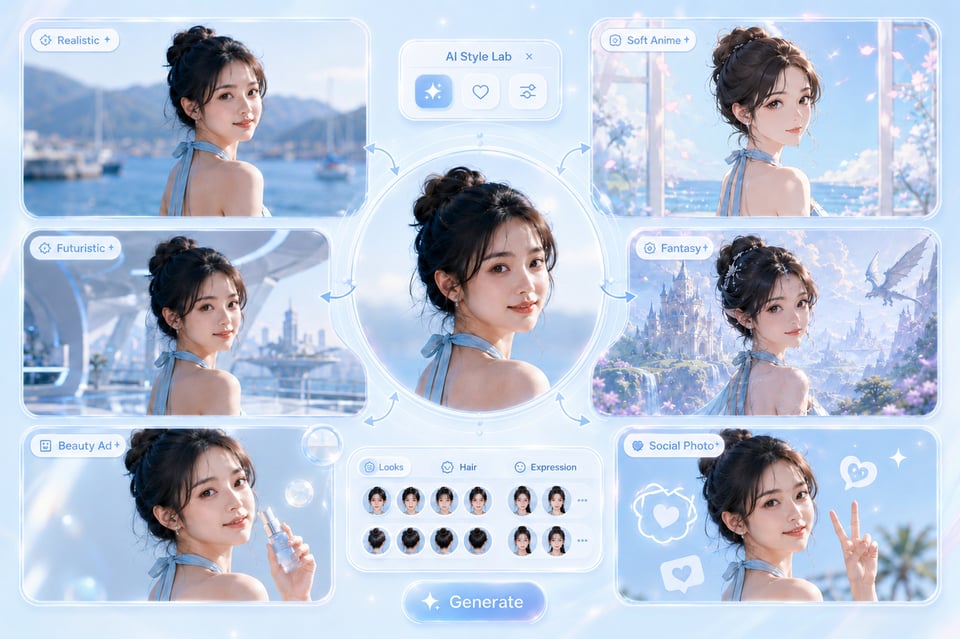
Style Fidelity and Subject Preservation Across Hailuo AI API Outputs
Hailuo AI API can work across realistic footage, anime-inspired visuals, CGI-style scenes, fantasy worlds, commercial product shots, and stylized social content while keeping the output visually coherent. The key value is not only style variety, but also subject preservation, composition stability, and motion consistency across frames. This helps reduce the drifting details, unstable identities, and broken visual continuity that often weaken AI-generated video.
Erstellen Sie mehr sehenswürdige KI-Video-Momente mit der MiniMax Hailuo API
01
Viral-Bewegungsvideos mit Tieren mit der Hailuo 02 API
Die Hailuo 02 API eignet sich besonders für kurze, unterhaltsame Videos, in denen Tiere unerwartete Aktionen durchführen – zum Beispiel eine Katze, die von einer Plattform springt, ein Hund, der durch den Schnee skifährt, oder ein kleines Tier, das durch eine dramatische Sport-Szene bewegt.
02
Bild-zu-Video: Charaktermomente mit der MiniMax Hailuo API
Die MiniMax Hailuo API kann ein Charakterporträt, einen Avatar, einen Mode-Shot oder eine illustrierte Figur in eine kurze, expressive Szene verwandeln. Anstatt nur grundlegende Bewegung hinzuzufügen, können Bilder durch Gesten, Mimik, Kamerabewegungen, Lichtwechsel oder Umgebungsatmosphäre ergänzt werden. Dies macht sie ideal für Creator-Avatare, fiktive Charaktere, Anime-Stil-Szenen, kurze Dramaschnitte und visuelle Erzählungsclips, die für schnelles Scrollen konzipiert sind.
03
Kinoähnliche Produktreveal-Videos mit der Hailuo AI Video API
Die Hailuo AI Video API kann kurze, produktzentrierte Clips erstellen, bei denen der Wert aus der Kamerapraxis und nicht aus einem statischen Produktbild entsteht. Ein Prompt kann eine langsamer Zoom in die Produktansicht (Push-in), eine Drehung, eine Makroaufnahme, einen Flüssigkeitsspritzeffekt, einen Lichtwechsel oder ein Premium-Commerce-Setup beschreiben – alles, um einen Produkt-Visual-Effekt zu erzeugen, der wie ein professioneller Launch-Teaser oder Werbecontent wirkt. Besonders nützlich, wenn ein statisches Bild in ein Video umgewandelt werden soll, das das Scrollen aufhält.
So erreichen Sie bessere Video-Ergebnisse mit Hailuo API-Prompts
Bauen Sie die Szene um eine eindeutige visuelle Aktion herum
Ein starkes Hailuo API-Video beginnt oft mit einer klaren Bewegung. Anstatt mehrere Ereignisse gleichzeitig zu fordern, konzentrieren Sie sich auf eine einzelne, leicht verständliche Bewegung – wie zum Beispiel ein Charakter sich dreht, eine Katze ins Wasser springt, ein Produkt unter Studio-Licht rotiert oder eine Kamera langsam in eine künstlerische Szene einfährt. Dies gibt dem Modell einen klaren Bewegungsziel und sorgt dafür, dass das Endvideo bewusster und gezielter wirkt.
Verwenden Sie die Hailuo 02 API für bewegungsbasierte Video-Ideen
Die Hailuo 02 API ist besser für Videos geeignet, bei denen Bewegung der Hauptfokus ist. Sie eignet sich gut für Tieraktionen, Sport-Szenen, spielerische Bewegungen, Objektanimation, Charakterbewegungen oder kurze Social-Media-Videos, bei denen der Zuschauer sofort die Handlung versteht. Die Eingaben sollten den Gegenstand, die Bewegung und die Umgebung klar beschreiben, damit das Modell einen Clip auf Basis sichtbarer Bewegung statt auf Basis einer vagen Atmosphäre generieren kann.
Wählen Sie die Hailuo 2.3 API für noch cinematiscere Szenen
Die Hailuo 2.3 API ist besonders geeignet, wenn das Video auf Atmosphäre, Realismus, Beleuchtung, Charakterdetails und visuelle Kontinuität setzt. Sie ist ideal für dramatische Porträts, Fantasy-Szenen, Produktreveal, Mode-Visuals, kurze Erzählmomente und Clips, die einen professionellen, filmähnlichen Finish benötigen. Bei der Nutzung der Hailuo 2.3 API sollten Ihre Eingaben nicht nur den Gegenstand, sondern auch Stimmung, Kamerarsprache, Beleuchtung und Szenenzusammenstellung enthalten.
Halten Sie die Image-to-Video-Prompts eng am Ursprungsbild orientiert
Bei der Verwendung der MiniMax Hailuo API für Image-to-Video-Generierung sollte das Bild den Gegenstand, die Zusammensetzung, die Kleidung, die Produktform oder die künstlerische Richtung bestimmen. Die Eingabe sollte hauptsächlich beschreiben, wie sich das Bild bewegen soll – z. B. langsamer Zoom, Haar- oder Stoffbewegung, Gesichtsausdruck, Hintergrundatmosphäre, Kamerabewegung oder Produktrotation. Wenn der Prompt stark vom Bild abweicht, kann das Video an Identität, Struktur oder visueller Konsistenz verlieren.
Warum sollte man Kie.ai für die Implementierung der Hailuo API wählen?
Unterstützung mehrerer Hailuo API-Modelle von MiniMax auf einer Plattform
Kostengünstige Hailuo API-Preise zum Testen und Skalieren
Vollständige Hailuo AI API-Dokumentation für schnellere Bereitstellung
24/7 Hailuo AI Video API-Service und Support
Add Camera Language to Make the Clip Feel Directed
Why Choose Kie.ai to Deploy Hailuo API
Multiple MiniMax Hailuo API Models in One Platform
Kie.ai brings Hailuo 02 API and Hailuo 2.3 API together in one platform, making it easier to choose the right model for different video generation needs. Users can work with motion-led clips, image-to-video animation, cinematic scenes, and higher-fidelity outputs without switching between separate tools or managing different model setups.
Affordable Hailuo API Pricing for Testing and Scale
Kie.ai offers a flexible way to use Hailuo API across early testing, creative iteration, and larger generation needs. Teams can compare outputs across Hailuo models, control usage based on project volume, and scale video generation without a heavy upfront commitment.
Complete Hailuo AI API Documentation for Faster Deployment
Kie.ai provides clear Hailuo AI API documentation to support model selection, input setup, request structure, task creation, result retrieval, callback usage, and integration details. Since model availability, parameters, duration options, resolutions, and pricing may change over time, users should always check the latest documentation before deployment.
24/7 Hailuo AI Video API Service and Support
Kie.ai provides 24/7 Hailuo AI Video API service support for users running video generation in real products, creative tools, automation systems, or content platforms. Continuous support helps with API usage, task tracking, callback handling, generation issues, and other production questions that may appear after deployment.
Frequently Asked Questions About Hailuo API
1
What is Hailuo API?
Hailuo API is an AI video generation API based on MiniMax Hailuo models. It can be used to create short videos from text prompts or image inputs, making it suitable for text-to-video generation, image-to-video animation, motion-heavy clips, cinematic scenes, product visuals, character moments, and other AI video creation tasks.
2
Does Kie.ai support MiniMax Hailuo API?
Yes. Kie.ai supports MiniMax Hailuo API models, including Hailuo 02 API and Hailuo 2.3 API. Users can test different Hailuo models, compare video results, and deploy Hailuo API for AI video generation through Kie.ai. Available models and parameters may change over time, so always refer to the latest Kie.ai API documentation before integration.
3
What is the difference between Hailuo 02 API and Hailuo 2.3 API?
Hailuo 02 API is better suited for motion-focused short videos where visible action is the main highlight, such as animal movement, character actions, product motion, or dynamic social clips. Hailuo 2.3 API is designed for higher-fidelity video generation, with stronger cinematic quality, smoother scene continuity, richer visual atmosphere, and more refined character presentation.
4
Can Hailuo AI API generate videos from both text and images?
Yes. Hailuo AI API can support both text-to-video and image-to-video generation, depending on the selected model and supported parameters. Text prompts can describe the subject, action, scene, style, lighting, and camera direction, while image inputs can be used to animate product photos, portraits, concept art, campaign visuals, or other existing creative assets.
5
What types of videos can I create with Hailuo API?
Hailuo API can be used for cinematic short clips, animal action videos, character scenes, image-to-video animations, product reveals, fantasy visuals, social media hooks, stylized transformations, and branded creative assets. It works especially well when the video needs clear motion, strong visual atmosphere, or a short-form format that can quickly capture attention.
6
Is Hailuo API suitable for production video generation?
Yes. Hailuo API can be used for both testing and production-oriented video generation. On Kie.ai, users can deploy Hailuo API for video tools, content platforms, creative automation systems, and other AI video products. For production use, check the latest documentation for model availability, supported inputs, resolution options, duration limits, pricing, task status tracking, callback behavior, and response format.
7
How do I start using Hailuo API on Kie.ai?
Yes. Hailuo API can be used for both testing and production-oriented video generation. On Kie.ai, users can deploy Hailuo API for video tools, content platforms, creative automation systems, and other AI video products. For production use, check the latest documentation for model availability, supported inputs, resolution options, duration limits, pricing, task status tracking, callback behavior, and response format.