
Kie.ai supports two main MiniMax Hailuo API model families: Hailuo 02 and Hailuo 2.3. Developers can use them for different AI video generation needs, from motion-focused short clips to higher-fidelity cinematic scenes, while keeping testing and integration inside one Hailuo API workflow. Available models, parameters, resolutions, durations, and pricing may change over time, so always check the latest Kie.ai API documentation before integration.
Image to VideoText to VideoVideo to Video
Seedance2.5
Seedance 2.5 on KIE is ByteDance’s upgraded AI video model, built for longer, more controllable video generation. It supports up to 30-second videos, multimodal references, precise editing, and improved consistency for more cinematic and production-ready creative workflows.
Text to Video
Wan 3.0
Wan3.0 is Alibaba’s next-generation all-in-one video generation model built for multimodal creation. It supports text, image, video, audio, and structured references to produce more consistent, realistic, and controllable video content with enhanced storytelling and editing capabilities.
Image to VideoText to VideoVideo to Video
Seedance 2
Seedance 2.0 on KIE is a multimodal Al video model by ByteDance, optimized for fast and realistic video generation. It supports high-quality virtual human video creation with strong multi-shot consistency, enabling more lifelike and cinematic outputs across scenes.
Text to ImageImage to Image
GPT Image 2
GPT Image 2 is OpenAI’s next-gen image model built for stronger photorealism, cleaner image editing, sharper text rendering, and more polished product photography. Designed for more advanced visual workflows, it pushes image generation beyond basic text-to-image output and into higher-quality creative, commercial, and design-ready use cases.
Text to ImageImage to Image
Nano Banana 2
Meet Nano Banana 2, Google’s Gemini 3.1 Flash Image model, now available via Kie AI API. Built for developers, it combines lightning-fast speed with Pro-level quality, accurate text rendering, strong character consistency, and scalable image generation and editing workflows.
Chat
Grok 4.6
Grok 4.6 is xAI’s latest frontier AI model, designed to enhance long-running agents, advanced reasoning, coding intelligence, and interactive AI experiences. Building on Grok 4.5, it delivers improved performance for complex multi-step tasks, knowledge work, software engineering, and creative applications.
All Models
3 models found3 MODELS
Providers(1/25)
Tasks(15)
Hailuo
Hailuo
MiniMax H3 (Hailuo-03)
Text to VideoImage to Video
Hailuo
Hailuo
Hailuo 2.3
starting from
$0.15-20%
30 Credits/6s
Text to VideoImage to Video
Hailuo
Hailuo 2.3
Hailuo 2.3 is MiniMax’s high-fidelity AI video generation model designed to create realistic motion, expressive characters, and cinematic visuals. It supports both text-to-video and image-to-video, handling complex movements, lighting changes, and detailed facial expressions with stability and consistency.
Multiple MiniMax Hailuo API Models for Dynamic AI Video Generation
Use MiniMax Hailuo 02 and Hailuo 2.3 on Kie.ai to turn prompts and images into dynamic short videos with natural motion, cinematic style, and flexible creative control.
Choose the Right Hailuo API Model for Your Video Project on Kie.ai
Hailuo 02 API for Motion-Focused AI Video Generation
Hailuo 02 API is suitable for projects where movement is the core requirement, such as character actions, object motion, camera movement, product animation, and fast social video concepts. Through Kie.ai, developers can use this MiniMax Hailuo API model to turn text prompts or image inputs into short videos with clear motion direction, making it a practical choice for rapid testing, creative iteration, and lightweight video generation workflows.
Hailuo 2.3 API for Higher-Fidelity Cinematic Video Output
Hailuo 2.3 API is designed for more polished AI video generation, with stronger realism, smoother motion, better facial expression handling, and broader visual style support. It fits projects that need cinematic scenes, character-driven clips, product ads, stylized videos, or storytelling shots where visual quality, prompt interpretation, and natural scene dynamics matter more.
Key Features of Hailuo AI API for AI Video Creation
Unified Text-to-Video and Image-to-Video Generation with MiniMax Hailuo API
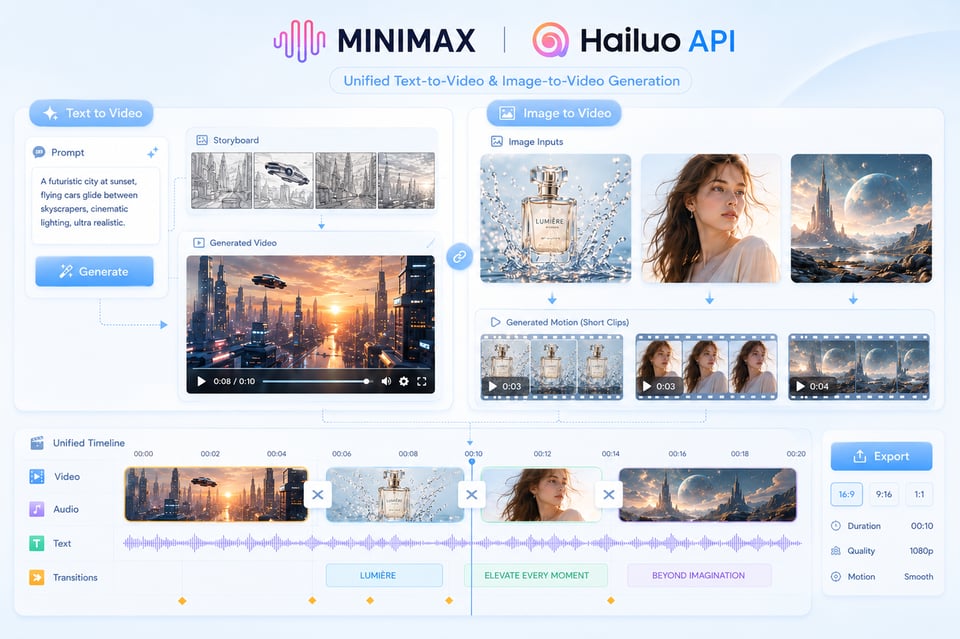
MiniMax Hailuo API supports both text-to-video and image-to-video generation, giving users a flexible starting point for different creative tasks. A prompt can define the scene logic, subject behavior, camera language, lighting mood, and visual style from the beginning, while an image input can preserve the original subject, composition, or art direction and extend it into motion. This makes Hailuo API useful for building original scenes as well as animating existing assets such as product images, character portraits, concept art, and campaign visuals.
Motion Coherence Built Around Hailuo 02 API
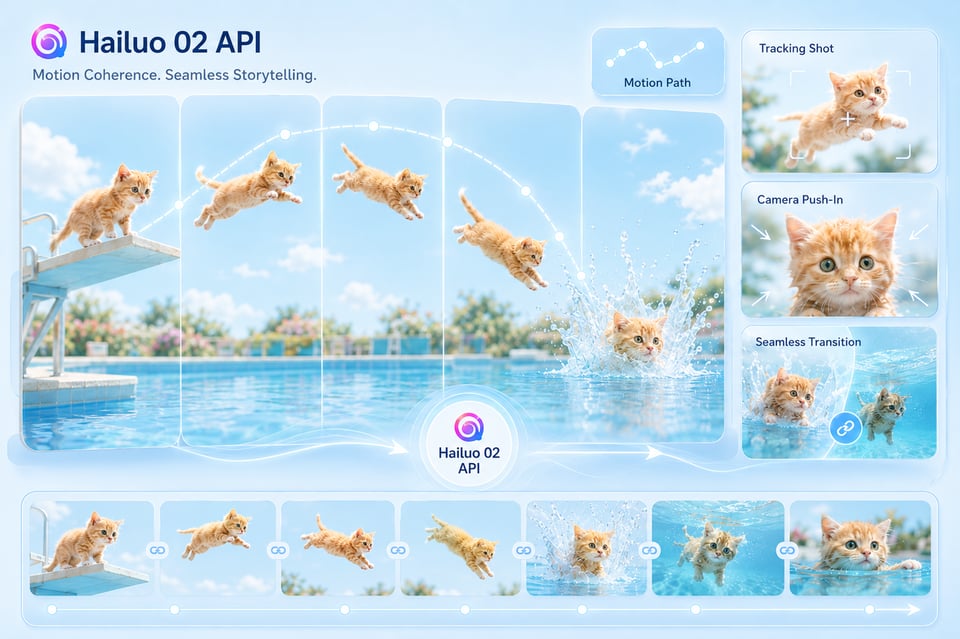
Hailuo 02 API is especially suitable for videos where motion needs to carry the visual impact. It can handle visible subject movement, object actions, camera-driven transitions, and short-form scenes with a clearer sense of direction and rhythm. Instead of producing a clip that only adds minor animation to a still image, Hailuo 02 helps create movement that feels more connected to the subject, the environment, and the intended scene flow.
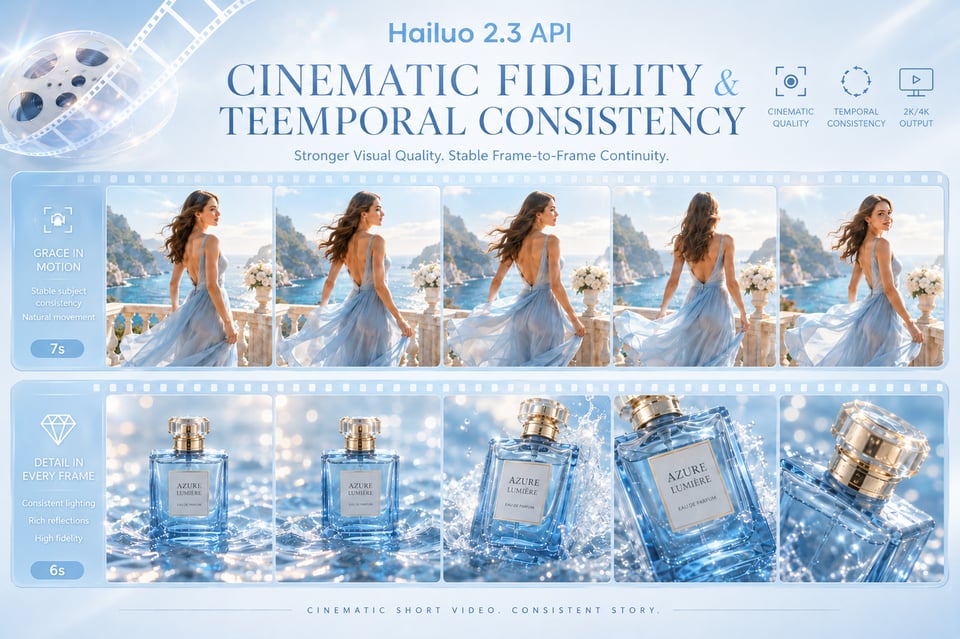
Cinematic Fidelity and Temporal Consistency in Hailuo 2.3 API
Hailuo 2.3 API is designed for videos that need stronger visual quality and more stable frame-to-frame continuity. It can deliver richer lighting, more natural scene dynamics, refined character presentation, and better temporal consistency across the clip. This makes it a stronger fit for cinematic storytelling, product films, fashion visuals, branded campaign shots, and other short videos where atmosphere, realism, and continuity matter as much as movement.
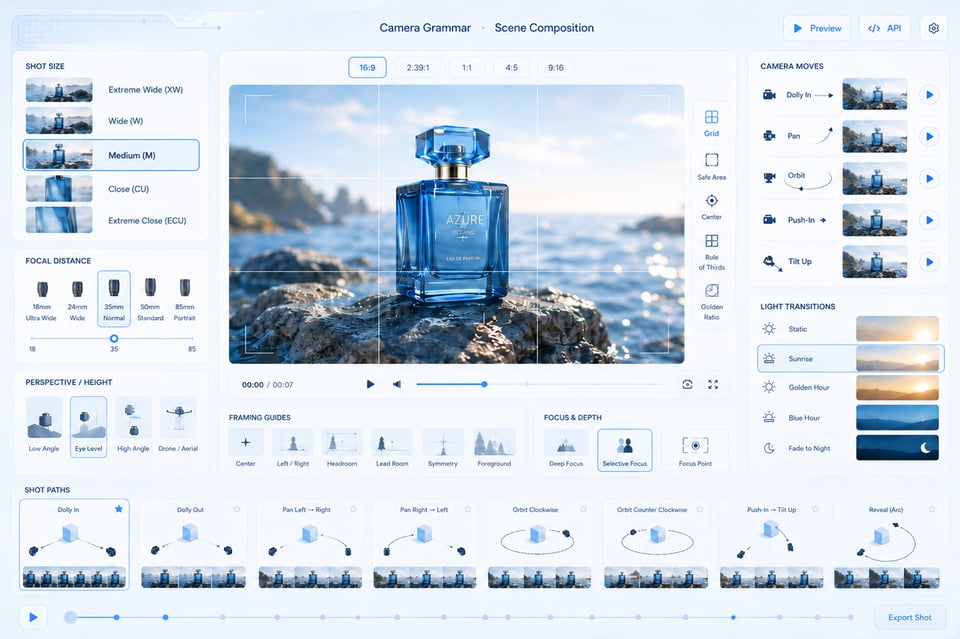
Camera Grammar and Scene Composition with Hailuo AI Video API
Hailuo AI Video API can interpret camera and scene instructions in a more structured way, helping users guide not only what appears in the frame, but how the shot unfolds. Prompts can describe camera movement, focal distance, subject framing, perspective shifts, lighting transitions, and pacing, so the final clip feels closer to a composed video sequence rather than a random motion effect. This is useful for product reveals, character close-ups, dynamic scene openings, and cinematic social clips.
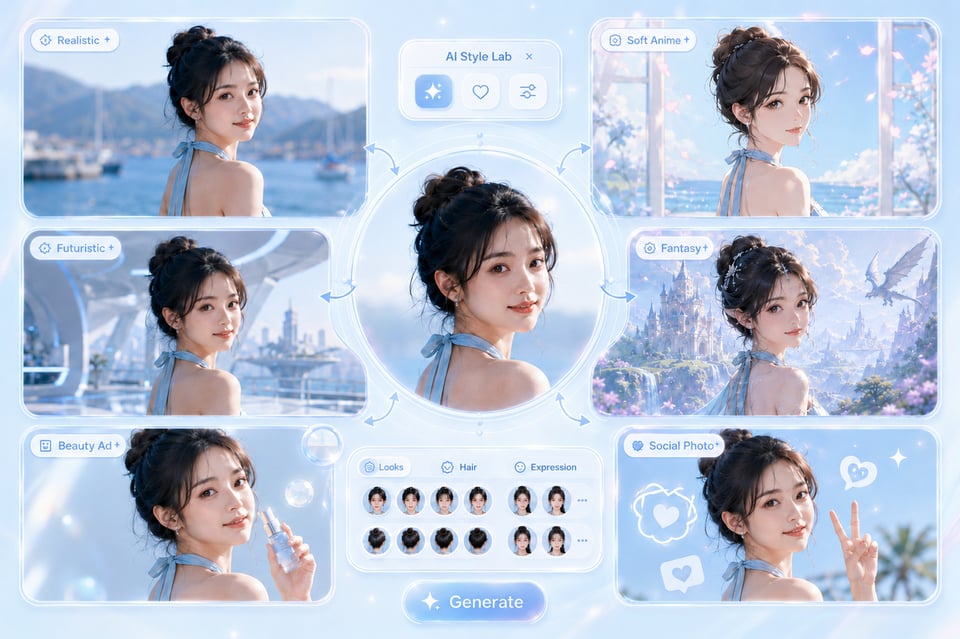
Style Fidelity and Subject Preservation Across Hailuo AI API Outputs
Hailuo AI API can work across realistic footage, anime-inspired visuals, CGI-style scenes, fantasy worlds, commercial product shots, and stylized social content while keeping the output visually coherent. The key value is not only style variety, but also subject preservation, composition stability, and motion consistency across frames. This helps reduce the drifting details, unstable identities, and broken visual continuity that often weaken AI-generated video.
How to Deploy Hailuo API for Video Generation on Kie.ai
01
Step 1: Get Your Hailuo API Key on Kie.ai
Create an account on Kie.ai and generate your API key from the dashboard. This key is used to authenticate your Hailuo API requests and connect your application to the available MiniMax Hailuo API models. Before building a production workflow, check the latest Kie.ai API documentation for current model names, request parameters, supported inputs, resolution options, duration limits, pricing, and callback settings.
02
Step 2: Test Hailuo AI API with Text or Image Inputs
Use the Kie.ai Playground or API test environment to compare how Hailuo 02 and Hailuo 2.3 respond to different video tasks. You can start with a text prompt for text-to-video generation, or provide an image input for image-to-video animation. At this stage, refine the scene description, subject action, camera language, visual style, aspect ratio, duration, and resolution so the output direction is clear before integration.
03
Step 3: Create a Video Task and Retrieve the Result
Send a video generation request through the Hailuo API, including the selected model, prompt, image URL when needed, and other required parameters. After the task is created, use the returned task ID to query the generation status, or configure a callback URL to receive the result automatically when the video is complete. Once finished, the API returns the generated video URL for preview, download, storage, or use inside your product workflow.
Create More Watchable AI Video Moments with MiniMax Hailuo API
Viral Animal Motion Clips with Hailuo 02 API
Hailuo 02 API works well for playful short videos where an animal performs an unexpected action, such as a cat diving from a platform, a dog skiing through snow, or a small animal moving through a dramatic sports-style scene. This type of content fits short-form platforms because the idea is instantly understandable, the motion is the hook, and the final clip can feel funny, surprising, and visually believable within only a few seconds.
Image-to-Video Character Moments with MiniMax Hailuo API
MiniMax Hailuo API can turn a character portrait, avatar image, fashion shot, or illustrated figure into a short expressive scene. Instead of only adding basic movement, the image can be extended with gestures, facial reactions, camera motion, lighting changes, or environmental atmosphere. This makes it useful for creator avatars, fictional characters, anime-style moments, short drama snippets, and visual storytelling clips designed for fast scrolling feeds.
Cinematic Product Reveal Videos Using Hailuo AI Video API
Hailuo AI Video API can create short product-focused clips where the value comes from camera language rather than a static product image. A prompt can describe a slow push-in, rotating reveal, macro detail shot, liquid splash, lighting transition, or premium commercial setup, helping a product visual feel more like a polished launch teaser or ad creative. This is especially useful when a still asset needs to become a scroll-stopping video hook.
Trend-Driven Visual Transformations with Hailuo 2.3 API
Hailuo 2.3 API is suitable for stylized short clips built around transformation, atmosphere, and cinematic continuity. Users can create scenes where an ordinary photo becomes a fantasy shot, a portrait shifts into a film-like moment, a concept image turns into CGI-style motion, or a simple scene gains dramatic lighting and camera movement. These transformation-style videos work well on social platforms because they combine a clear before-to-after idea with stronger visual polish and short-form pacing.
How to Get Better Video Results from Hailuo API Prompts
Build the Scene Around One Clear Visual Action
Use Hailuo 02 API for Motion-Led Video Ideas
Choose Hailuo 2.3 API for More Cinematic Scenes
Keep Image-to-Video Prompts Close to the Source Image
Add Camera Language to Make the Clip Feel Directed
Why Choose Kie.ai to Deploy Hailuo API
Multiple MiniMax Hailuo API Models in One Platform
Kie.ai brings Hailuo 02 API and Hailuo 2.3 API together in one platform, making it easier to choose the right model for different video generation needs. Users can work with motion-led clips, image-to-video animation, cinematic scenes, and higher-fidelity outputs without switching between separate tools or managing different model setups.
Affordable Hailuo API Pricing for Testing and Scale
Kie.ai offers a flexible way to use Hailuo API across early testing, creative iteration, and larger generation needs. Teams can compare outputs across Hailuo models, control usage based on project volume, and scale video generation without a heavy upfront commitment.
Complete Hailuo AI API Documentation for Faster Deployment
Kie.ai provides clear Hailuo AI API documentation to support model selection, input setup, request structure, task creation, result retrieval, callback usage, and integration details. Since model availability, parameters, duration options, resolutions, and pricing may change over time, users should always check the latest documentation before deployment.
24/7 Hailuo AI Video API Service and Support
Kie.ai provides 24/7 Hailuo AI Video API service support for users running video generation in real products, creative tools, automation systems, or content platforms. Continuous support helps with API usage, task tracking, callback handling, generation issues, and other production questions that may appear after deployment.
Frequently Asked Questions About Hailuo API
1
What is Hailuo API?
Hailuo API is an AI video generation API based on MiniMax Hailuo models. It can be used to create short videos from text prompts or image inputs, making it suitable for text-to-video generation, image-to-video animation, motion-heavy clips, cinematic scenes, product visuals, character moments, and other AI video creation tasks.
2
Does Kie.ai support MiniMax Hailuo API?
Yes. Kie.ai supports MiniMax Hailuo API models, including Hailuo 02 API and Hailuo 2.3 API. Users can test different Hailuo models, compare video results, and deploy Hailuo API for AI video generation through Kie.ai. Available models and parameters may change over time, so always refer to the latest Kie.ai API documentation before integration.
3
What is the difference between Hailuo 02 API and Hailuo 2.3 API?
Hailuo 02 API is better suited for motion-focused short videos where visible action is the main highlight, such as animal movement, character actions, product motion, or dynamic social clips. Hailuo 2.3 API is designed for higher-fidelity video generation, with stronger cinematic quality, smoother scene continuity, richer visual atmosphere, and more refined character presentation.
4
Can Hailuo AI API generate videos from both text and images?
Yes. Hailuo AI API can support both text-to-video and image-to-video generation, depending on the selected model and supported parameters. Text prompts can describe the subject, action, scene, style, lighting, and camera direction, while image inputs can be used to animate product photos, portraits, concept art, campaign visuals, or other existing creative assets.
5
What types of videos can I create with Hailuo API?
Hailuo API can be used for cinematic short clips, animal action videos, character scenes, image-to-video animations, product reveals, fantasy visuals, social media hooks, stylized transformations, and branded creative assets. It works especially well when the video needs clear motion, strong visual atmosphere, or a short-form format that can quickly capture attention.
6
Is Hailuo API suitable for production video generation?
Yes. Hailuo API can be used for both testing and production-oriented video generation. On Kie.ai, users can deploy Hailuo API for video tools, content platforms, creative automation systems, and other AI video products. For production use, check the latest documentation for model availability, supported inputs, resolution options, duration limits, pricing, task status tracking, callback behavior, and response format.
7
How do I start using Hailuo API on Kie.ai?
Yes. Hailuo API can be used for both testing and production-oriented video generation. On Kie.ai, users can deploy Hailuo API for video tools, content platforms, creative automation systems, and other AI video products. For production use, check the latest documentation for model availability, supported inputs, resolution options, duration limits, pricing, task status tracking, callback behavior, and response format.