
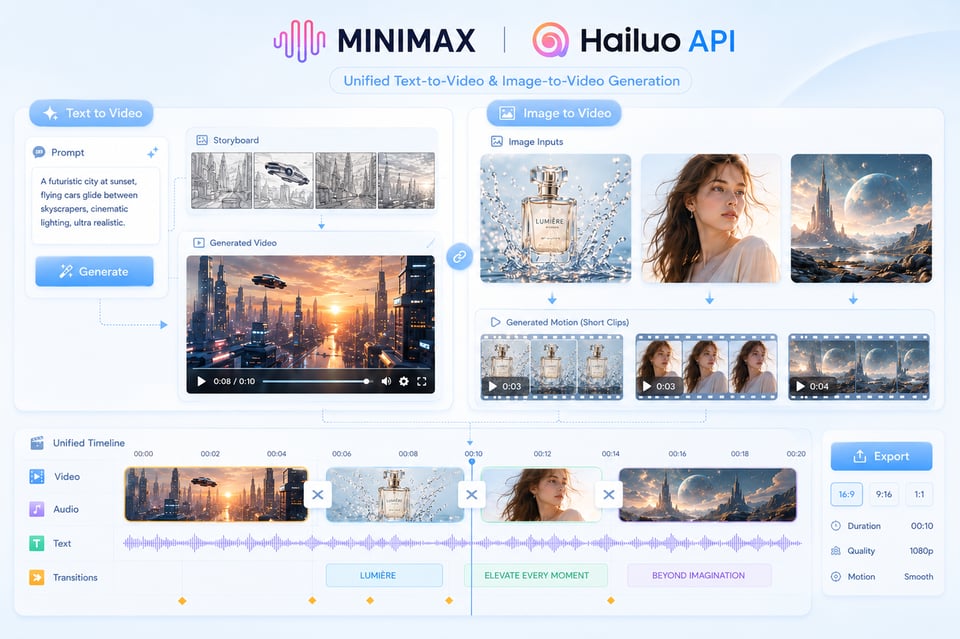
L’API MiniMax Hailuo prend en charge à la fois la génération de vidéos à partir de texte et celle à partir d’images, offrant ainsi aux utilisateurs un point de départ flexible pour diverses tâches créatives. Un prompt peut définir la logique de la scène, le comportement du sujet, le langage cinématographique, l’ambiance lumineuse et le style visuel dès le départ, tandis qu’une image d’entrée permet de conserver le sujet, la composition ou la direction artistique, et de l’étendre en mouvement. Cela rend l’API Hailuo particulièrement utile pour créer des scènes originales ainsi que pour animer des éléments existants, comme les images produits, les portraits de personnages, l’art conceptuel ou les visuels de campagne.
Image to VideoText to VideoVideo to Video
Seedance2.5
Seedance 2.5 on KIE is ByteDance’s upgraded AI video model, built for longer, more controllable video generation. It supports up to 30-second videos, multimodal references, precise editing, and improved consistency for more cinematic and production-ready creative workflows.
Text to Video
Wan 3.0
Wan3.0 is Alibaba’s next-generation all-in-one video generation model built for multimodal creation. It supports text, image, video, audio, and structured references to produce more consistent, realistic, and controllable video content with enhanced storytelling and editing capabilities.
Image to VideoText to VideoVideo to Video
Seedance 2
Seedance 2.0 on KIE is a multimodal Al video model by ByteDance, optimized for fast and realistic video generation. It supports high-quality virtual human video creation with strong multi-shot consistency, enabling more lifelike and cinematic outputs across scenes.
Text to ImageImage to Image
GPT Image 2
GPT Image 2 is OpenAI’s next-gen image model built for stronger photorealism, cleaner image editing, sharper text rendering, and more polished product photography. Designed for more advanced visual workflows, it pushes image generation beyond basic text-to-image output and into higher-quality creative, commercial, and design-ready use cases.
Text to ImageImage to Image
Nano Banana 2
Meet Nano Banana 2, Google’s Gemini 3.1 Flash Image model, now available via Kie AI API. Built for developers, it combines lightning-fast speed with Pro-level quality, accurate text rendering, strong character consistency, and scalable image generation and editing workflows.
Chat
Grok 4.6
Grok 4.6 is xAI’s latest frontier AI model, designed to enhance long-running agents, advanced reasoning, coding intelligence, and interactive AI experiences. Building on Grok 4.5, it delivers improved performance for complex multi-step tasks, knowledge work, software engineering, and creative applications.
Tous les modèles
3 modèles disponibles3 MODELS
Fournisseurs(1/25)
Tâches(15)
Hailuo
Hailuo
MiniMax H3 (Hailuo-03)
Text to VideoImage to Video
Hailuo
Hailuo
Hailuo 2.3
starting from
$0.15-20%
30 Credits/6s
Text to VideoImage to Video
Hailuo
Hailuo 2.3
Hailuo 2.3 is MiniMax’s high-fidelity AI video generation model designed to create realistic motion, expressive characters, and cinematic visuals. It supports both text-to-video and image-to-video, handling complex movements, lighting changes, and detailed facial expressions with stability and consistency.
Plusieurs modèles d’API MiniMax Hailuo pour la génération de vidéos IA dynamiques
Utilisez les modèles MiniMax Hailuo 02 et Hailuo 2.3 sur Kie.ai pour transformer vos prompts et images en courtes vidéos dynamiques, avec un mouvement naturel, un style cinématographique et un contrôle créatif flexible.
Principales capacités de l'API Hailuo AI pour la création de vidéos IA
Cohérence du mouvement fondée sur l’API Hailuo 02
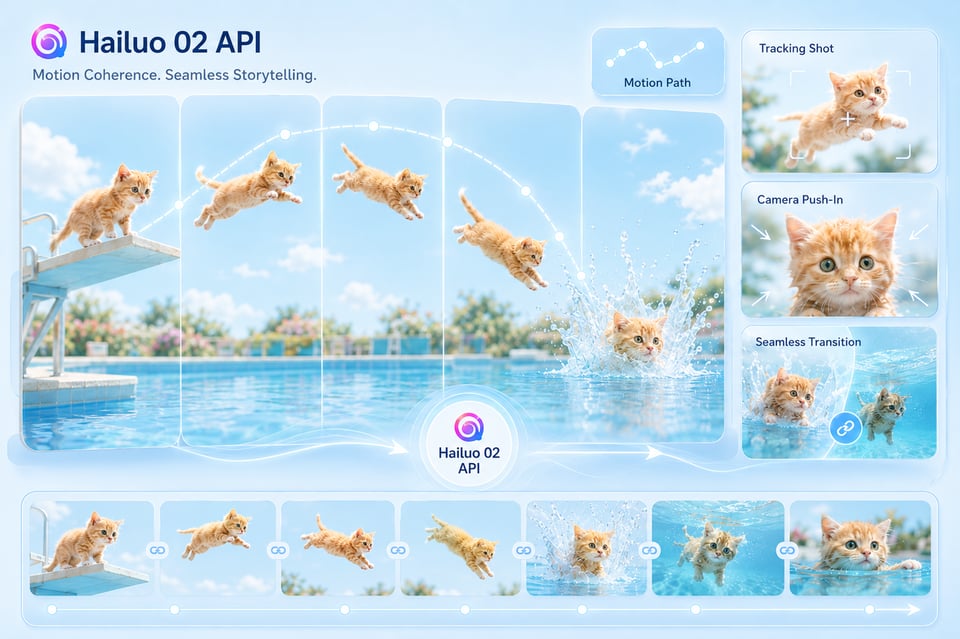
L’API Hailuo 02 est particulièrement adaptée aux vidéos où le mouvement doit véhiculer un impact visuel fort. Elle gère efficacement les mouvements du sujet, les actions des objets, les transitions pilotées par la caméra, ainsi que les scènes courtes avec une direction et un rythme plus clairs. Contrairement à une séquence qui ajoute simplement une animation mineure à une image statique, Hailuo 02 permet de créer un mouvement qui semble plus intégré au sujet, à l’environnement et au flux scénique souhaité.
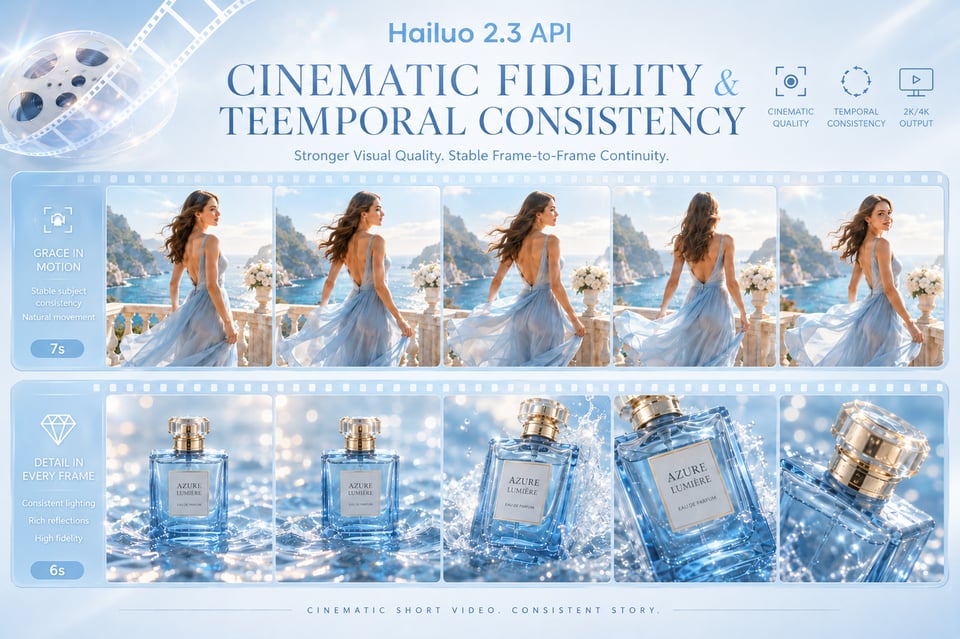
Fidélité cinématographique et cohérence temporelle dans l’API Hailuo 2.3
L'API Hailuo 2.3 est conçue pour les vidéos exigeant une qualité visuelle renforcée et une continuité entre les images plus stable. Elle permet d'obtenir un éclairage plus riche, une dynamique de scène plus naturelle, une représentation de personnages plus précise, ainsi qu'une meilleure stabilité temporelle dans la séquence. Cela en fait un choix idéal pour le récit cinématographique, les films produits, les visuels de mode, les campagnes de marque et autres courtes vidéos où l’atmosphère, la réalisme et la continuité comptent autant que le mouvement.
Comment déployer l’API Hailuo pour la génération de vidéos sur Kie.ai
Étape 1 : Obtenez votre clé API Hailuo sur Kie.ai
Créez un compte sur Kie.ai et générez votre clé API depuis le tableau de bord. Cette clé est utilisée pour authentifier vos requêtes vers l'API Hailuo et connecter votre application aux modèles Hailuo de MiniMax disponibles. Avant de mettre en place un workflow de production, consultez la documentation actuelle de l'API Kie.ai pour connaître les noms des modèles, les paramètres de requête, les formats d'entrée supportés, les options de résolution, les limites de durée, les tarifs et les paramètres de callback.
Étape 2 : Testez l'API Hailuo AI avec des entrées textuelles ou des images
Utilisez le Playground Kie.ai ou l’environnement de test pour comparer la manière dont Hailuo 02 et Hailuo 2.3 réagissent à différentes tâches vidéo. Vous pouvez commencer avec une invite textuelle pour la génération de vidéo à partir de texte, ou fournir une image pour animer une vidéo à partir d'une image. À ce stade, affinez la description de la scène, l'action du sujet, le langage caméra, le style visuel, le rapport d’aspect, la durée et la résolution afin que la direction de sortie soit claire avant l'intégration.
Étape 3 : Créer une tâche vidéo et récupérer le résultat
Envoyez une requête de génération vidéo via l’API Hailuo, en incluant le modèle sélectionné, le prompt, l’URL de l’image si nécessaire, ainsi que les autres paramètres requis. Une fois la tâche créée, utilisez l’identifiant de tâche retourné pour vérifier l’état de la génération. Vous pouvez également configurer une URL de callback pour recevoir le résultat automatiquement lorsque la vidéo est terminée. Une fois le processus terminé, l’API renvoie l’URL de la vidéo générée, prête à être prévisualisée, téléchargée, stockée ou intégrée dans votre flux de travail.
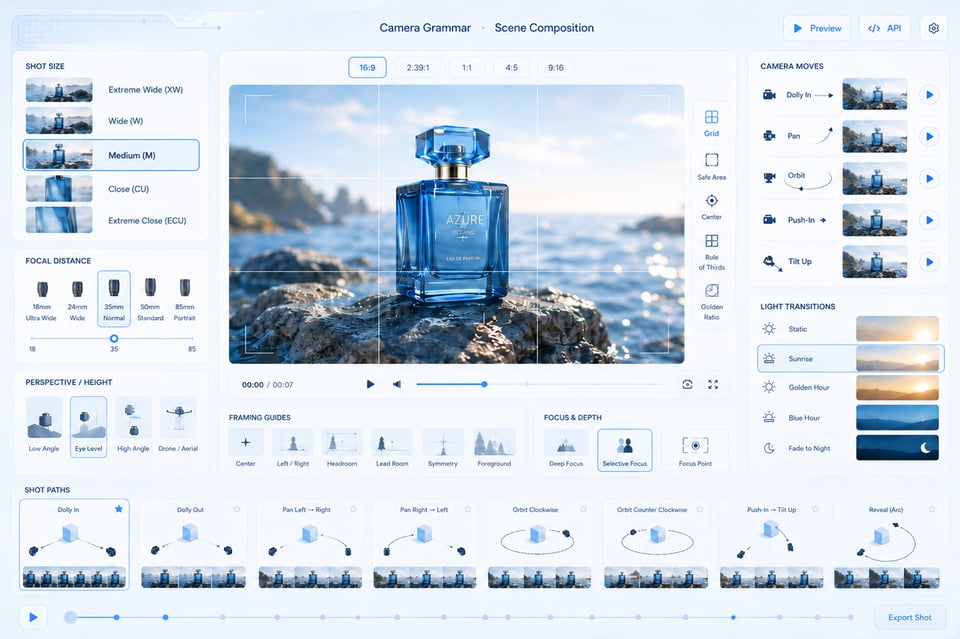
Camera Grammar and Scene Composition with Hailuo AI Video API
Hailuo AI Video API can interpret camera and scene instructions in a more structured way, helping users guide not only what appears in the frame, but how the shot unfolds. Prompts can describe camera movement, focal distance, subject framing, perspective shifts, lighting transitions, and pacing, so the final clip feels closer to a composed video sequence rather than a random motion effect. This is useful for product reveals, character close-ups, dynamic scene openings, and cinematic social clips.
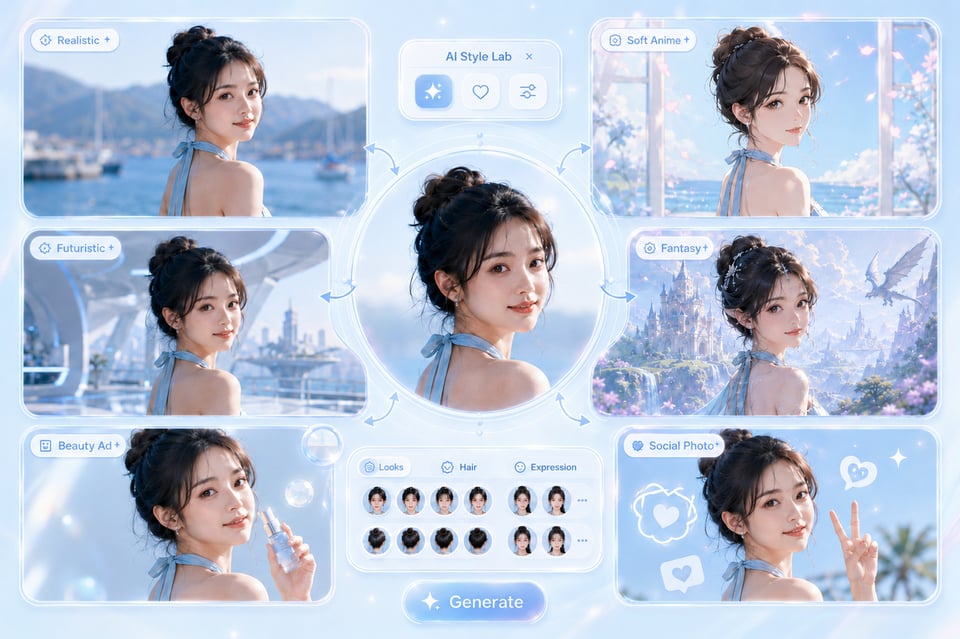
Style Fidelity and Subject Preservation Across Hailuo AI API Outputs
Hailuo AI API can work across realistic footage, anime-inspired visuals, CGI-style scenes, fantasy worlds, commercial product shots, and stylized social content while keeping the output visually coherent. The key value is not only style variety, but also subject preservation, composition stability, and motion consistency across frames. This helps reduce the drifting details, unstable identities, and broken visual continuity that often weaken AI-generated video.
Créez davantage de moments vidéo IA captivants avec l’API MiniMax Hailuo
01
Clips d’animaux en mouvement viraux avec l’API Hailuo 02
L’API Hailuo 02 convient parfaitement pour des vidéos courtes ludiques où un animal effectue une action inattendue, comme un chat qui plonge d’une plateforme, un chien qui skie à travers la neige, ou un petit animal qui se déplace dans une scène sportive dramatique. Ce type de contenu s’adapte bien aux plateformes de format court, car l’idée est immédiatement compréhensible, le mouvement est l’élément captivant, et le clip final peut sembler amusant, surprenant et visuellement convaincant en quelques secondes.
02
Création de scènes caractéristiques à partir d'images avec l'API Minimax Hailuo
L'API Hailuo de MiniMax permet de transformer un portrait de personnage, une image d'avatar, une photo de mode ou une figure illustrée en une scène expressive courte. Au lieu de simplement ajouter un mouvement basique, l'image peut être enrichie avec des gestes, des réactions faciales, un mouvement de caméra, des changements d'éclairage ou une atmosphère environnementale. Cela en fait un outil idéal pour les avatars créateurs, les personnages fictifs, les scènes au style anime, les extraits de drames courts et les clips de narration visuelle conçus pour les réseaux à défilement rapide.
03
Vidéos de présentation produit à l'effet cinématographique avec l'API vidéo Hailuo AI
L'API vidéo Hailuo AI permet de créer de courtes séquences axées sur le produit, où la valeur réside dans le langage caméra plutôt qu'une image statique du produit. Un prompt peut décrire un plan rapproché lent, un révélateur tournant, un plan macro, une goutte d'eau, une transition lumineuse ou un setup commercial de qualité. Cela permet de donner au produit une apparence plus proche d’un teaser de lancement soigné ou d’une créative publicitaire. C’est particulièrement utile lorsque vous devez transformer un actif statique en un hook vidéo qui retient l’attention sur les réseaux sociaux.
Comment obtenir de meilleurs résultats vidéo à partir des prompts de l’API Hailuo
Construisez votre scène autour d’une action visuelle précise
Une vidéo générée via l’API Hailuo commence généralement par une action claire. Plutôt que de solliciter plusieurs éléments simultanément, concentrez-vous sur un seul mouvement clair, comme un personnage qui tourne, un chat qui plonge dans l'eau, un produit qui tourne sous une lumière de studio, ou une caméra qui s'approche lentement d'une scène cinématographique. Cela permet au modèle d'avoir une cible de mouvement plus nette et aide à ce que la vidéo finale semble plus intentionnelle.
Utilisez l’API Hailuo 02 pour créer des vidéos centrées sur le mouvement
L'API Hailuo 02 est plus adaptée aux vidéos où le mouvement est l'élément principal. Utilisez-la pour des extraits d'actions animales, des scènes sportives, des mouvements ludiques, de l'animation d'objets, du mouvement des personnages ou des courtes vidéos sociales où le spectateur doit comprendre l'action immédiatement. Les prompts doivent décrire clairement le sujet, le mouvement et l’environnement pour que le modèle puisse créer un clip basé sur un mouvement visible plutôt que sur une atmosphère floue.
Choisissez l'API Hailuo 2.3 pour des scènes plus visuellement cinématographiques
L'API Hailuo 2.3 est particulièrement adaptée lorsque la vidéo repose sur l'atmosphère, le réalisme, l'éclairage, le détail des personnages et la continuité visuelle. Elle est idéalement choisie pour les portraits dramatiques, les scènes fantastiques, les dévoilages de produits, les images de mode, les moments de narration courte et les extraits nécessitant un rendu fin et filmé. Lorsque vous utilisez Hailuo 2.3, le prompt doit inclure l'ambiance, le langage caméra, l'éclairage et la composition de la scène, et non seulement le sujet.
Assurez-vous que les prompts d'image vers vidéo restent proches de l'image source
Lorsque vous utilisez l'API MiniMax Hailuo pour générer une vidéo à partir d'une image, laissez l'image définir le sujet, la composition, le vêtement, la forme du produit ou la direction artistique. Le prompt doit principalement décrire comment l'image doit bouger : zoom lent, mouvements du cheveu ou du tissu, changement d'expression faciale, atmosphère de fond, déplacement de la caméra ou rotation du produit. Si le prompt s'éloigne trop de l'image, la vidéo peut perdre son identité, sa structure ou sa cohérence visuelle.
Pourquoi faire confiance à Kie.ai pour déployer l’API Hailuo ?
Plusieurs modèles Hailuo de Minimax disponibles sur une seule plateforme
Tarification abordable de l’API Hailuo pour les tests et la scalabilité
Documentation complète de l’API Hailuo pour un déploiement rapide
Service et support de l’API vidéo Hailuo AI 24h/24, 7j/7
Add Camera Language to Make the Clip Feel Directed
Why Choose Kie.ai to Deploy Hailuo API
Multiple MiniMax Hailuo API Models in One Platform
Kie.ai brings Hailuo 02 API and Hailuo 2.3 API together in one platform, making it easier to choose the right model for different video generation needs. Users can work with motion-led clips, image-to-video animation, cinematic scenes, and higher-fidelity outputs without switching between separate tools or managing different model setups.
Affordable Hailuo API Pricing for Testing and Scale
Kie.ai offers a flexible way to use Hailuo API across early testing, creative iteration, and larger generation needs. Teams can compare outputs across Hailuo models, control usage based on project volume, and scale video generation without a heavy upfront commitment.
Complete Hailuo AI API Documentation for Faster Deployment
Kie.ai provides clear Hailuo AI API documentation to support model selection, input setup, request structure, task creation, result retrieval, callback usage, and integration details. Since model availability, parameters, duration options, resolutions, and pricing may change over time, users should always check the latest documentation before deployment.
24/7 Hailuo AI Video API Service and Support
Kie.ai provides 24/7 Hailuo AI Video API service support for users running video generation in real products, creative tools, automation systems, or content platforms. Continuous support helps with API usage, task tracking, callback handling, generation issues, and other production questions that may appear after deployment.
Frequently Asked Questions About Hailuo API
1
What is Hailuo API?
Hailuo API is an AI video generation API based on MiniMax Hailuo models. It can be used to create short videos from text prompts or image inputs, making it suitable for text-to-video generation, image-to-video animation, motion-heavy clips, cinematic scenes, product visuals, character moments, and other AI video creation tasks.
2
Does Kie.ai support MiniMax Hailuo API?
Yes. Kie.ai supports MiniMax Hailuo API models, including Hailuo 02 API and Hailuo 2.3 API. Users can test different Hailuo models, compare video results, and deploy Hailuo API for AI video generation through Kie.ai. Available models and parameters may change over time, so always refer to the latest Kie.ai API documentation before integration.
3
What is the difference between Hailuo 02 API and Hailuo 2.3 API?
Hailuo 02 API is better suited for motion-focused short videos where visible action is the main highlight, such as animal movement, character actions, product motion, or dynamic social clips. Hailuo 2.3 API is designed for higher-fidelity video generation, with stronger cinematic quality, smoother scene continuity, richer visual atmosphere, and more refined character presentation.
4
Can Hailuo AI API generate videos from both text and images?
Yes. Hailuo AI API can support both text-to-video and image-to-video generation, depending on the selected model and supported parameters. Text prompts can describe the subject, action, scene, style, lighting, and camera direction, while image inputs can be used to animate product photos, portraits, concept art, campaign visuals, or other existing creative assets.
5
What types of videos can I create with Hailuo API?
Hailuo API can be used for cinematic short clips, animal action videos, character scenes, image-to-video animations, product reveals, fantasy visuals, social media hooks, stylized transformations, and branded creative assets. It works especially well when the video needs clear motion, strong visual atmosphere, or a short-form format that can quickly capture attention.
6
Is Hailuo API suitable for production video generation?
Yes. Hailuo API can be used for both testing and production-oriented video generation. On Kie.ai, users can deploy Hailuo API for video tools, content platforms, creative automation systems, and other AI video products. For production use, check the latest documentation for model availability, supported inputs, resolution options, duration limits, pricing, task status tracking, callback behavior, and response format.
7
How do I start using Hailuo API on Kie.ai?
Yes. Hailuo API can be used for both testing and production-oriented video generation. On Kie.ai, users can deploy Hailuo API for video tools, content platforms, creative automation systems, and other AI video products. For production use, check the latest documentation for model availability, supported inputs, resolution options, duration limits, pricing, task status tracking, callback behavior, and response format.