
Kie.ai groups Ideogram API access into two creation paths: one for general image generation and visual transformation, and one for character-based workflows that need stronger identity consistency. This makes it easier for developers to select the right Ideogram AI API model for prompt-based image creation, image refinement, visual variation, or character continuity. Supported capabilities, parameters, input requirements, and output options may change as models are updated, so please refer to the latest Kie.ai API documentation for the most accurate implementation details.

Image to VideoText to VideoVideo to Video
Seedance2.5
Seedance 2.5 on KIE is ByteDance’s upgraded AI video model, built for longer, more controllable video generation. It supports up to 30-second videos, multimodal references, precise editing, and improved consistency for more cinematic and production-ready creative workflows.
Text to Video
Wan 3.0
Wan3.0 is Alibaba’s next-generation all-in-one video generation model built for multimodal creation. It supports text, image, video, audio, and structured references to produce more consistent, realistic, and controllable video content with enhanced storytelling and editing capabilities.
Image to VideoText to VideoVideo to Video
Seedance 2
Seedance 2.0 on KIE is a multimodal Al video model by ByteDance, optimized for fast and realistic video generation. It supports high-quality virtual human video creation with strong multi-shot consistency, enabling more lifelike and cinematic outputs across scenes.
Text to ImageImage to Image
GPT Image 2
GPT Image 2 is OpenAI’s next-gen image model built for stronger photorealism, cleaner image editing, sharper text rendering, and more polished product photography. Designed for more advanced visual workflows, it pushes image generation beyond basic text-to-image output and into higher-quality creative, commercial, and design-ready use cases.
Text to ImageImage to Image
Nano Banana 2
Meet Nano Banana 2, Google’s Gemini 3.1 Flash Image model, now available via Kie AI API. Built for developers, it combines lightning-fast speed with Pro-level quality, accurate text rendering, strong character consistency, and scalable image generation and editing workflows.
Chat
Grok 4.6
Grok 4.6 is xAI’s latest frontier AI model, designed to enhance long-running agents, advanced reasoning, coding intelligence, and interactive AI experiences. Building on Grok 4.5, it delivers improved performance for complex multi-step tasks, knowledge work, software engineering, and creative applications.
تمام مدلها
2 مدلها پیدا شد2 MODELS
ارائهدهندگان(1/25)
وظایف(15)
Ideogram
Ideogram Character
Image to Image
Ideogram
Ideogram Character
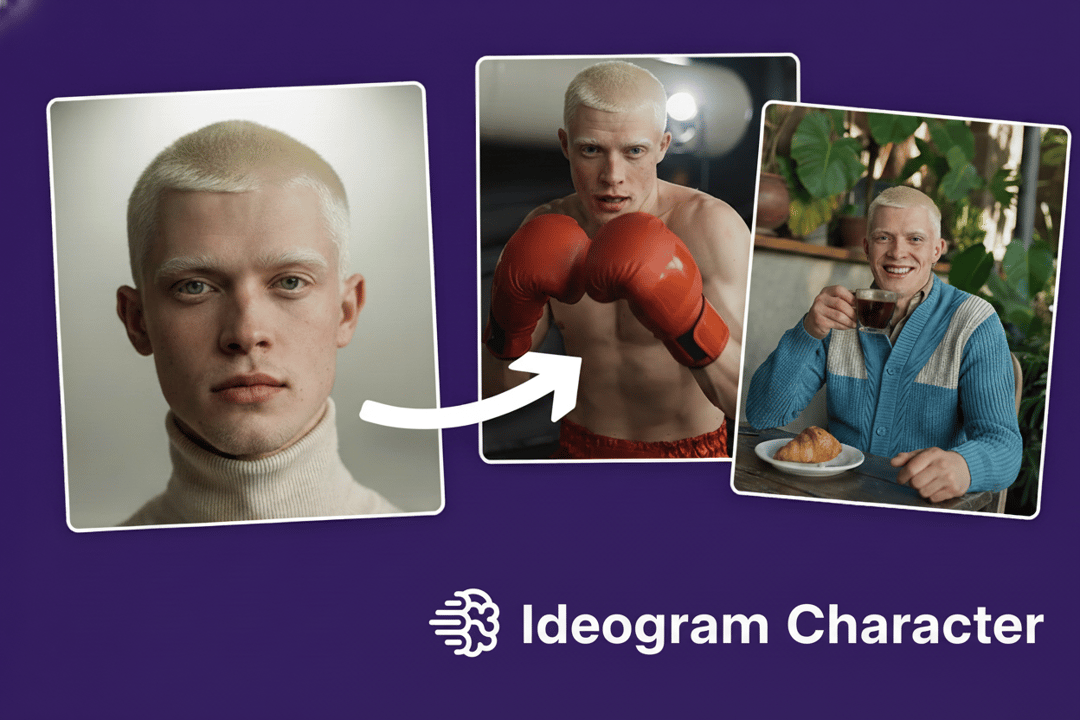
Ideogram Character is the latest feature released by Ideogram AI, ensuring characters retain core features such as facial traits, proportions, and hairstyles across different scenes, artistic styles, and contexts. Whether creating characters from a single reference image or fine-tuning existing ones, Kie.ai's Ideogram Character API offers flexibility and precision through its Base, Edit, and Remix operations.
One Ideogram API Platform for Image Creation and Character Consistency
Generate polished visuals, refine existing images, remix creative directions, and build repeatable character assets through Ideogram API models on Kie.ai.
Ideogram API Options for Different Creative Workflows
Build Image Generation and Editing Pipelines with Ideogram V3 API
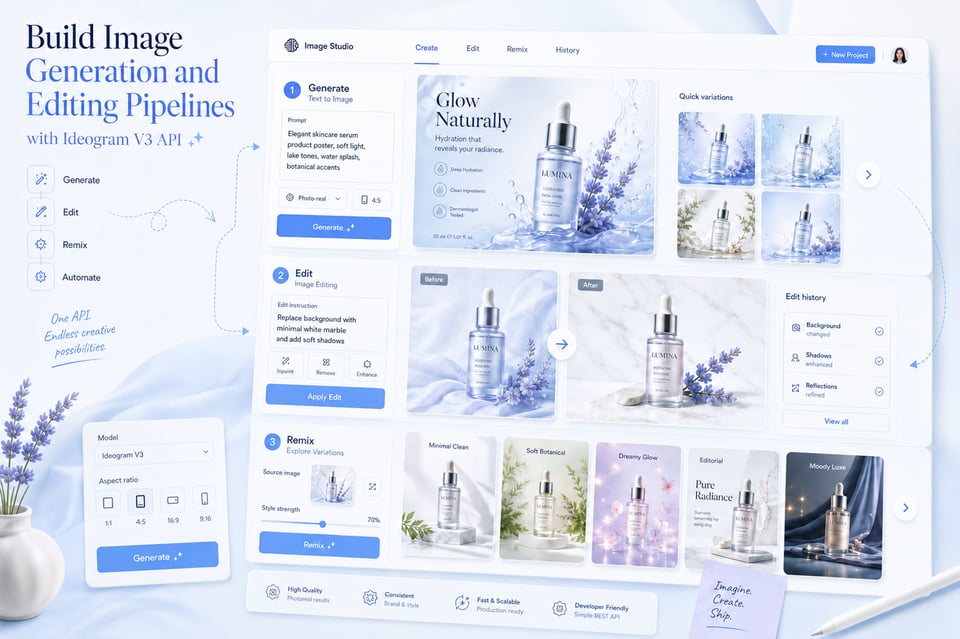
Ideogram V3 API supports text-to-image, edit, and remix workflows on Kie.ai. Text-to-image generates new visuals directly from prompts, making it suitable for posters, product images, brand graphics, thumbnails, concept visuals, and marketing assets. Edit allows users to modify existing images through prompt-based instructions, such as changing backgrounds, adjusting objects, or refining specific visual details. Remix creates new variations from an input image, helping users explore different styles, layouts, moods, and creative directions while keeping part of the original visual reference.
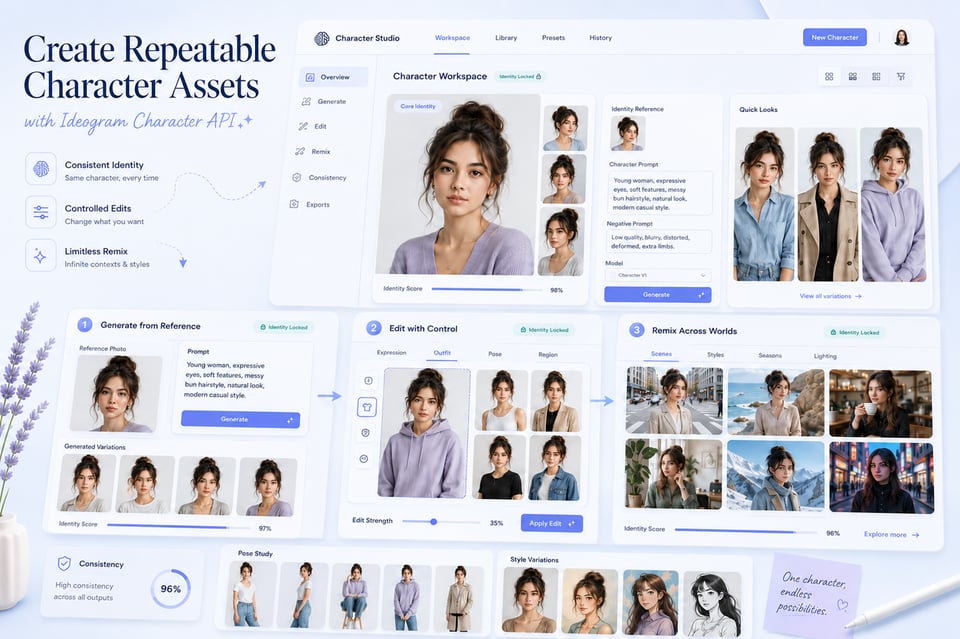
Create Repeatable Character Assets with Ideogram Character API
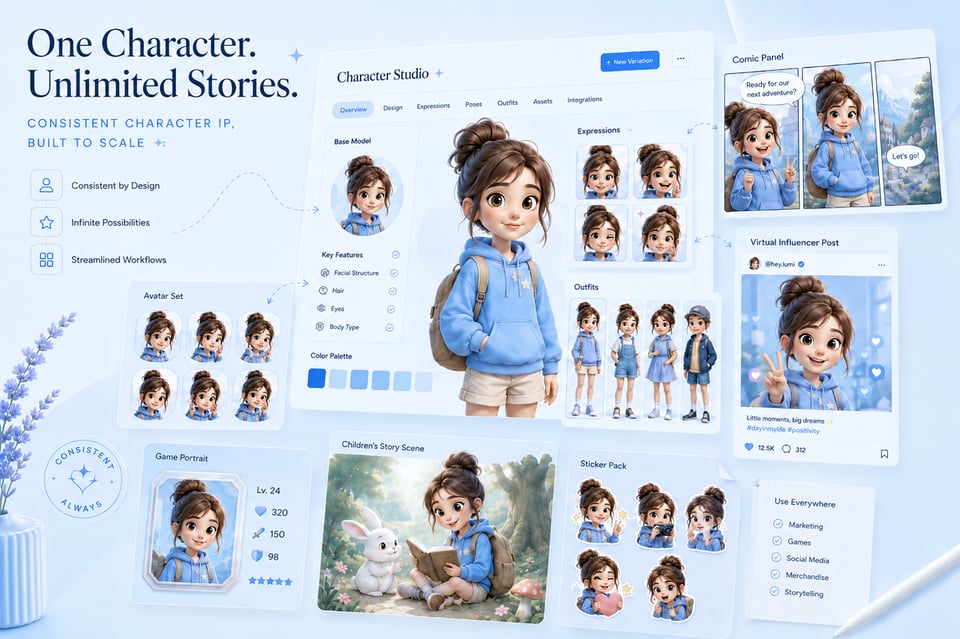
Ideogram Character API supports Character, Character Edit, and Character Remix workflows on Kie.ai. Character mode generates new character images from a reference image and prompt while preserving recognizable identity traits. Character Edit helps adjust existing character outputs, such as expression, outfit, pose, or selected image areas, without losing the character’s core appearance. Character Remix transforms a referenced character into new scenes, styles, outfits, or visual contexts while keeping the character visually consistent across multiple outputs.
Key Features of Ideogram AI API for Visual Creation
Ideogram V3 API for Accurate Text Rendering
Clean in-image typography is one of the most important strengths of Ideogram V3 API. It can generate short words, slogans, poster titles, product labels, badge-style text, logo-like lettering, and multi-line layouts with stronger readability. For Ideogram text to image API workflows, this helps text become part of the visual composition itself instead of being added manually after generation.

Design-Ready Output from Ideogram AI API
When a prompt includes lighting, perspective, subject placement, composition, style, or scene direction, Ideogram AI API can turn those details into more polished visual results. Rather than only creating a basic prompt-to-image output, Ideogram API supports realistic images, product-style visuals, brand graphics, posters, concept designs, and marketing assets with cleaner details and a stronger finished-design feel.

Refined Visual Control Through Ideogram Image Editing API
Ideogram image editing API helps users adjust existing visuals through prompt-based instructions instead of starting from a blank prompt. With Ideogram V3 API, users can edit general images by changing backgrounds, updating objects, refining selected areas, or improving visual details. With Ideogram Character API, character edit workflows can adjust expressions, outfits, poses, or specific image regions while keeping the character’s core identity recognizable.

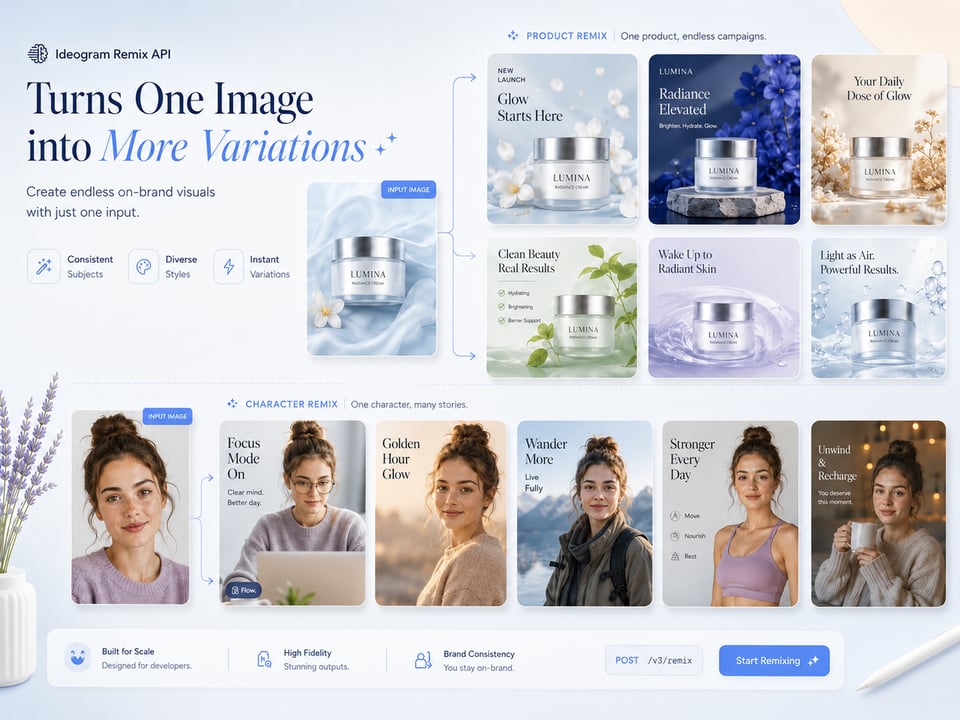
Ideogram Remix API Turns One Image into More Variations
Ideogram Remix API turns an input image into new creative variations while preserving part of the original visual reference. In Ideogram V3 API, remix can change style, layout, mood, scene, color direction, or overall creative treatment for general image workflows. In Ideogram Character API, character remix can move the same referenced character into new styles, scenes, outfits, or visual contexts while keeping the character visually consistent.
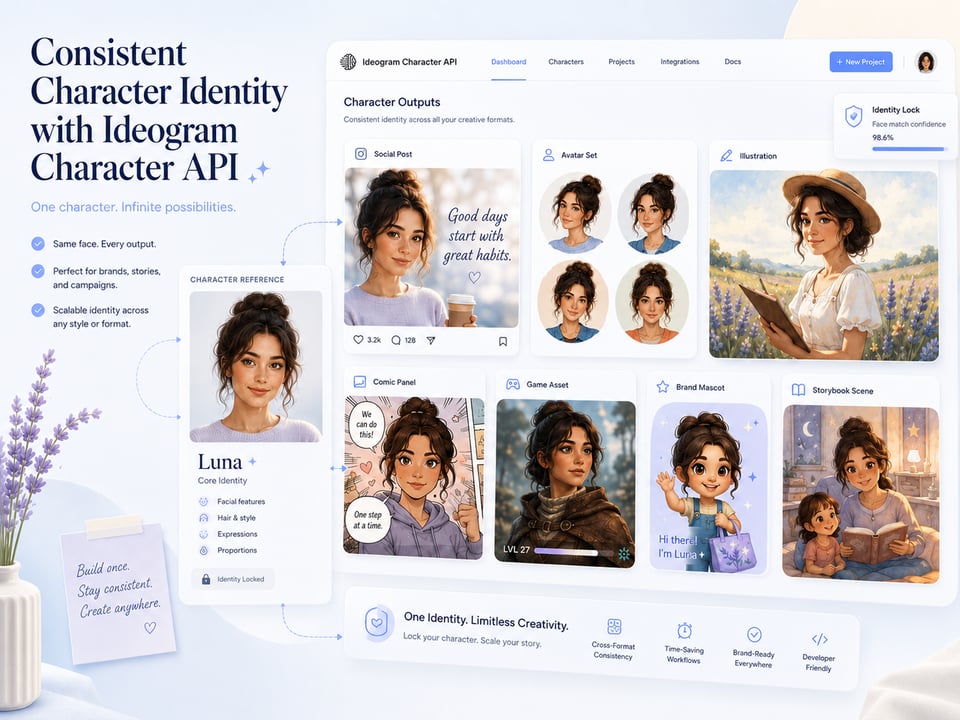
Consistent Character Identity with Ideogram Character API
Character-focused workflows need more than visual style; they need identity continuity. Ideogram Character API supports consistent character generation from a reference image, helping preserve facial features, hairstyle, proportions, and overall appearance. With this Ideogram character consistency API capability, the same character can appear in new scenes, outfits, poses, expressions, or visual styles while remaining recognizable.
Start Building with Ideogram API on Kie.ai
01
Get Your Ideogram API Key from Kie.ai
Create or log in to your Kie.ai account, then open the API dashboard to generate your Ideogram API key. This key is used to authenticate requests for Ideogram models, including Ideogram V3 API and Ideogram Character API. For security, the API key should be stored in a protected backend environment instead of being exposed on the client side.
02
Test Ideogram AI API with Free Credits Before Integration
Use the Playground to test Ideogram AI API workflows before connecting them to your product. Free credits can be used for initial testing, but they are limited by your available account balance and credit rules. Check your remaining credits, model cost, and generation consumption in the Kie.ai dashboard before running larger tests, so the workflow is evaluated with a clear understanding of actual usage cost.
03
Select the Right Ideogram API Workflow
Choose the Ideogram API workflow based on the image task you want to support. Ideogram V3 API is suitable for text-to-image generation, general image editing, and remix-based visual variations. Ideogram Character API is better for character generation, character edit, and character remix when the same character identity needs to remain recognizable across different outputs.
04
Configure Request Parameters for Ideogram API
Prepare the required request fields according to the selected Ideogram API workflow. Depending on the model and operation, this may include prompt, input image, reference image, mask image, aspect ratio, rendering mode, operation type, or other supported parameters. Exact parameter names, accepted formats, limits, and response structures may change, so the latest Kie.ai API documentation should be used as the final implementation reference.
05
Submit the Ideogram API Request and Retrieve Results
Send the authenticated request to the selected Ideogram API endpoint, then follow the documented response or task-status flow to retrieve the final result. After generation is complete, the returned image URL or result data can be used in your application, creative tool, automation system, or user-facing image workflow.
Visual Content You Can Produce with Ideogram API
Typography-Led Ad Creatives with Ideogram V3 API
Ad visuals often need to deliver a clear message at first glance, not just look visually attractive. Ideogram V3 API can help create banner ads, product launch graphics, limited-time sale posters, app promotion visuals, and paid social creatives where slogans, product names, discount text, or campaign phrases appear directly inside the design. For teams creating high-volume marketing assets, Ideogram API makes it easier to combine visual impact, readable copy, and campaign direction in one image.

Product Listing Images Using Ideogram Image Editing API
Product images usually need consistency around the main item, while the background, lighting, or scene can change for different campaigns. Ideogram image editing API can help turn a plain product photo into listing-ready visuals by adjusting the surrounding environment, refreshing seasonal settings, changing surface materials, improving lighting mood, or adding a more lifestyle-oriented context. With Ideogram V3 API, product teams can create updated catalog visuals, promotional images, and product page test assets without preparing a full reshoot for every variation.

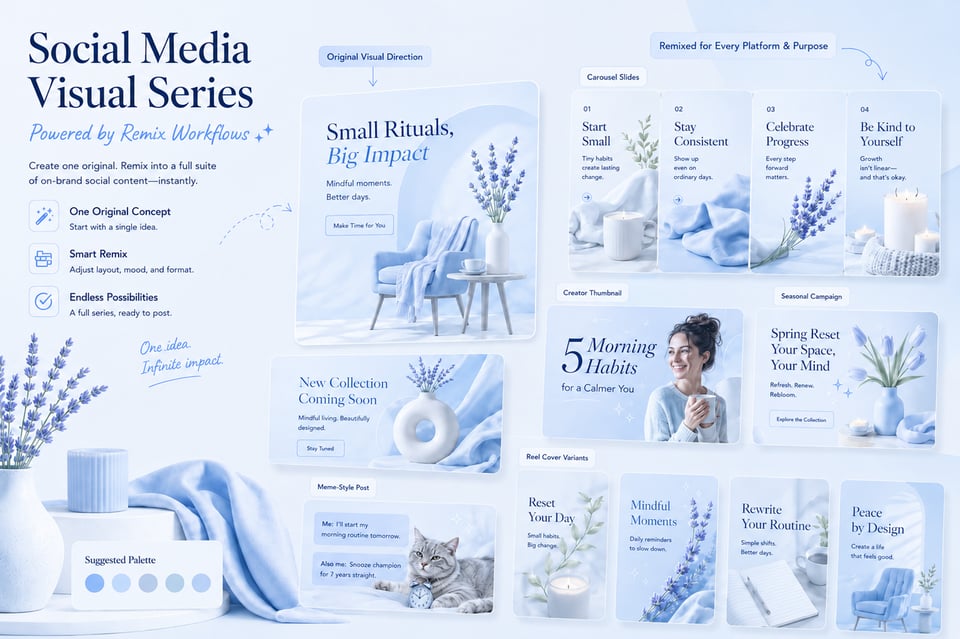
Social Media Visual Series Powered by Ideogram Remix API
Social content often works best when the visuals feel connected but not repetitive. Ideogram Remix API can take one existing image direction and generate related versions for carousel posts, announcement graphics, creator thumbnails, seasonal campaigns, meme-style images, or reel covers. By changing layout, color mood, scene style, character placement, or creative angle, Ideogram V3 API helps extend one original visual into multiple social-ready assets while keeping the broader concept recognizable.
Character IP Assets Built with Ideogram Character API
Character-based content depends on continuity across many images, especially when the same figure appears in different scenes or campaigns. Ideogram Character API can support avatar sets, mascot campaigns, comic panels, game character portraits, virtual influencer posts, children’s story visuals, and branded character content where the same character needs different poses, outfits, expressions, or environments. This Ideogram character consistency API use case is valuable for building repeatable character assets without losing the identity users recognize.
Why Choose Kie.ai as Your Ideogram API Platform
Unified Ideogram API Access for V3 and Character Models
Kie.ai brings Ideogram V3 API and Ideogram Character API into one platform, giving users a clearer way to access both general image creation and character-focused generation. Ideogram V3 API supports text-to-image, edit, and remix workflows, while Ideogram Character API supports character generation, character edit, and character remix for outputs that need stronger identity consistency.
Affordable Ideogram API Pricing with Free Credit Testing
Kie.ai uses a credit-based pricing structure for Ideogram API, making it easier to start with small tests and scale based on actual usage. Users can test Ideogram AI API models with free credits in the Playground before larger integration or production use, but available credits, model cost, and generation consumption should be checked in the dashboard first. This keeps free testing clear as limited trial usage rather than unlimited free access.
Complete Ideogram API Documentation for Easier Integration
Kie.ai provides Ideogram API documentation covering authentication, model selection, request parameters, input formats, response handling, and result retrieval. Since supported capabilities, parameter names, model options, and output settings may change as models are updated, the latest documentation should be used as the final reference before implementation.
24/7 Support for Ideogram AI API Users
Kie.ai offers 24/7 support for users working with Ideogram AI API workflows, including setup questions, API usage issues, model selection, request configuration, and troubleshooting. This helps users resolve integration problems faster when using Ideogram API for image generation, editing, remix, or character consistency workflows.
FAQs About Ideogram API
Ideogram API is an AI image generation and image transformation service for creating visuals from prompts and existing images. On Kie.ai, users can access Ideogram models for text-to-image generation, image editing, remix variations, and character-based creation with stronger identity consistency.
Kie.ai provides access to Ideogram V3 API and Ideogram Character API. Ideogram V3 API supports text-to-image, edit, and remix workflows, while Ideogram Character API supports character generation, character edit, and character remix for outputs that need stronger identity consistency. Model availability, supported operations, input requirements, and parameters may change as models are updated, so please check the latest Kie.ai API documentation for the most accurate details.
Yes. Users can test Ideogram AI API models with free credits in the Kie.ai Playground before larger integration or production use. Free testing depends on the available account credits, selected model cost, and generation consumption, so users should check their remaining credits and pricing details in the dashboard before running more tests.
Ideogram V3 API can create posters, product visuals, brand graphics, thumbnails, social media images, campaign assets, concept designs, and other prompt-based images. It is especially useful for visuals that need polished composition, realistic details, and readable text inside the generated image.
Yes. Ideogram API supports image edit and remix workflows depending on the selected model. Ideogram V3 API can edit or remix general images, while Ideogram Character API can support character edit and character remix when the goal is to adjust or restyle a referenced character while keeping the identity recognizable.
Ideogram Character API is used to generate, edit, and remix characters from a reference image while preserving key identity traits such as facial features, hairstyle, proportions, and overall appearance. It is suitable for avatars, mascots, comics, game characters, virtual influencers, story visuals, and other repeatable character assets.
You can find Ideogram API documentation on Kie.ai, including authentication, model options, request parameters, input requirements, response formats, and result retrieval methods. Since supported capabilities and parameters may change as models are updated, the latest documentation should be used as the final implementation reference.