Click to upload or drag and drop
Supported formats: MPEG, WAV, X-WAV, AAC, MP4, OGG Maximum file size: 200MB
URL of the audio file to transcribe
Language code of the audio
Tag audio events like laughter, applause, etc.
Whether to annotate who is speaking
A configurable parameter. Defaults to true in the Playground.
Complete guide to using
ElevenLabs Speech to Text API
Turn audio into accurate transcripts with the ElevenLabs Scribe API. 99-language support, speaker diarization, audio-event tagging, and affordable API pricing—all optimized for developers.
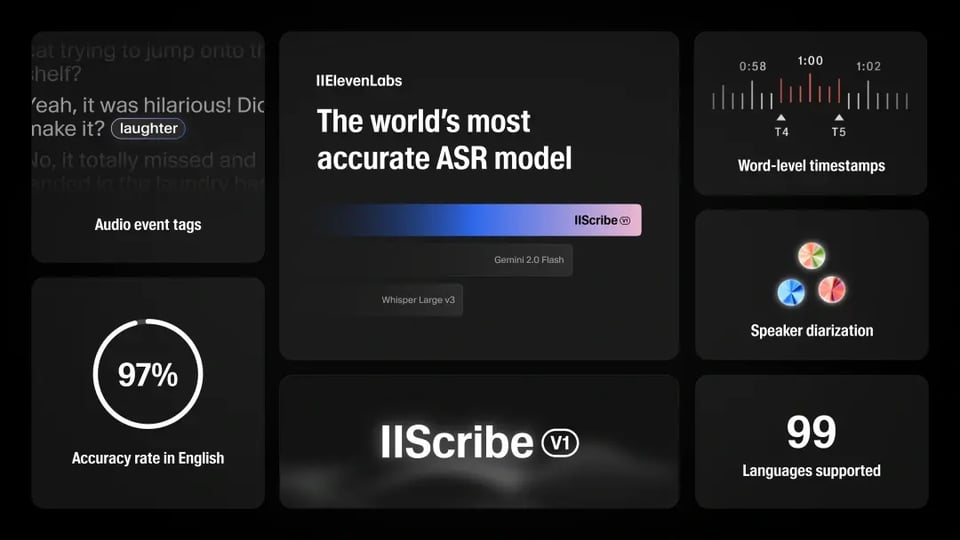
ElevenLabs Scribe v1 API: Transcribe Speech to Text with Unmatched Accuracy
The ElevenLabs Speech to Text API is designed to turn spoken audio into clear, structured text with industry-leading precision. Powered by the ElevenLabs Scribe v1 model, it handles real-world audio challenges such as background noise, multiple speakers, and diverse accents. Developers can easily transcribe audio to text across 99 languages, making it a versatile solution for apps, media, and enterprise workflows.
Powerful Features of ElevenLabs Scribe v1 API
Multilingual Support Across 99 Languages
The ElevenLabs speech to text API provides automatic transcription in 99 languages, including underserved ones like Serbian and Malayalam. Whether you are building multilingual apps, transcribing international sales calls, or creating subtitles for global media, the Scribe ASR model ensures accurate results across accents and dialects without the need for manual language switching.
Industry-Leading Accuracy
The ElevenLabs speech to text API achieves industry-leading accuracy, with word error rates as low as 3.3% in English and 1.3% in Italian, per FLEURS benchmarks. It excels in noisy environments, diverse accents, and spontaneous speech, making it ideal for transcribing audio to text in podcasts, interviews, or meetings.
Character-Level Timestamps for Precision
What you see is what you get real-time previewWith character-level timestamps, developers can capture the exact moment each word is spoken. This feature is essential for subtitles, closed captions, and time-synced transcripts. By using the ElevenLabs Scribe API, you can transcribe audio to text with precise alignment, giving users a more seamless reading and viewing experience.
Speaker Diarization for Multi-Speaker Audio
The ElevenLabs STT API identifies up to 32 speakers in a single recording, labeling each with pinpoint accuracy. This speech to text AI API feature is perfect for transcribing audio to text in meetings or panel discussions, ensuring clear speaker attribution. Developers can leverage diarization to create structured, searchable transcripts, enhancing usability for collaborative or media projects.
Audio Event Tagging for Rich Transcripts
Beyond words, the ElevenLabs Scribe API tags non-verbal sounds like laughter or applause, enriching your audio to text model output. This audio-event tagging feature adds context to transcripts, making them more dynamic. The speech to text API delivers structured JSON outputs, streamlining integration into creative workflows.
ElevenLabs Speech to Text API vs. Other ASR Models
The ElevenLabs speech to text API with Scribe v1 model leads in transcribing audio to text, offering unmatched accuracy, 99-language support, and advanced features like speaker diarization. Compared to OpenAI Whisper, Google Cloud Speech-to-Text, and AWS Transcribe, it excels in real-world audio challenges. While OpenAI Whisper is cost-effective but lacks native diarization, Google Cloud offers robust streaming but higher costs, and AWS provides compliance but less multilingual accuracy.
| Feature | ElevenLabs Scribe v1 | OpenAI Whisper | Google Cloud STT | AWS Transcribe |
|---|---|---|---|---|
| WER (English) | 3.3% (FLEURS) | 7.7% (Indonesian) | Higher in accents | Higher in noise |
| Languages | 99, auto-detection | ~99, translation | 125+, ecosystem | 100+, streaming |
| Diarization | Up to 32 speakers | None (add-ons) | Limited precision | Custom setup |
| Event Tagging | Applause and various non-verbal cues | Not supported | Limited | Not supported |
| Latency | Low for optimized formats | Hardware-dependent | Real-time streaming | Streaming-focused |
Why Choose Kie.ai for ElevenLabs Audio to Text API
Affordable Speech to Text API Pricing
Kie.ai offers the ElevenLabs speech to text API through a simple credit-based system. Developers only pay for what they use, making it cost-effective to test, scale, and integrate transcription features. Compared to the official ElevenLabs plans and providers like Fal, Kie.ai delivers the same high-quality STT API at a significantly lower cost.
Comprehensive API Documentation and Developer Support
Integration is easy thanks to detailed ElevenLabs API documentation. Kie.ai provides clear examples, code snippets, and technical guides for the ElevenLabs Speech to Text API, so developers can get started quickly. Dedicated support channels ensure smooth onboarding and help troubleshoot any issues.
InnovationReliable and Scalable Infrastructure
Kie.ai ensures 99.9% uptime and supports high concurrency, allowing the STT API to handle everything from single-user apps to enterprise-level workloads. Whether processing short voice notes or large-scale meeting transcripts, developers can rely on consistent performance and stability.
How to Integrate ElevenLabs STT API on Kie.ai
Step 1: Get Your Speech to Text API Key
Register on Kie.ai to obtain your API key. This key enables secure access to the ElevenLabs Speech to Text API, allowing you to authenticate requests when using the audio to text API.
Step 2: Create a Transcription Task
Send a request to Task endpoint with the model set to "elevenlabs/speech-to-text". Provide the audio file URL and optional parameters such as language_code, tag_audio_events, or diarize to tailor the speech to text converter to your needs.
Step 3: Retrieve Your Transcripts
Check task status or use the callBackUrl to receive transcription results automatically. The ElevenLabs Scribe API returns structured JSON outputs that can be integrated into apps, subtitles, or enterprise workflows using the STT API.